Overview
Filtering tables is a critical skill within the Data Insights section of the GMAT, specifically under the Table Analysis question type. This competency involves the ability to manipulate, sort, and selectively display data within interactive spreadsheet-like tables to answer complex analytical questions. Unlike traditional paper-based exams, the GMAT presents dynamic tables where test-takers must actively use dropdown menus and sorting functions to organize information before drawing conclusions.
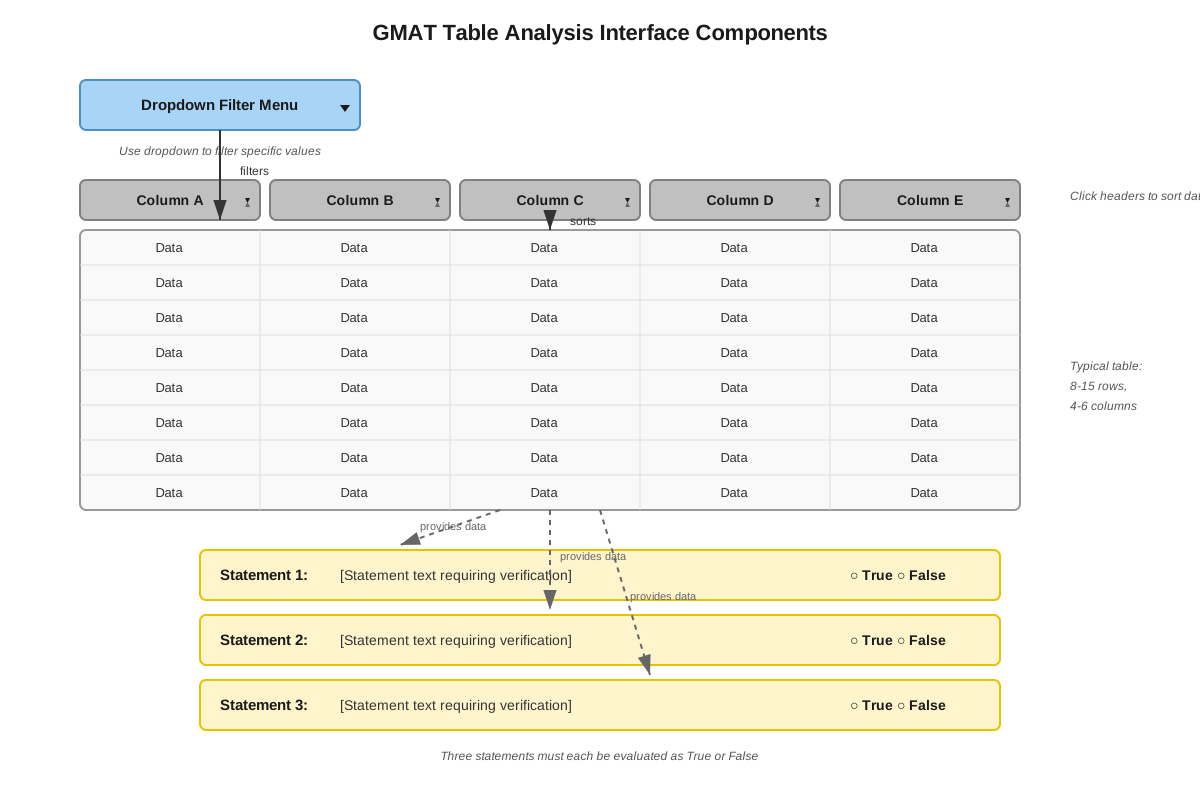
The importance of mastering GMAT filtering tables cannot be overstated. Table Analysis questions typically present a dataset with 8-15 rows and 4-6 columns, accompanied by three true/false statements that require careful data manipulation to verify. Students must efficiently filter and sort the data to identify patterns, compare values, calculate percentages, or determine rankings. This question type tests not only quantitative reasoning but also the ability to work systematically under time pressure with unfamiliar data structures.
Within the broader Data Insights framework, filtering tables represents the intersection of data literacy, logical reasoning, and computational thinking. It builds upon fundamental skills in reading tables and interpreting data while preparing students for more complex multi-source reasoning tasks. Success with table filtering directly translates to improved performance across all Data Insights question types, as the underlying analytical approach—breaking complex questions into manageable steps through strategic data organization—applies universally throughout the section.
Learning Objectives
- [ ] Identify filtering tables and recognize when filtering functionality is required to answer GMAT questions
- [ ] Explain filtering tables methodology, including the purpose and mechanics of sorting and filtering operations
- [ ] Apply filtering tables techniques to GMAT questions efficiently and accurately
- [ ] Determine the optimal filtering strategy for different question types within 30 seconds
- [ ] Execute multi-step filtering operations to verify complex conditional statements
- [ ] Recognize patterns in filtered data that lead to correct answers without exhaustive checking
Prerequisites
- Basic spreadsheet literacy: Understanding rows, columns, and cells is essential because GMAT table interfaces mimic spreadsheet functionality
- Fundamental arithmetic operations: Calculating percentages, ratios, and differences is necessary since filtering reveals data that must then be analyzed quantitatively
- Logical reasoning with conditional statements: Evaluating true/false claims requires understanding "if-then" logic and compound conditions
- Reading comprehension of data labels: Interpreting column headers and row descriptors accurately ensures correct filtering choices
Why This Topic Matters
In professional contexts, filtering tables mirrors the daily work of business analysts, consultants, financial professionals, and managers who must extract insights from large datasets. The ability to quickly organize information, identify outliers, compare subgroups, and verify hypotheses against data represents a fundamental business skill that MBA programs value highly.
On the GMAT specifically, Table Analysis questions appear 2-3 times per Data Insights section, representing approximately 15-20% of the section's content. Each Table Analysis question presents three statements to evaluate, effectively creating 3 decision points per question. Given that Data Insights comprises roughly one-quarter of the total GMAT score, mastering table filtering directly impacts overall performance and competitive positioning for top business schools.
Table filtering appears in exam passages through several common formats: financial data requiring profitability comparisons, demographic information necessitating percentage calculations, performance metrics demanding ranking determinations, and multi-attribute datasets requiring conditional filtering. Questions frequently combine multiple filtering operations—for example, first sorting by one variable to identify a subset, then mentally filtering by a second criterion to verify a statement. The interactive nature means students must physically manipulate the interface, making practice with the actual mechanics essential for exam-day confidence and speed.
Core Concepts
Understanding the Table Analysis Interface
The GMAT presents filtering tables through an interactive interface that simulates spreadsheet software. Each table contains a dataset organized in rows and columns, with a dropdown menu above one column that enables sorting. The dropdown typically offers options to sort in ascending or descending order based on the selected column. Unlike physical spreadsheets, students cannot create custom filters or formulas—they must work within the provided sorting functionality and perform mental calculations or systematic checking.
The interface design serves a specific testing purpose: it requires students to think strategically about which sorting operation will most efficiently reveal the answer. With only one column sortable at a time, choosing the right sorting criterion becomes a critical decision point. For example, if a question asks about the "company with the highest profit margin among those with revenue exceeding $50 million," students must decide whether to sort by profit margin (to see highest values) or by revenue (to identify the qualifying subset).
Fundamental Filtering Operations
Sorting in ascending order arranges data from smallest to largest (for numerical data) or alphabetically from A to Z (for text data). This operation proves valuable when questions ask about minimum values, lowest rankings, or identifying entities at the bottom of a distribution. For instance, sorting employee salaries in ascending order immediately reveals the lowest-paid employees.
Sorting in descending order arranges data from largest to smallest or Z to A. This operation efficiently addresses questions about maximum values, top performers, or highest rankings. When a question asks "Which company had the third-highest revenue?" sorting revenue in descending order places the answer in the third row.
Mental filtering represents the cognitive operation students must perform after sorting. Since the GMAT interface typically allows sorting by only one column, students must often sort by one variable and then mentally filter by another. This requires systematic scanning of the sorted table while applying additional criteria. For example, after sorting by profit margin, a student might need to mentally exclude all companies not in the "Technology" sector to answer a sector-specific question.
Strategic Filtering Workflow
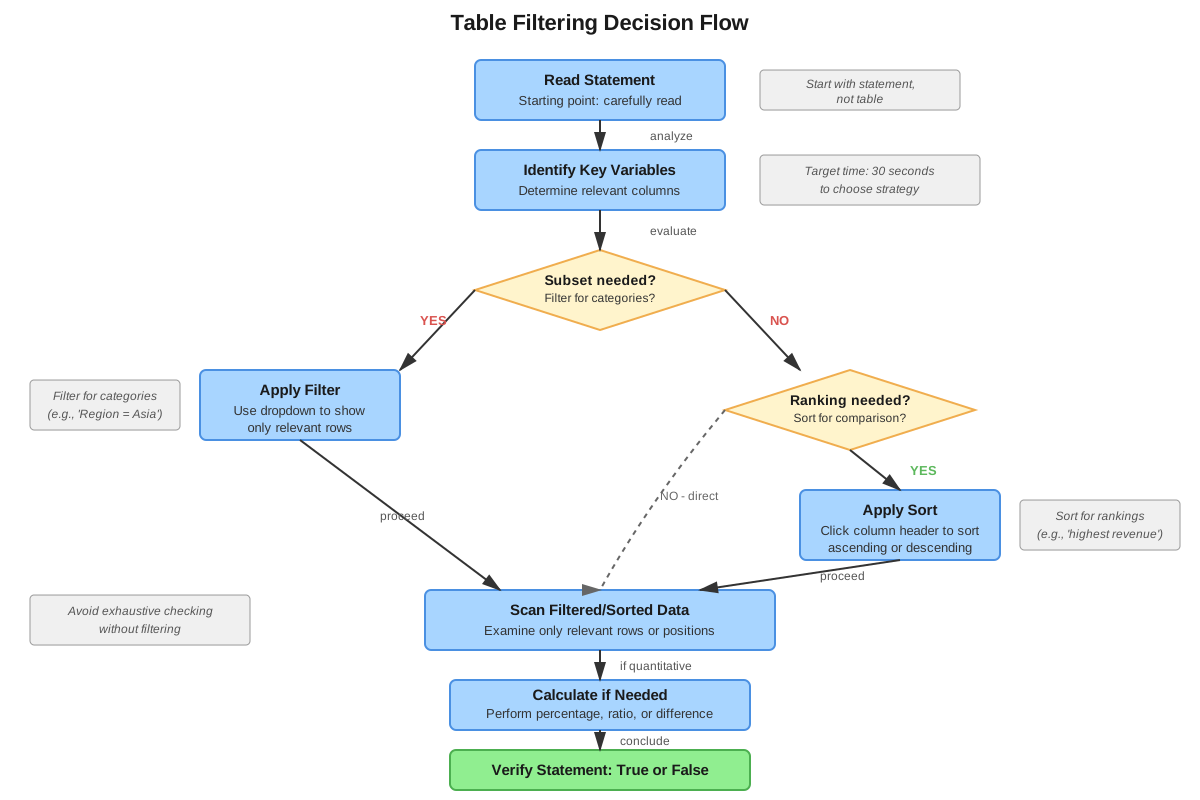
The optimal approach to GMAT filtering tables follows a systematic four-step process:
- Read the statement completely before touching the interface: Understanding exactly what the question asks prevents wasted sorting operations and ensures the filtering strategy aligns with the required answer.
- Identify the primary filtering criterion: Determine which variable, when sorted, will most directly reveal the answer or reduce the search space most effectively.
- Execute the sort operation: Use the dropdown menu to sort by the chosen column in the appropriate direction (ascending or descending).
- Apply secondary filters mentally: Scan the sorted results while applying any additional conditions specified in the question, checking each row systematically.
This workflow minimizes time expenditure while maximizing accuracy. Many students make the error of sorting randomly or repeatedly, wasting precious seconds. The strategic approach recognizes that each sort operation costs approximately 3-5 seconds, so choosing correctly the first time provides a significant time advantage.
Types of Questions Requiring Filtering
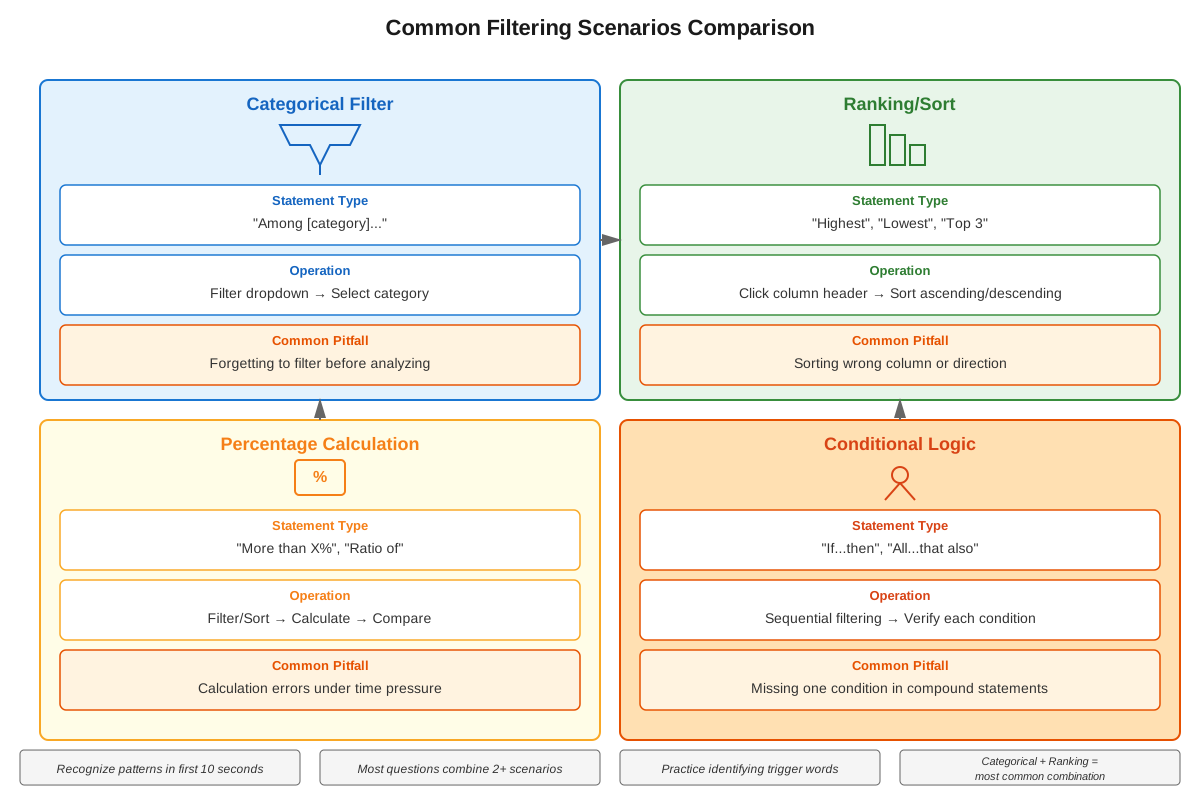
Ranking questions ask students to identify entities at specific positions (e.g., "third-largest," "second-lowest"). These questions require sorting by the relevant column in the appropriate direction, then counting rows to find the specified position. Complications arise when ties exist or when additional conditions apply (e.g., "third-largest among European countries").
Threshold questions require identifying all entities meeting a specific criterion (e.g., "all companies with revenue exceeding $100 million"). These typically require sorting by the threshold variable to group qualifying entities together, then counting or analyzing that subset.
Comparison questions ask students to compare values across different entities or determine relationships (e.g., "Company A has higher profit margin than Company B"). These often require sorting to locate both entities quickly, then comparing the relevant values.
Conditional questions present compound criteria requiring multiple filtering steps (e.g., "Among companies in the Technology sector, which has the highest employee count?"). These demand sorting by one variable while mentally filtering by another, representing the most complex filtering challenge.
Efficiency Techniques
Boundary scanning involves recognizing that for many questions, only the top few or bottom few rows matter after sorting. If a question asks about the "top three" of anything, sorting in descending order and examining only rows 1-3 provides the answer without reading the entire table.
Elimination through sorting uses the sorted order to quickly eliminate impossible answer choices. If a statement claims "Company X has the lowest revenue," sorting by revenue in ascending order should place Company X in the first row—if it appears elsewhere, the statement is false without further analysis.
Pattern recognition develops through practice and involves identifying common question structures that always require the same filtering approach. For example, questions containing "highest," "maximum," or "greatest" almost always require descending sorts, while "lowest," "minimum," or "smallest" require ascending sorts.
Concept Relationships
The core concepts within filtering tables form a hierarchical relationship: Understanding the interface provides the foundation, enabling fundamental filtering operations (sorting ascending/descending and mental filtering). These operations combine within the strategic filtering workflow, which then applies to the four types of questions requiring filtering. Finally, efficiency techniques optimize the entire process, reducing time expenditure while maintaining accuracy.
Filtering tables connects to prerequisite knowledge through several pathways: Basic spreadsheet literacy → Interface understanding, Arithmetic operations → Post-filtering calculations, and Logical reasoning → Mental filtering and compound conditions. The topic also connects forward to Multi-Source Reasoning questions, where students must integrate filtered table data with information from other sources (text passages, graphs) to answer complex questions.
The relationship map flows as follows: Question analysis → Primary criterion identification → Sort execution → Mental filtering application → Answer verification. This linear process occasionally requires iteration when the first sorting choice proves suboptimal, creating a feedback loop: Insufficient information → Criterion reassessment → Alternative sort execution.
Quick check — test yourself on Filtering tables so far.
Try Flashcards →High-Yield Facts
- ⭐ The GMAT Table Analysis interface allows sorting by only ONE column at a time, requiring mental filtering for compound conditions
- ⭐ Sorting in descending order places the LARGEST values at the TOP of the table (row 1)
- ⭐ Each Table Analysis question presents THREE statements to evaluate as True or False
- ⭐ Questions asking about "highest," "maximum," or "greatest" typically require DESCENDING sorts
- ⭐ Questions asking about "lowest," "minimum," or "smallest" typically require ASCENDING sorts
- The dropdown menu for sorting appears ABOVE the column headers in the GMAT interface
- Sorting by text columns (like company names) arranges entries alphabetically
- When ties exist in the sorted column, the relative order of tied rows is unpredictable
- Mental filtering requires systematic row-by-row checking to avoid missing qualifying entries
- Boundary scanning (checking only top/bottom rows) works for ranking questions but not threshold questions
- Percentage calculations often require filtering to identify the relevant subset before computing
- The table typically contains 8-15 rows of data, making exhaustive checking time-prohibitive
- Sorting operations take 3-5 seconds each, making strategic first-choice sorting critical for time management
- Some statements can be evaluated as false by finding a SINGLE counterexample after sorting
Common Misconceptions
Misconception: Students can filter by multiple columns simultaneously like in Excel → Correction: The GMAT interface allows sorting by only one column at a time. Multi-criteria questions require sorting by one variable and mentally applying additional filters while scanning the results.
Misconception: Ascending sort places the largest values at the top → Correction: Ascending sort arranges data from smallest to largest, placing the SMALLEST values at the top (row 1) and largest values at the bottom. Descending sort places largest values at the top.
Misconception: All three statements in a Table Analysis question require the same sorting approach → Correction: Each statement typically requires a different sorting strategy or column choice. Students must analyze each statement independently and may need to re-sort between statements.
Misconception: Sorting automatically filters out irrelevant data → Correction: Sorting only rearranges the order of rows; it does not hide or remove any data. Students must mentally filter by scanning the sorted table and applying additional criteria cognitively.
Misconception: The fastest approach is to sort randomly and scan until finding the answer → Correction: Strategic sorting—choosing the optimal column and direction before executing—saves significant time. Random sorting often requires multiple re-sorts, wasting 15-20 seconds per question.
Misconception: Percentage questions can be answered by sorting the percentage column → Correction: Many tables do not include pre-calculated percentage columns. Students must identify the relevant subset through filtering, then calculate percentages from the raw data values provided.
Worked Examples
Example 1: Ranking with Conditional Filtering
Question: The table below provides data on 12 technology companies. For each statement, indicate whether it is True or False.
| Company | Revenue ($M) | Employees | Founded | Sector |
|---|---|---|---|---|
| AlphaTech | 450 | 2,300 | 2005 | Software |
| BetaCorp | 680 | 3,100 | 1998 | Hardware |
| GammaSys | 290 | 1,200 | 2010 | Software |
| DeltaNet | 520 | 2,800 | 2003 | Services |
| EpsilonAI | 380 | 1,900 | 2012 | Software |
| ZetaCloud | 710 | 3,400 | 2008 | Services |
| EtaData | 340 | 1,600 | 2015 | Software |
| ThetaChip | 590 | 2,700 | 2001 | Hardware |
Statement: Among software companies, EpsilonAI has the second-highest revenue.
Solution Process:
Step 1 - Analyze the statement: This is a conditional ranking question requiring two filters: (1) identify only software companies, and (2) rank them by revenue.
Step 2 - Choose sorting strategy: Sort by Revenue in descending order to see highest revenues at the top. This addresses the "second-highest" ranking requirement.
Step 3 - Execute sort: After sorting by Revenue (descending), the table shows:
- ZetaCloud: $710M (Services - exclude)
- BetaCorp: $680M (Hardware - exclude)
- ThetaChip: $590M (Hardware - exclude)
- DeltaNet: $520M (Services - exclude)
- AlphaTech: $450M (Software - 1st among software)
- EpsilonAI: $380M (Software - 2nd among software)
- EtaData: $340M (Software - 3rd among software)
- GammaSys: $290M (Software - 4th among software)
Step 4 - Apply mental filter: Scan the sorted list, mentally excluding non-software companies. Among software companies only: AlphaTech ($450M) ranks first, EpsilonAI ($380M) ranks second.
Answer: TRUE. EpsilonAI has the second-highest revenue among software companies.
Key insight: This question demonstrates why sorting by the ranking variable (revenue) proves more efficient than sorting by the filtering variable (sector). Sorting by sector would group software companies together but not reveal their revenue ranking, requiring additional mental sorting.
Example 2: Threshold Analysis with Calculation
Question: Using the same table, evaluate this statement: More than 40% of companies with revenue exceeding $500M are in the Services sector.
Solution Process:
Step 1 - Analyze the statement: This requires (1) identifying companies with revenue > $500M, (2) determining how many are in Services, and (3) calculating if that proportion exceeds 40%.
Step 2 - Choose sorting strategy: Sort by Revenue in descending order to group high-revenue companies at the top, making the $500M threshold easy to identify.
Step 3 - Execute sort and identify threshold: After sorting by Revenue (descending):
- ZetaCloud: $710M (Services) ✓ exceeds $500M
- BetaCorp: $680M (Hardware) ✓ exceeds $500M
- ThetaChip: $590M (Hardware) ✓ exceeds $500M
- DeltaNet: $520M (Services) ✓ exceeds $500M
- AlphaTech: $450M ✗ below $500M (stop checking here)
Step 4 - Count and calculate: Four companies exceed $500M threshold. Of these four, two are in Services (ZetaCloud and DeltaNet). Percentage = 2/4 = 50%.
Step 5 - Compare to threshold: 50% > 40%, so the statement is TRUE.
Answer: TRUE. Among the four companies with revenue exceeding $500M, two (50%) are in the Services sector, which exceeds 40%.
Key insight: Sorting by the threshold variable (revenue) creates a natural boundary in the table where values transition from above to below the threshold. This eliminates the need to check all rows—once values drop below $500M, no further checking is necessary.
Exam Strategy
Approach sequence for every Table Analysis question: (1) Read all three statements before sorting anything to identify if any share a common sorting requirement, (2) Tackle statements in order of easiest sorting strategy first to build momentum, (3) Use the 30-second rule—if a sorting approach doesn't yield progress within 30 seconds, reassess and try a different column.
Trigger words for descending sorts: "highest," "maximum," "greatest," "largest," "most," "top," "best," "leading." When these appear, immediately consider sorting the relevant column in descending order.
Trigger words for ascending sorts: "lowest," "minimum," "smallest," "least," "fewest," "bottom," "worst." These signal ascending sort as the likely optimal strategy.
Trigger phrases for mental filtering: "among," "of those," "for companies that," "in the category," "excluding." These indicate compound conditions requiring sorting by one variable and mentally filtering by another.
Process-of-elimination approach: For statements that seem complex, sometimes proving FALSE requires finding only a single counterexample. Sort to position likely counterexamples prominently, then check if the statement fails for even one case.
Time allocation guideline: Spend no more than 2 minutes per Table Analysis question (covering all three statements). This translates to approximately 40 seconds per statement, including sorting time. If a statement requires more than 45 seconds, mark your best guess and move forward rather than spiraling into time-consuming exhaustive checking.
Interface efficiency: Minimize mouse movements by reading the dropdown options carefully before clicking. Accidental sorts waste 5-10 seconds. Practice clicking precisely on the dropdown arrow rather than the column header itself.
Memory Techniques
DASH mnemonic for the filtering workflow:
- Determine what the question asks
- Analyze which column to sort
- Sort by that column (ascending or descending)
- Hunt through results applying mental filters
"High-Down, Low-Up" visualization: Picture a mountain where "high" values (maximum, greatest) require descending DOWN from the peak (descending sort), while "low" values (minimum, smallest) require ascending UP from the valley (ascending sort).
"One Sort, Many Filters" principle: Remember that the interface gives you ONE sort operation but UNLIMITED mental filters. Visualize the sort as organizing a filing cabinet, while mental filters are your eyes scanning the organized files.
The "Boundary Line" technique: When sorting by a threshold variable, visualize drawing a horizontal line across the table where values transition from qualifying to non-qualifying. Everything above the line matters; everything below can be ignored.
"ABC-123" for sort direction: Alphabetical (A-B-C) and numerical (1-2-3) both progress in ascending order. This helps remember that ascending means A-to-Z or smallest-to-largest.
Summary
Filtering tables represents a critical GMAT Data Insights skill that combines interface manipulation, strategic thinking, and systematic analysis. The core challenge lies in the constraint that only one column can be sorted at a time, requiring students to choose the optimal sorting variable and then apply additional criteria mentally. Success demands understanding the four-step workflow: analyzing the question, identifying the primary sorting criterion, executing the sort, and applying mental filters. Questions fall into four main categories—ranking, threshold, comparison, and conditional—each requiring slightly different approaches. The most common error students make is sorting randomly or repeatedly rather than strategically choosing the first sort. Mastery requires recognizing trigger words that signal ascending versus descending sorts, understanding when to use boundary scanning versus exhaustive checking, and maintaining strict time discipline of approximately 40 seconds per statement. The interface mimics real-world business analytics tools, making this skill both practically valuable and frequently tested, appearing in 2-3 questions per Data Insights section.
Key Takeaways
- The GMAT allows sorting by only ONE column at a time; compound conditions require mental filtering after sorting
- Strategic sorting—choosing the right column and direction before clicking—saves 15-20 seconds per question
- Descending sorts place largest values at the top; ascending sorts place smallest values at the top
- Trigger words like "highest" and "maximum" signal descending sorts; "lowest" and "minimum" signal ascending sorts
- Boundary scanning (checking only top/bottom rows) works for ranking questions but not for threshold or conditional questions
- Each Table Analysis question presents three independent statements requiring separate analysis and potentially different sorting strategies
- Time discipline is critical: allocate no more than 40 seconds per statement to maintain overall section pacing
Related Topics
Multi-Source Reasoning: Builds on table filtering by requiring integration of filtered table data with information from text passages and graphics. Mastering filtering tables provides the foundational data extraction skills necessary for these more complex questions.
Graphics Interpretation: Shares the analytical approach of extracting specific information from visual data representations. The systematic scanning and mental filtering techniques transfer directly to reading graphs and charts efficiently.
Two-Part Analysis: Often incorporates table-like data presentations where students must evaluate relationships between variables. The conditional reasoning developed through filtering tables applies directly to evaluating the two-part constraints.
Quantitative Reasoning - Statistics: The data analysis skills developed through filtering tables—identifying subsets, calculating percentages, comparing distributions—directly support statistical reasoning questions involving means, medians, and ranges.
Practice CTA
Now that you understand the mechanics and strategy of filtering tables, the next critical step is hands-on practice with actual GMAT-style questions. The concepts covered here will solidify through repeated application, and you'll develop the pattern recognition and speed that separate good scores from great scores. Attempt the practice questions associated with this topic, focusing on executing the four-step workflow systematically. Use the flashcards to reinforce trigger words and common question patterns until your sorting decisions become automatic. Remember: every expert was once a beginner who refused to give up. Your investment in mastering this high-yield topic will pay dividends across the entire Data Insights section!
Sign up free to keep reading
Create a free AnvayaPrep account to finish this GMAT guide on Filtering tables — plus flashcards and practice questions.