Overview
Sorting tables is a fundamental skill within the Data Insights section of the GMAT, specifically under Table Analysis questions. This question type presents candidates with a sortable spreadsheet-like table containing multiple rows and columns of data. Students must analyze the information by sorting columns in ascending or descending order to answer a series of true/false or yes/no statements efficiently. Unlike static tables, GMAT sorting tables are interactive, requiring test-takers to manipulate the data actively to extract insights and verify relationships between variables.
Mastering sorting tables is essential for GMAT success because these questions test multiple analytical skills simultaneously: data interpretation, logical reasoning, quantitative analysis, and time management. The ability to quickly identify which column to sort, recognize patterns in sorted data, and evaluate multiple statements against the reorganized information distinguishes high-scoring candidates from average performers. Table Analysis questions typically present 3-4 statements that must be evaluated, and inefficient sorting strategies can consume valuable testing time.
Within the broader Data Insights framework, sorting tables connects directly to other analytical skills such as recognizing data patterns, comparing values across categories, calculating percentages and ratios, and drawing logical conclusions from numerical evidence. This topic builds upon foundational skills in reading comprehension and quantitative reasoning while preparing students for more complex multi-source reasoning questions. The interactive nature of these questions also mirrors real-world business analytics scenarios where professionals must manipulate datasets to extract actionable insights—making this both a practical and exam-critical competency.
Learning Objectives
- [ ] Identify sorting tables and recognize their structure in GMAT Data Insights questions
- [ ] Explain the purpose and functionality of sorting tables in the context of data analysis
- [ ] Apply sorting tables strategies to efficiently answer GMAT questions within time constraints
- [ ] Determine the optimal sorting sequence to evaluate multiple statements with minimal column manipulations
- [ ] Analyze sorted data to identify patterns, extremes, and relationships between variables
- [ ] Evaluate true/false statements by cross-referencing multiple columns in sorted configurations
- [ ] Develop systematic approaches to avoid common sorting errors and misinterpretations
Prerequisites
- Basic spreadsheet familiarity: Understanding how data is organized in rows and columns is essential for quickly orienting to table structure and identifying relevant information fields.
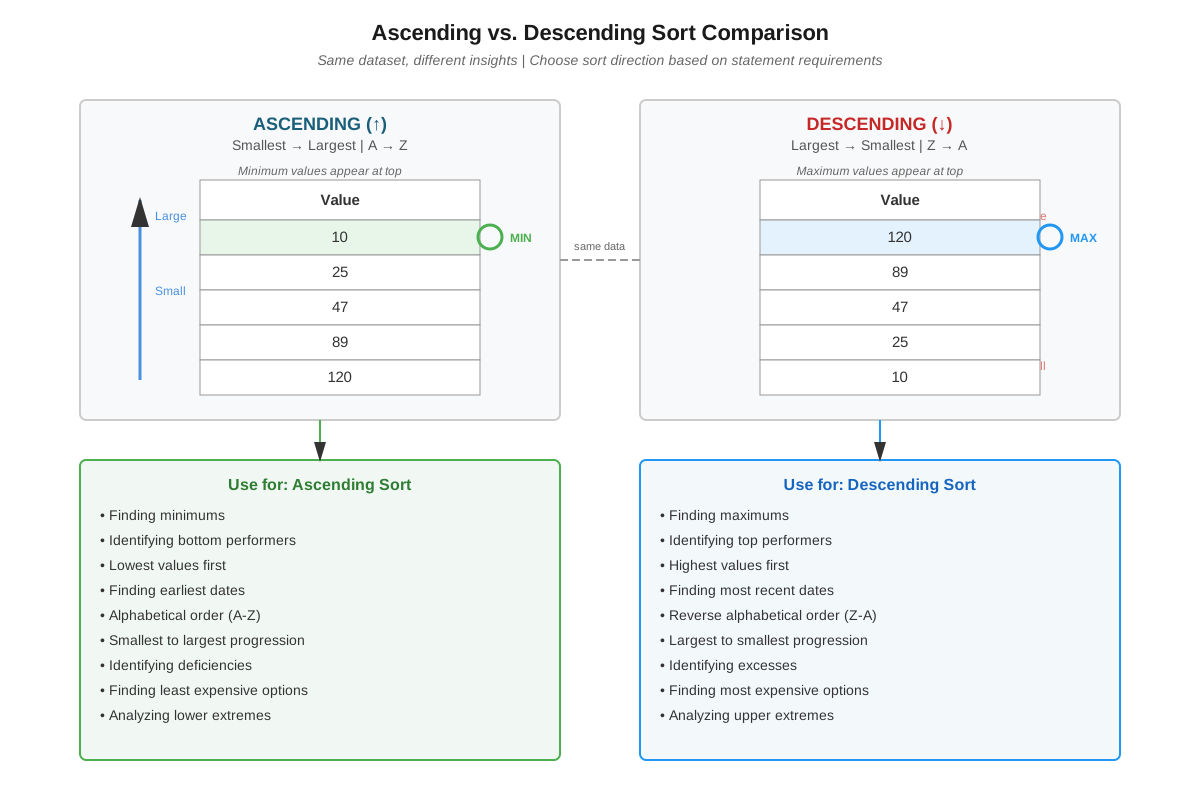
- Ascending and descending order concepts: Recognizing that ascending means smallest-to-largest (or A-to-Z) and descending means largest-to-smallest (or Z-to-A) enables accurate interpretation of sorted data.
- Percentage and ratio calculations: Many table analysis questions require computing percentages, ratios, or proportions from the numerical data presented in the table.
- Comparative reasoning: The ability to compare values, identify maximums and minimums, and recognize relative magnitudes is fundamental to evaluating statements about sorted data.
- Reading comprehension: Understanding column headers, data categories, and statement wording ensures accurate analysis and prevents misinterpretation of what is being asked.
Why This Topic Matters
Table Analysis questions featuring sortable tables appear consistently on the GMAT Data Insights section, typically comprising 2-3 questions per exam. These questions carry significant weight because they assess multiple competencies simultaneously: quantitative reasoning, data literacy, attention to detail, and strategic thinking. Business schools value these skills because they reflect the analytical demands of MBA coursework and professional business environments where data-driven decision-making is paramount.
In real-world applications, professionals across industries regularly work with sortable datasets in spreadsheets, databases, and business intelligence tools. The ability to quickly reorganize data to answer specific questions—whether analyzing sales performance, comparing financial metrics, or evaluating operational efficiency—is a core competency in consulting, finance, marketing, and operations management. GMAT sorting tables directly simulate these practical scenarios, making them highly relevant beyond test preparation.
On the exam, Table Analysis questions typically present 10-20 rows of data with 4-8 columns, followed by 3-4 statements that must be evaluated as true/false or yes/no. Common question themes include comparing performance across categories, identifying top or bottom performers, calculating percentages or changes, and verifying relationships between variables. The interactive sorting functionality means that strategic column selection can dramatically reduce solution time—making this topic as much about test-taking efficiency as analytical accuracy. Students who master sorting strategies can complete these questions in 2-3 minutes, while those who sort inefficiently may spend 4-5 minutes or more, creating time pressure for subsequent questions.
Core Concepts
Understanding Table Structure and Components
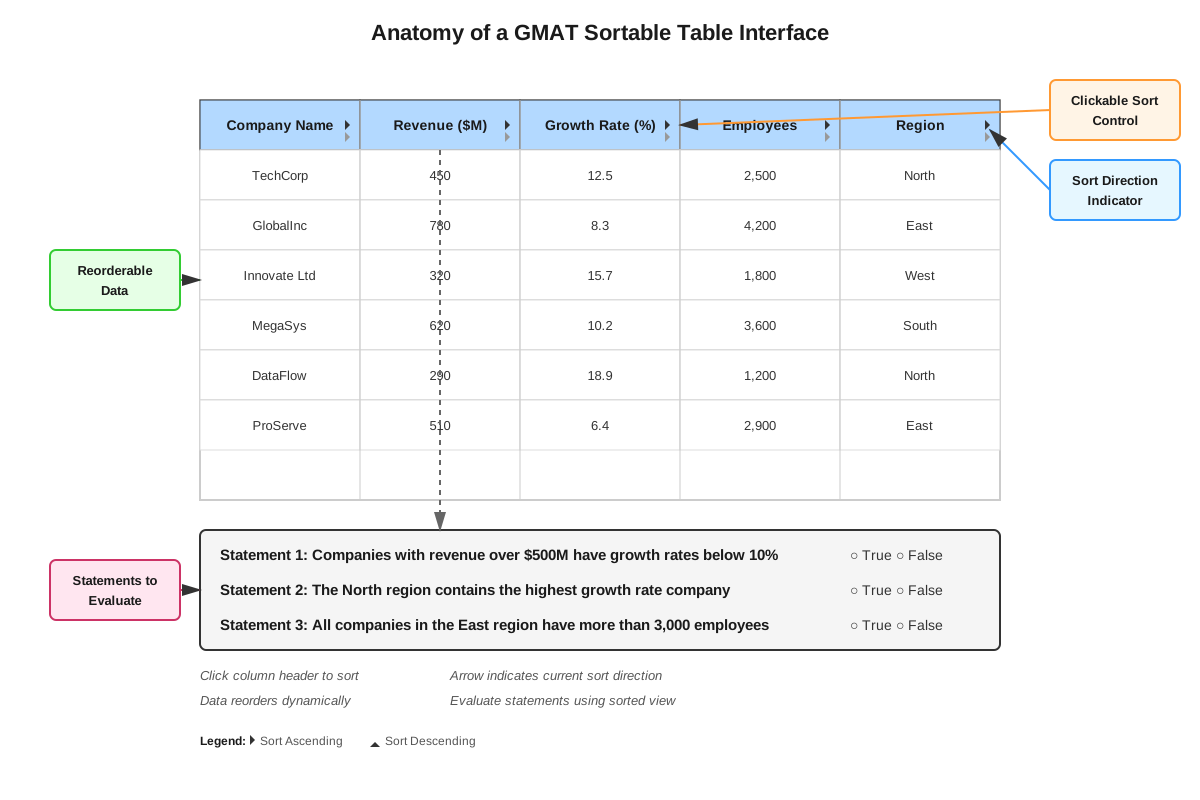
A sorting table in GMAT Data Insights consists of several key components that must be quickly identified. The table header contains column titles that describe the type of data in each vertical column. Each row represents a distinct entity, case, or observation (such as a company, country, product, or time period). The cells contain the actual data values—numerical figures, percentages, text categories, or dates. Above the table, a brief description or context statement explains what the data represents and may provide definitions for specific terms or categories.
The sorting functionality allows test-takers to click on any column header to reorganize all rows based on that column's values. The first click typically sorts in ascending order (smallest to largest for numbers, A to Z for text), while a second click on the same column reverses to descending order (largest to smallest, Z to A). Critically, when one column is sorted, all other columns' data moves with their respective rows—maintaining the integrity of each entity's complete information. This preservation of row relationships is fundamental to accurate analysis.
Strategic Sorting Principles
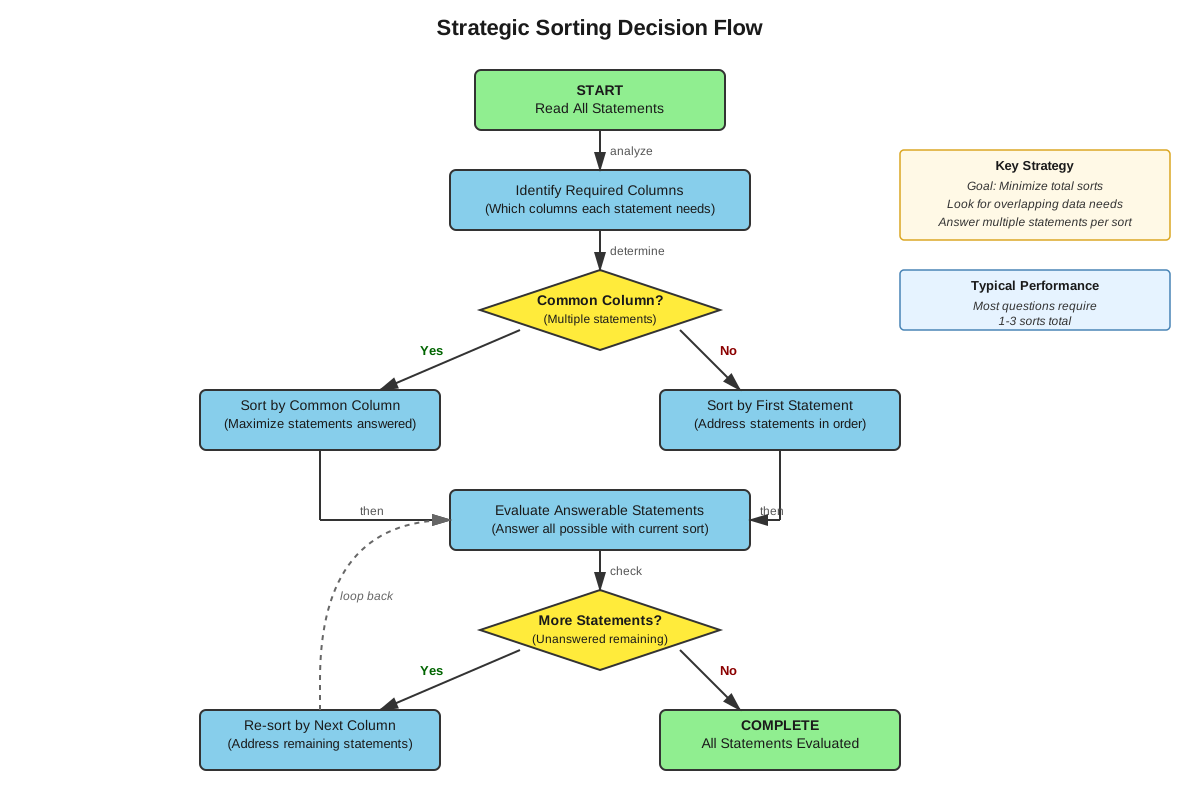
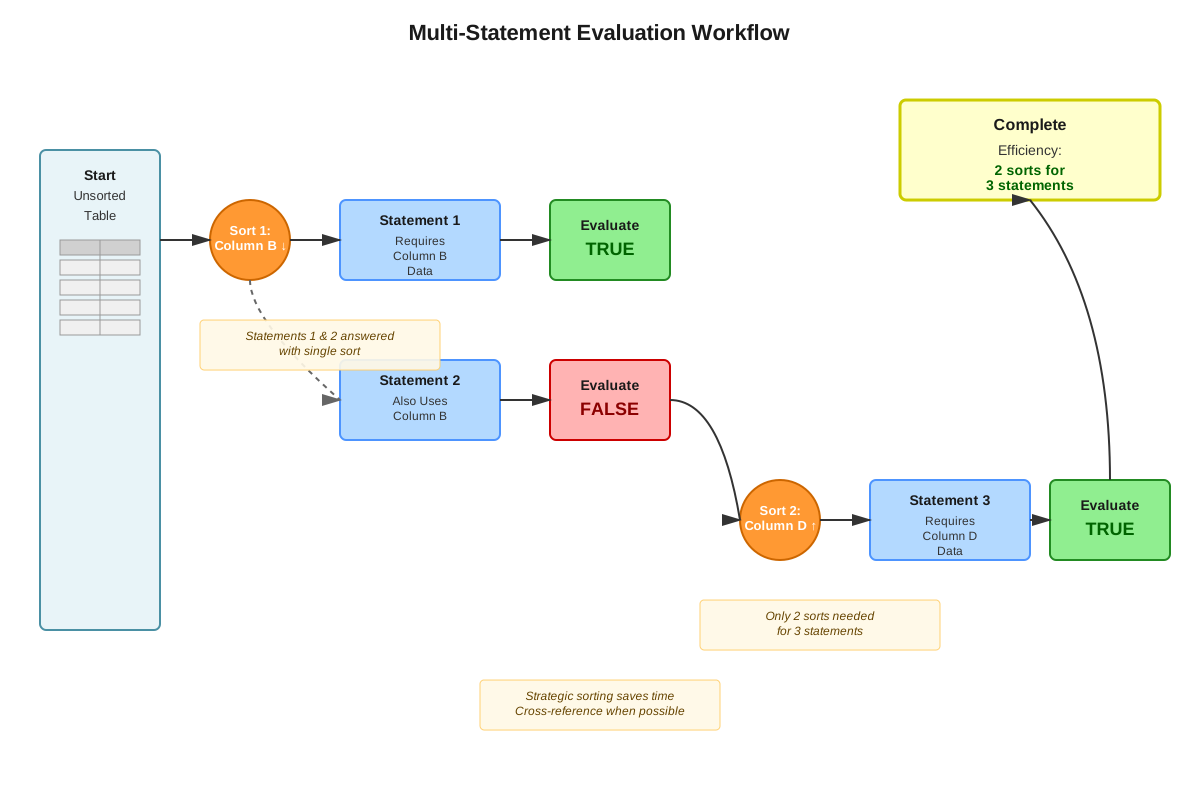
Efficient sorting requires understanding which column arrangement will most quickly answer the given statements. The optimal sorting strategy involves analyzing all statements before making any sorts to identify which single column arrangement might address multiple statements simultaneously. For example, if two statements ask about the "highest" and "lowest" values of a particular metric, sorting that column once in descending order allows verification of both statements by examining the top and bottom rows.
When statements reference different columns, prioritize sorting the column that appears in multiple statements or that will provide the most definitive answers. Some statements can be evaluated without sorting at all if they ask about general patterns visible in the unsorted table. Advanced test-takers develop a mental checklist: (1) Can any statements be answered from the default view? (2) Which column sort addresses the most statements? (3) Will I need to re-sort, and if so, in what sequence?
Analyzing Sorted Data
Once a table is sorted, systematic analysis prevents errors. When examining sorted data in ascending order, the top rows contain the minimum values while bottom rows contain maximum values. The reverse is true for descending order. To verify statements about "highest," "lowest," "top three," or "bottom five," focus on the relevant extreme rows rather than scanning the entire table.
For statements requiring comparisons between specific entities, use the sorted column to quickly locate the relevant rows, then read across to compare values in other columns. For example, if the table is sorted by "Revenue" and a statement asks whether the company with the highest revenue also has the highest profit margin, locate the top row (highest revenue), then check that row's profit margin value against other rows' profit margins.
Common Statement Types and Sorting Approaches
Extremes and Rankings: Statements asking about "the highest," "the lowest," "the top three," or "ranks first" require sorting the relevant column in descending order (for highest/top) or ascending order (for lowest/bottom). Verify by checking the appropriate extreme rows.
Threshold Comparisons: Statements like "more than 50% of entities have values exceeding X" require sorting the relevant column, then counting rows above or below the threshold. Calculate the percentage of rows meeting the criterion against the total row count.
Correlations and Relationships: Statements claiming "all entities with characteristic A also have characteristic B" require sorting by one characteristic, identifying rows meeting that criterion, then checking whether those same rows satisfy the second characteristic. A single counterexample disproves such statements.
Calculations and Aggregations: Statements requiring sums, averages, or percentage calculations may not benefit from sorting. Instead, systematically work through relevant rows, performing calculations as needed. However, sorting can help identify which rows to include in calculations (e.g., "the average of the top five performers").
Time Management and Sorting Efficiency
Each sort operation consumes 3-5 seconds, and re-sorting adds cumulative time. The most efficient approach involves minimizing total sorts while maximizing information gained per sort. Before touching the table, read all statements and mentally map which sorts are needed. If possible, answer multiple statements from a single sorted view before re-sorting.
Some test-takers benefit from a systematic left-to-right or right-to-left approach, sorting each column once and evaluating all relevant statements before moving to the next column. Others prefer a statement-by-statement approach, sorting as needed for each question. The optimal method depends on the specific question structure, but both approaches should aim to avoid redundant sorting of the same column multiple times.
Concept Relationships
The core concepts within sorting tables build upon each other in a logical progression. Understanding table structure serves as the foundation, enabling recognition of how data is organized and what each component represents. This understanding leads directly to strategic sorting principles, which guide decisions about which columns to sort and in what sequence. Strategic sorting then enables efficient data analysis, where sorted arrangements reveal patterns, extremes, and relationships that answer specific questions.
The relationship between statement types and sorting approaches is bidirectional: recognizing the statement type suggests the appropriate sorting strategy, while understanding available sorting options helps interpret what statements are actually asking. Both of these concepts feed into time management, which integrates all previous concepts into a cohesive test-taking strategy that balances accuracy with efficiency.
Connecting to prerequisite knowledge, basic spreadsheet familiarity enables quick orientation to table structure, while ascending/descending order concepts directly support strategic sorting decisions. Percentage and ratio calculations become necessary during data analysis after sorting, and comparative reasoning underlies the evaluation of statements about sorted data. The entire process relies on reading comprehension to accurately interpret column headers, data values, and statement wording.
Looking forward to related topics, sorting tables provides the foundation for multi-source reasoning questions where multiple data sources (including tables) must be synthesized. The analytical skills developed through sorting tables also transfer to graphics interpretation and two-part analysis questions within Data Insights, creating a unified framework for data-driven problem-solving across the GMAT.
Concept Flow: Table Structure Recognition → Strategic Sort Planning → Column Sorting Execution → Sorted Data Analysis → Statement Evaluation → Time-Efficient Completion
High-Yield Facts
⭐ The first click on a column header sorts in ascending order; the second click reverses to descending order.
⭐ When one column is sorted, all data in each row moves together, preserving the relationship between different variables for each entity.
⭐ Statements about "highest," "maximum," or "top" values require descending order sorting; statements about "lowest," "minimum," or "bottom" require ascending order.
⭐ Reading all statements before sorting any column allows identification of the most efficient sorting sequence.
⭐ Approximately 30-40% of Table Analysis statements can be answered or eliminated without any sorting by analyzing the default table view.
- Sorting by a text/category column arranges entries alphabetically (A-Z ascending, Z-A descending).
- Sorting by a date column arranges entries chronologically (earliest-to-latest ascending, latest-to-earliest descending).
- To verify "all" or "none" statements, a single counterexample is sufficient to prove the statement false.
- When statements reference percentages or ratios not directly shown in the table, calculations must be performed using values from relevant columns.
- The total number of rows in the table is critical for calculating percentages and proportions (e.g., "more than 50% of entities").
- Some statements require cross-referencing multiple columns simultaneously, which is easiest when the table is sorted by one of those columns.
- Statements using comparative language like "greater than," "less than," or "equal to" require precise value comparisons, not approximations.
Quick check — test yourself on Sorting tables so far.
Try Flashcards →Common Misconceptions
Misconception: Sorting one column changes the values in other columns for the same row.
Correction: Sorting reorganizes entire rows as units; all values for a given entity remain associated with that entity regardless of sort order. Only the vertical arrangement of rows changes, not the horizontal relationships within rows.
Misconception: The default (unsorted) table view is always alphabetical or numerical order.
Correction: The default view may be in any order—chronological, categorical, or arbitrary. Never assume the default arrangement follows any particular pattern; always check column headers and values to understand the current organization.
Misconception: Every statement requires sorting to answer.
Correction: Many statements can be evaluated from the default view or from a sort performed for a previous statement. Efficient test-takers identify which statements require new sorts versus which can be answered from the current view.
Misconception: Ascending order means "best" or "highest quality."
Correction: Ascending and descending are purely organizational terms referring to numerical or alphabetical sequence. Ascending means smallest-to-largest (or A-to-Z), regardless of whether smaller values are "better" or "worse" in context.
Misconception: If a statement is true for the top row after sorting, it's true for all rows.
Correction: Statements must be evaluated according to their specific scope. A statement about "the entity with the highest X" refers only to that top row, while a statement about "all entities" requires checking every row, not just the extremes.
Misconception: Sorting by one column automatically reveals patterns in other columns.
Correction: Sorting by Column A arranges rows by Column A's values only. Patterns in Column B become visible only if there happens to be a correlation between Column A and Column B values. To analyze Column B patterns, sort by Column B directly.
Misconception: The fastest approach is to sort once and answer all questions from that single view.
Correction: While minimizing sorts is efficient, some statement sets require multiple sorts because they reference different columns. The optimal strategy balances minimizing sorts with ensuring each statement can be accurately evaluated.
Worked Examples
Example 1: Technology Company Performance Analysis
Table Description: The table shows data for 12 technology companies, including columns for Company Name, Annual Revenue ($M), Profit Margin (%), Number of Employees, and R&D Spending ($M).
Statements to Evaluate:
- The company with the highest annual revenue also has the highest R&D spending.
- More than half of the companies have profit margins exceeding 15%.
- Among companies with more than 5,000 employees, the average R&D spending exceeds $500M.
Solution Process:
Statement 1 Analysis: This statement requires identifying the company with the highest revenue and checking if that same company has the highest R&D spending.
Step 1: Sort the "Annual Revenue" column in descending order. The top row now shows the company with the highest revenue (let's say Company A with $8,200M revenue).
Step 2: Note Company A's R&D spending from the same row (let's say $650M).
Step 3: Scan down the R&D Spending column while the table remains sorted by revenue. If any other company shows R&D spending greater than $650M, the statement is FALSE. If Company A's $650M is the highest value in the R&D column, the statement is TRUE.
Step 4: Suppose Company F (in row 6) shows R&D spending of $720M. This is higher than Company A's $650M, so Statement 1 is FALSE.
Statement 2 Analysis: This requires counting companies with profit margins above 15% and determining if they exceed 50% of the total.
Step 1: Sort the "Profit Margin (%)" column in descending order. This groups all high-margin companies at the top.
Step 2: Count rows from the top until reaching the first company with a profit margin of 15% or below. Suppose the first 7 companies have margins above 15%, and the 8th company has exactly 15%.
Step 3: Since the statement asks for margins "exceeding 15%" (not including 15%), only 7 companies qualify.
Step 4: Calculate: 7 out of 12 companies = 58.3%, which is more than 50%. Statement 2 is TRUE.
Statement 3 Analysis: This requires filtering for companies with >5,000 employees, then calculating their average R&D spending.
Step 1: Sort the "Number of Employees" column in descending order to group large companies at the top.
Step 2: Identify all rows where employees exceed 5,000. Suppose 5 companies meet this criterion.
Step 3: Record the R&D spending for these 5 companies: $650M, $720M, $480M, $550M, $420M.
Step 4: Calculate the average: ($650 + $720 + $480 + $550 + $420) ÷ 5 = $2,820M ÷ 5 = $564M.
Step 5: Since $564M exceeds $500M, Statement 3 is TRUE.
Key Takeaway: This example demonstrates how different statements require different sorting strategies. Statement 1 needed one sort with cross-column comparison, Statement 2 needed a different sort with counting, and Statement 3 required sorting to filter rows before performing calculations.
Example 2: Regional Sales Performance
Table Description: The table contains data for 15 sales regions, with columns for Region Name, Q1 Sales ($K), Q2 Sales ($K), Sales Growth (%), and Customer Count.
Statements to Evaluate:
- All regions with sales growth exceeding 20% have customer counts above 1,000.
- The region with the lowest Q1 sales achieved higher Q2 sales than at least three other regions.
- Fewer than 40% of regions experienced negative sales growth.
Solution Process:
Statement 1 Analysis: This "all" statement requires verifying that every region meeting the first condition also meets the second condition.
Step 1: Sort "Sales Growth (%)" in descending order to group high-growth regions at the top.
Step 2: Identify all regions with growth exceeding 20%. Suppose 6 regions qualify.
Step 3: For each of these 6 regions, check the "Customer Count" column in the same row. If all 6 show customer counts above 1,000, the statement is TRUE. If even one shows 1,000 or fewer customers, the statement is FALSE.
Step 4: Suppose Region M has 22% growth but only 950 customers. This single counterexample proves Statement 1 is FALSE.
Statement 2 Analysis: This requires finding the minimum Q1 sales, then comparing that region's Q2 sales to other regions' Q2 sales.
Step 1: Sort "Q1 Sales ($K)" in ascending order. The top row shows the region with the lowest Q1 sales (suppose Region C with $120K).
Step 2: Note Region C's Q2 sales from the same row (suppose $185K).
Step 3: Re-sort the table by "Q2 Sales ($K)" in ascending order to see where $185K ranks.
Step 4: Count how many regions have Q2 sales below $185K. Suppose 4 regions show Q2 sales lower than $185K.
Step 5: Since Region C's Q2 sales of $185K exceeded at least 4 other regions (more than the required 3), Statement 2 is TRUE.
Statement 3 Analysis: This requires counting regions with negative growth and calculating the percentage.
Step 1: Sort "Sales Growth (%)" in ascending order to group negative growth regions at the top.
Step 2: Count rows with negative growth percentages (values less than 0%). Suppose 5 regions show negative growth.
Step 3: Calculate the percentage: 5 out of 15 regions = 33.3%.
Step 4: Since 33.3% is less than 40%, Statement 3 is TRUE.
Key Takeaway: This example illustrates the importance of re-sorting when statements reference different columns (Statement 2 required two different sorts) and demonstrates how "all" statements can be efficiently disproven with a single counterexample rather than checking every case.
Exam Strategy
When approaching GMAT sorting table questions, begin by investing 15-20 seconds reading the table description and scanning column headers to understand the data structure. This upfront investment prevents misinterpretation and guides efficient sorting decisions. Next, read all statements before performing any sorts—this overview reveals which columns are referenced most frequently and whether any statements can be answered from the default view.
Trigger words that indicate specific sorting needs include: "highest" and "maximum" (sort descending), "lowest" and "minimum" (sort ascending), "top three" or "bottom five" (sort to appropriate extreme), "all" or "every" (requires checking all rows, often after sorting to group relevant cases), "more than half" or percentage thresholds (requires counting after sorting), and "average" or "total" (may require sorting to identify relevant subset before calculating).
For process of elimination, evaluate statements in order of difficulty—answer the easiest statements first to build confidence and momentum. If a statement seems ambiguous, check whether it can be definitively proven false with a single counterexample rather than attempting to verify it's true across all cases. When time is limited, statements with absolute language ("all," "none," "every") are often easier to evaluate (and disprove) than statements with qualified language ("most," "some," "typically").
Time allocation should follow this pattern: 20 seconds for initial table review, 30 seconds for reading all statements and planning sorts, 90-120 seconds for sorting and evaluating statements, and 10-20 seconds for final review of answers. If a single statement is consuming more than 45 seconds, mark your best answer and move forward rather than falling into a time trap. The entire Table Analysis question (with 3-4 statements) should be completed in 2.5-3 minutes.
Develop a systematic evaluation process: After each sort, immediately evaluate all statements that can be answered from that view before re-sorting. Use the scratch pad or noteboard to track which statements have been answered and which still need evaluation. For complex calculations, write down intermediate values to avoid mental arithmetic errors. When re-sorting is necessary, plan the sequence to minimize total sorts—if Statement 2 and Statement 4 both reference Column C, evaluate both after sorting Column C once.
Memory Techniques
SORT mnemonic for the systematic approach:
- Scan the table structure and read all statements first
- Organize your sorting strategy by identifying which columns address multiple statements
- Review each sorted view completely before re-sorting
- Track your answers and remaining statements to avoid redundant work
ACED for statement evaluation:
- Absolutes ("all," "none") can be disproven with one counterexample
- Comparisons require sorting the relevant column to identify extremes
- Extremes (highest, lowest) are found in the top or bottom rows after sorting
- Data calculations (averages, percentages) may not require sorting at all
Visualization strategy: Picture the table as a physical deck of cards where each row is a card. Sorting is like shuffling the deck to arrange cards by a specific attribute (suit, number, etc.). Just as shuffling doesn't change what's printed on each card, sorting doesn't change the values in each row—only their vertical arrangement. This mental model reinforces that row integrity is preserved during sorting.
Ascending/Descending memory aid: "Ascending starts with A—like the Alphabet starts with A, and A comes before Z, so ascending goes from beginning to end (small to large, A to Z)." Alternatively, visualize ascending as climbing up a mountain (starting low, ending high) and descending as coming down (starting high, ending low).
Summary
Sorting tables is a high-yield GMAT Data Insights skill that requires strategic thinking, systematic analysis, and efficient time management. The interactive nature of these questions demands that test-takers actively manipulate data by sorting columns in ascending or descending order to evaluate multiple true/false statements. Success depends on understanding table structure, recognizing how sorting preserves row relationships while reorganizing vertical arrangement, and developing efficient sorting strategies that minimize redundant operations. Key competencies include identifying which column sort addresses multiple statements, recognizing statement types that require specific sorting approaches (extremes, thresholds, correlations, calculations), and systematically evaluating sorted data to verify or disprove claims. The most effective approach involves reading all statements before sorting to plan an optimal sequence, answering multiple statements from each sorted view, and using counterexamples to efficiently disprove absolute statements. Time management is critical—the entire question should be completed in 2.5-3 minutes through strategic sorting and focused analysis rather than exhaustive checking of every cell.
Key Takeaways
- Sorting tables are interactive data displays where clicking column headers reorganizes rows while preserving each row's complete information across all columns.
- Strategic planning before sorting—reading all statements and identifying which columns are referenced—dramatically improves efficiency and reduces total sorting operations.
- Ascending order places smallest values (or A-Z) at the top; descending order places largest values (or Z-A) at the top; this distinction is critical for quickly locating extremes.
- Statements about "highest," "top," or "maximum" require descending sorts; statements about "lowest," "bottom," or "minimum" require ascending sorts.
- Approximately one-third of statements can be answered without sorting or from a sort performed for another statement—avoid unnecessary sorting operations.
- "All" or "none" statements can be efficiently disproven with a single counterexample rather than verifying every row.
- Cross-column analysis (checking multiple columns for the same row) is essential when statements link different variables or require verifying relationships between attributes.
Related Topics
Multi-Source Reasoning: Builds on sorting tables by requiring synthesis of information from multiple sources (tables, text, graphics) to answer complex questions. Mastering sorting tables provides the foundational data analysis skills needed for these more advanced questions.
Graphics Interpretation: Applies similar analytical thinking to graphs, charts, and visual data representations. The pattern recognition and comparative reasoning developed through sorting tables transfers directly to interpreting trends and relationships in graphical formats.
Two-Part Analysis: Requires evaluating relationships between variables and selecting answers that satisfy multiple conditions simultaneously. The systematic evaluation approach learned through sorting tables supports the logical reasoning needed for two-part questions.
Quantitative Problem Solving: Many sorting table questions require percentage calculations, ratio comparisons, and arithmetic operations. Strengthening these quantitative skills enhances both sorting table performance and overall GMAT math scores.
Data Sufficiency: While structurally different, data sufficiency questions share the analytical mindset of determining what information is needed to answer specific questions—similar to identifying which column sort will address particular statements in table analysis.
Practice CTA
Now that you've mastered the concepts and strategies for sorting tables, it's time to put your knowledge into action! Attempt the practice questions to reinforce your understanding and build the speed and accuracy needed for test day. Focus on implementing the systematic approach outlined in this guide: read all statements first, plan your sorting strategy, and minimize redundant operations. The flashcards will help you internalize key facts and trigger words that signal specific sorting needs. Remember, sorting tables is a skill that improves dramatically with deliberate practice—each question you work through builds your pattern recognition and strategic decision-making. You're developing not just test-taking skills, but analytical competencies that will serve you throughout your MBA and professional career. Approach each practice question as an opportunity to refine your technique and increase your confidence. You've got this!
Sign up free to keep reading
Create a free AnvayaPrep account to finish this GMAT guide on Sorting tables — plus flashcards and practice questions.