Overview
Line charts are one of the most frequently tested graphical representations in the GMAT Data Insights section, appearing in approximately 15-20% of Graphics Interpretation questions. These visual tools display quantitative information by connecting data points with line segments, making them ideal for showing trends, patterns, and changes over continuous intervals—most commonly time. Understanding how to rapidly extract, interpret, and analyze information from GMAT line charts is essential for achieving a competitive score, as these questions often require synthesizing multiple data points, calculating rates of change, and identifying relationships between variables.
The power of line charts lies in their ability to communicate complex numerical relationships at a glance. On the GMAT, test-makers exploit this format to assess a candidate's quantitative reasoning, analytical thinking, and ability to work under time pressure. Questions may ask students to identify maximum or minimum values, calculate percentage changes, compare growth rates across different time periods, or extrapolate trends beyond the given data range. The medium difficulty rating reflects that while basic interpretation is straightforward, GMAT questions typically layer multiple analytical steps or combine line chart data with other information sources.
Within the broader Data Insights framework, line charts serve as a foundational skill that connects to other graphical interpretation topics including bar charts, scatter plots, and multi-source reasoning questions. Mastery of line charts builds the visual literacy and analytical framework necessary for tackling more complex data presentations. The skills developed here—identifying axes, understanding scale, recognizing trends, and performing calculations based on visual data—transfer directly to other quantitative reasoning tasks throughout the exam.
Learning Objectives
- [ ] Identify line charts and distinguish them from other graphical representations
- [ ] Explain the components, structure, and purpose of line charts in data presentation
- [ ] Apply line chart interpretation skills to solve GMAT Data Insights questions accurately and efficiently
- [ ] Calculate rates of change, percentage increases/decreases, and absolute differences using line chart data
- [ ] Analyze multiple line series simultaneously to compare trends and identify relationships
- [ ] Recognize common GMAT question patterns involving line charts and select appropriate solution strategies
- [ ] Evaluate the validity of statements about trends, projections, and data relationships based on line chart information
Prerequisites
- Basic coordinate plane understanding: Line charts use x-axis and y-axis conventions to plot data points, requiring familiarity with Cartesian coordinates
- Percentage calculations: Many GMAT line chart questions involve computing percentage change, percentage of total, or percentage differences between values
- Rate and ratio concepts: Interpreting slopes and comparing growth rates requires understanding how rates express relationships between quantities
- Basic arithmetic operations: Extracting values from charts and performing calculations with those values forms the foundation of all line chart questions
- Reading scales and estimating values: Charts may not mark every data point explicitly, requiring interpolation skills to determine approximate values
Why This Topic Matters
Line charts represent one of the most ubiquitous data visualization methods in business, economics, finance, and scientific research—precisely the domains GMAT candidates will encounter in graduate management education and professional careers. Corporate earnings reports, market trend analyses, operational metrics dashboards, and strategic planning documents all rely heavily on line charts to communicate performance over time. The ability to quickly interpret these visualizations and draw accurate conclusions is a fundamental business literacy skill.
On the GMAT specifically, line charts appear in approximately 15-20% of Data Insights questions, making them one of the highest-yield graphical formats to master. They most commonly appear in Graphics Interpretation questions, where candidates must complete statements by selecting values or relationships from dropdown menus. Line charts also feature in Multi-Source Reasoning questions, where they may be combined with tables, text passages, or other graphics to create integrated reasoning challenges. The median difficulty of line chart questions falls in the 600-700 score range, meaning they serve as differentiators for candidates targeting competitive programs.
Common GMAT presentations include: single-line charts showing one variable over time; multiple-line charts comparing two to four different series; charts with dual y-axes showing variables with different scales; and charts requiring calculation of derived metrics like growth rates or moving averages. Questions typically ask candidates to identify specific values, calculate changes between time periods, determine which time period showed maximum/minimum values, compare rates of change across different intervals, or evaluate whether statements about trends are supported by the data. The time pressure of the GMAT—approximately 2-3 minutes per Data Insights question—makes efficient line chart interpretation a critical skill for score optimization.
Core Concepts
Anatomy of a Line Chart
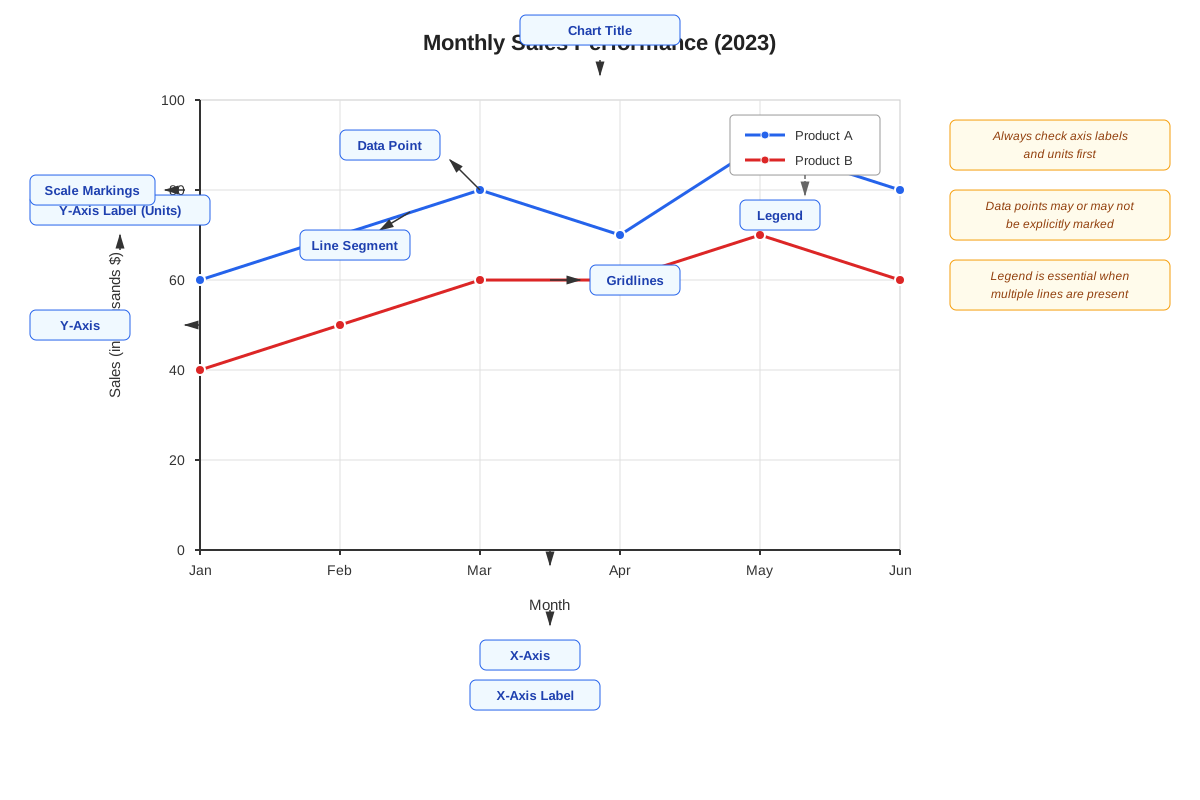
A line chart (also called a line graph) consists of several essential components that work together to convey quantitative information. The x-axis (horizontal axis) typically represents the independent variable, most commonly time intervals such as years, quarters, months, or days. The y-axis (vertical axis) represents the dependent variable—the quantity being measured, such as revenue, temperature, population, or any other metric that changes in relation to the x-axis variable.
Data points are marked at specific coordinates where the x and y values intersect, representing actual measured or recorded values. These points are connected by line segments that create a continuous visual representation of how the variable changes. The connecting lines help viewers perceive trends, patterns, and the overall trajectory of the data. Some line charts use markers (dots, squares, triangles) to emphasize individual data points, while others show only the connecting lines.
The chart title identifies what data is being presented, while axis labels specify what each axis measures. The scale on each axis determines the range of values displayed and the intervals between marked values. Understanding scale is crucial for GMAT questions, as test-makers may use non-standard intervals (counting by 5s, 50s, or 1000s) or non-zero baselines to test careful reading. A legend or key appears when multiple lines are shown, using different colors, line styles (solid, dashed, dotted), or markers to distinguish between data series.
Reading and Extracting Values
Extracting accurate values from line charts requires systematic attention to scale and careful visual estimation. When a data point falls exactly on a gridline, reading the value is straightforward—trace horizontally from the point to the y-axis and read the corresponding value. However, GMAT line charts frequently position data points between gridlines, requiring estimation.
To estimate values between gridlines, first identify the two gridlines the point falls between and note their values. Then mentally divide the space between gridlines into equal segments (halves, thirds, or quarters depending on precision needed) and estimate where the point falls within that range. For example, if gridlines mark 100 and 150, and a point appears roughly 60% of the way between them, the estimated value would be 100 + (0.6 × 50) = 130.
Exam Tip: GMAT answer choices are typically spaced far enough apart that precise estimation isn't necessary. If choices are 125, 135, 145, and 155, determining whether a point is "closer to 130 or 140" is sufficient.
Identifying Trends and Patterns
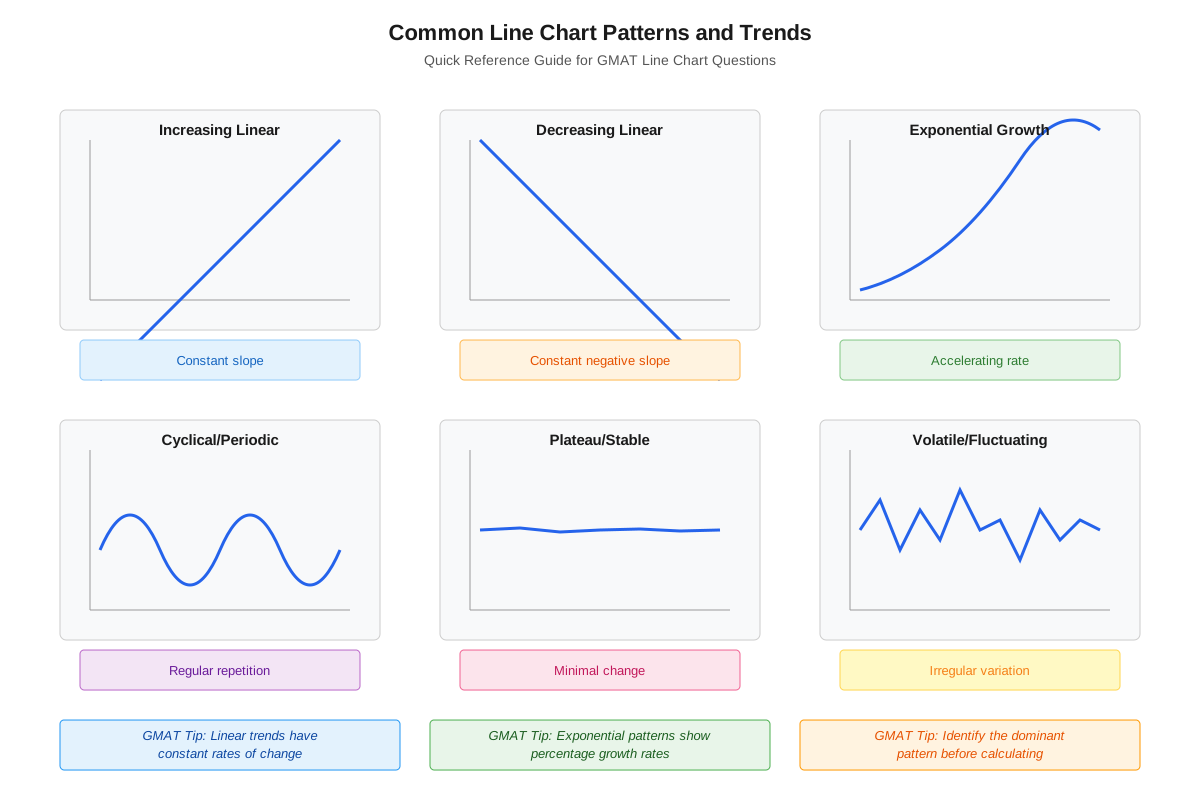
Line charts excel at revealing trends—the general direction or pattern of change over time. An upward trend (positive slope) indicates the variable is increasing, while a downward trend (negative slope) shows decrease. A flat or horizontal trend suggests the variable remains relatively constant. The steepness of the line indicates the rate of change—steeper lines represent faster change, while gradual slopes show slower change.
GMAT questions frequently test the ability to identify where trends change. An inflection point occurs where the line changes from increasing to decreasing (or vice versa), marking a local maximum or minimum. A peak represents the highest value in a given range, while a trough represents the lowest. Understanding these patterns allows quick identification of time periods with maximum growth, minimum values, or changing conditions.
Volatility or variability refers to how much the line fluctuates. A line with many sharp ups and downs shows high volatility, while a smooth, gradually changing line indicates stability. Some GMAT questions ask candidates to identify which time period showed greatest volatility or most stable conditions.
Calculating Changes and Rates
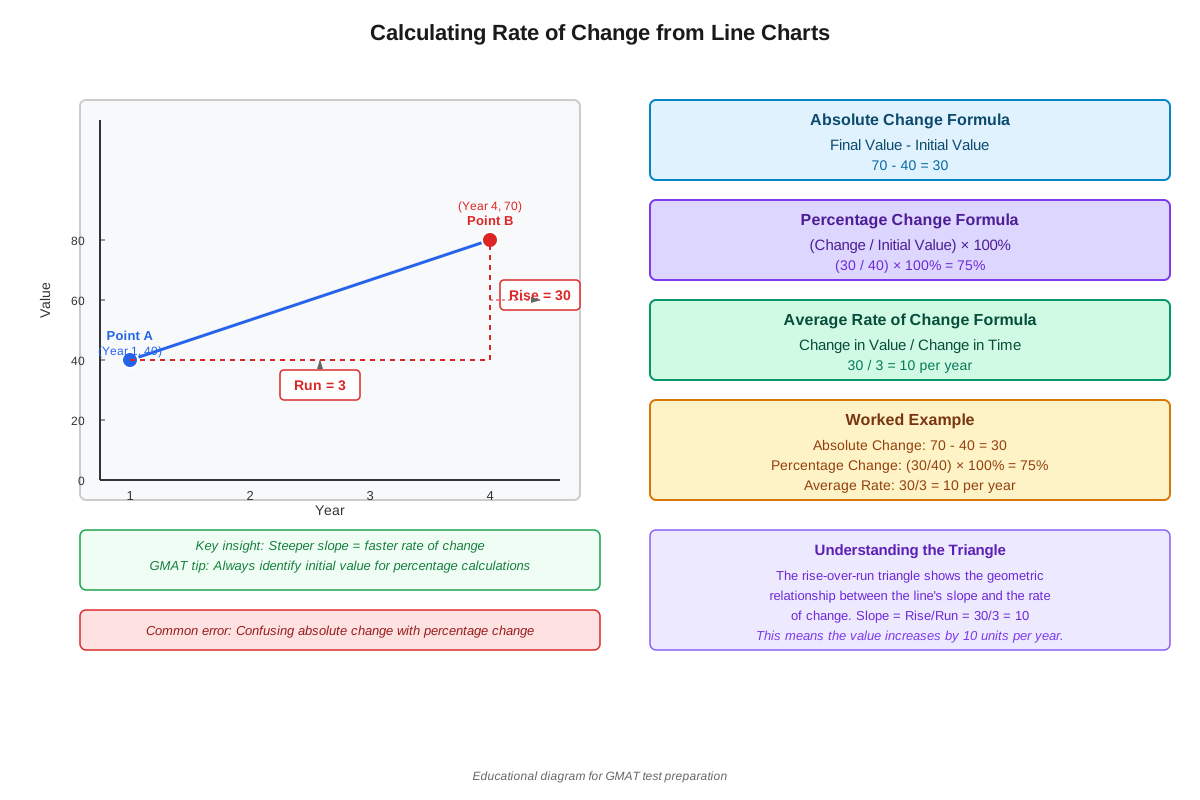
Many GMAT line chart questions require calculating changes between data points. The absolute change is simply the difference between two values: Final Value - Initial Value. If revenue was $200 million in 2020 and $250 million in 2022, the absolute change is $50 million.
Percentage change is calculated as: ((Final Value - Initial Value) / Initial Value) × 100%. Using the same example: (($250M - $200M) / $200M) × 100% = 25% increase. Note that percentage change depends on which value serves as the base—percentage increase from 200 to 250 (25%) differs from percentage decrease from 250 to 200 (20%).
The rate of change or slope between two points indicates how quickly the variable changes per unit of the x-axis. If population increased from 5 million to 8 million over 6 years, the average rate of change is (8M - 5M) / 6 years = 0.5 million per year. GMAT questions may ask which time interval showed the greatest rate of increase or whether the rate of change was accelerating or decelerating.
Comparing Multiple Lines
When line charts display multiple data series, comparison becomes a key analytical task. The relative position of lines indicates which variable has higher or lower values at any given point. Lines may converge (move closer together), diverge (move farther apart), or intersect (cross each other). An intersection point represents where two variables have equal values.
Gap analysis involves examining the vertical distance between lines at various points. A widening gap indicates the difference between variables is increasing, while a narrowing gap shows they're becoming more similar. GMAT questions might ask: "In which year was the difference between Product A and Product B sales greatest?" This requires identifying where the vertical distance between the two lines is maximum.
Comparing trends across multiple lines reveals whether variables move in the same direction (positive correlation), opposite directions (negative correlation), or show no consistent relationship. For example, if one line consistently increases while another decreases, they exhibit negative correlation.
Scale Considerations and Distortions
The y-axis scale dramatically affects visual perception of trends. A truncated scale (one that doesn't start at zero) can make small changes appear dramatic. If a chart shows values from 95 to 105 rather than 0 to 105, a change from 100 to 105 appears as a large visual jump despite being only a 5% increase. GMAT test-makers use this to test careful reading—always check where the y-axis begins.
Dual-axis charts display two different y-axes—one on the left and one on the right—allowing comparison of variables with different units or scales. For example, one axis might show revenue in millions while the other shows profit margin as a percentage. These charts require careful attention to which line corresponds to which axis, as the legend will specify this relationship.
Logarithmic scales (less common on the GMAT but possible) show equal vertical distances representing equal percentage changes rather than equal absolute changes. On a logarithmic scale, the distance from 10 to 100 equals the distance from 100 to 1000, since both represent 10-fold increases.
Concept Relationships
The core concepts of line chart interpretation build upon each other in a logical progression. Anatomy understanding → enables → accurate value extraction → which allows → trend identification → leading to → change calculations → supporting → multi-line comparisons → while considering → scale effects.
More specifically, before extracting values, one must understand which axis represents which variable and how the scale is marked. Value extraction skills are prerequisite to calculating changes, since you cannot compute a percentage increase without first determining the initial and final values. Trend identification relies on recognizing patterns in how extracted values change across the x-axis. Multi-line comparison synthesizes all previous skills, requiring simultaneous value extraction, trend recognition, and change calculation across multiple data series.
These line chart skills connect to broader Data Insights prerequisites: coordinate plane understanding provides the spatial framework for interpreting axes and positions; percentage calculation skills enable the quantitative analysis required for most GMAT questions; rate and ratio concepts help interpret slopes and compare growth rates. Looking forward, line chart mastery enables progression to more complex graphics including combination charts (line + bar), scatter plots with trend lines, and multi-source reasoning questions that integrate line charts with tables and text.
The relationship between line chart components and GMAT question types follows predictable patterns: questions about specific values test anatomy and extraction skills; questions about "greatest increase" or "maximum value" test trend identification; questions about "percentage change" or "rate of growth" test calculation skills; questions comparing multiple products or time periods test multi-line comparison abilities.
High-Yield Facts
⭐ Line charts most commonly display change over time, with time on the x-axis and the measured variable on the y-axis
⭐ The steepness of a line segment indicates the rate of change—steeper lines mean faster change
⭐ Percentage change = ((Final - Initial) / Initial) × 100%, and the base value matters for the calculation
⭐ When comparing multiple lines, intersection points indicate where the two variables have equal values
⭐ A truncated y-axis (not starting at zero) can make small changes appear visually dramatic
- The highest point on a line chart within a given range represents the maximum value for that period
- A flat or horizontal line segment indicates no change in the variable during that interval
- When estimating values between gridlines, GMAT answer choices are typically spaced to allow reasonable approximation
- The vertical distance between two lines on a multi-line chart represents the absolute difference between those variables
- Dual-axis charts require checking the legend to determine which line corresponds to which y-axis
- Calculating rate of change requires dividing the change in y-values by the change in x-values (slope formula)
- An inflection point where a line changes from increasing to decreasing represents a local maximum
- Volatility refers to how much a line fluctuates up and down, indicating instability or variability
- Extrapolating beyond the given data range (predicting future values) requires assuming trends continue
- Reading axis labels carefully prevents unit errors (thousands vs. millions, dollars vs. percentages)
Quick check — test yourself on Line charts so far.
Try Flashcards →Common Misconceptions
Misconception: A steeper line always means a larger value.
Correction: Steepness indicates rate of change, not absolute value. A line can be steep (rapid change) while still representing smaller values than a flatter line positioned higher on the chart. Always check the y-axis values, not just the visual slope.
Misconception: The percentage increase from A to B equals the percentage decrease from B to A.
Correction: Percentage change depends on the base value. Increasing from 100 to 150 is a 50% increase, but decreasing from 150 to 100 is a 33.3% decrease because the base values differ. Always identify which value serves as the denominator.
Misconception: When two lines intersect, they have the same rate of change at that point.
Correction: Intersection means the two variables have equal values at that specific point, not equal rates of change. The slopes (rates of change) of the two lines at an intersection point are typically different—that's often why they're crossing.
Misconception: If a line is above another line throughout the entire chart, the top line always has a greater rate of increase.
Correction: Position (which line is higher) indicates which variable has greater absolute values, but rate of increase depends on slope steepness. A lower line can have a steeper slope and thus a faster rate of increase even while maintaining lower absolute values.
Misconception: The connecting lines between data points represent actual measured values at all points along the line.
Correction: Unless explicitly stated, the lines simply connect known data points and don't necessarily represent measured values at intermediate positions. The line between "January: 100" and "February: 120" doesn't confirm the value was 110 on January 15th—it's a visual connector, not continuous measurement.
Misconception: A line chart with a non-zero baseline is intentionally deceptive or incorrect.
Correction: Truncated y-axes are legitimate design choices that can make meaningful variations more visible when all values fall within a narrow range. They're not inherently deceptive, but readers must check the scale to avoid misinterpreting the magnitude of changes. GMAT tests whether you notice and account for this.
Misconception: When a line is horizontal, the rate of change is undefined.
Correction: A horizontal line indicates a rate of change of zero—the variable is not changing during that interval. This is different from an undefined rate, which would occur with a vertical line (infinite rate of change).
Worked Examples
Example 1: Single-Line Chart with Calculations
Question: The line chart below shows the annual revenue of Company X from 2018 to 2023. In which year did Company X experience the greatest percentage increase in revenue compared to the previous year?
Chart shows:
2018: $400 million
2019: $450 million
2020: $500 million
2021: $525 million
2022: $550 million
2023: $605 millionSolution:
Step 1: Identify what's being asked. We need the greatest percentage increase, not absolute increase, and we're comparing each year to its previous year.
Step 2: Calculate percentage increase for each year-to-year transition:
- 2018 to 2019: (($450M - $400M) / $400M) × 100% = ($50M / $400M) × 100% = 12.5%
- 2019 to 2020: (($500M - $450M) / $450M) × 100% = ($50M / $450M) × 100% = 11.1%
- 2020 to 2021: (($525M - $500M) / $500M) × 100% = ($25M / $500M) × 100% = 5.0%
- 2021 to 2022: (($550M - $525M) / $525M) × 100% = ($25M / $525M) × 100% = 4.8%
- 2022 to 2023: (($605M - $550M) / $550M) × 100% = ($55M / $550M) × 100% = 10.0%
Step 3: Compare the percentages. The greatest percentage increase is 12.5%, which occurred in 2019.
Answer: 2019
Key Insights: This problem tests the understanding that percentage change depends on the base value. Notice that 2018-2019 and 2019-2020 both had $50M absolute increases, but different percentage increases because the base values differed. Also, 2022-2023 had the largest absolute increase ($55M) but not the largest percentage increase. This demonstrates why carefully reading what the question asks is crucial—absolute vs. percentage changes yield different answers.
Example 2: Multi-Line Chart with Comparison
Question: The line chart shows monthly sales for Product A and Product B over six months. Based on the chart, which of the following statements is true?
Chart shows:
         Jan   Feb   Mar   Apr   May   Jun
Product A: 100   120   140   130   150   160
Product B: 150   145   140   145   155   170
Statement options:
I. Product B had higher sales than Product A in every month.
II. The gap between Product B and Product A sales narrowed consistently throughout the period.
III. Product A showed a greater percentage increase from January to June than Product B.
Solution:
Step 1: Evaluate Statement I.
Check each month: Jan (B: 150 > A: 100 ✓), Feb (B: 145 > A: 120 ✓), Mar (B: 140 = A: 140 ✗)
Statement I is FALSE because in March, Product A equaled Product B, and in April-June, Product A exceeded Product B.
Step 2: Evaluate Statement II.
Calculate the gap (B - A) for each month:
- Jan: 150 - 100 = 50
- Feb: 145 - 120 = 25
- Mar: 140 - 140 = 0
- Apr: 145 - 130 = 15
- May: 155 - 150 = 5
- Jun: 170 - 160 = 10
The gap narrowed from Jan to May (50 → 25 → 0 → 15 → 5) but then widened in June (5 → 10).
Statement II is FALSE because the gap did not narrow consistently—it widened in the final month.
Step 3: Evaluate Statement III.
Product A: ((160 - 100) / 100) × 100% = 60% increase
Product B: ((170 - 150) / 150) × 100% = 13.3% increase
Statement III is TRUE because 60% > 13.3%.
Answer: Only Statement III is true.
Key Insights: This problem demonstrates the importance of checking all data points when evaluating statements about "every month" or "consistently." It also reinforces that a product with lower absolute values can still have a higher percentage increase. The multi-line comparison requires tracking both absolute values (for Statement I), differences between lines (for Statement II), and percentage calculations (for Statement III)—testing multiple line chart skills simultaneously.
Exam Strategy
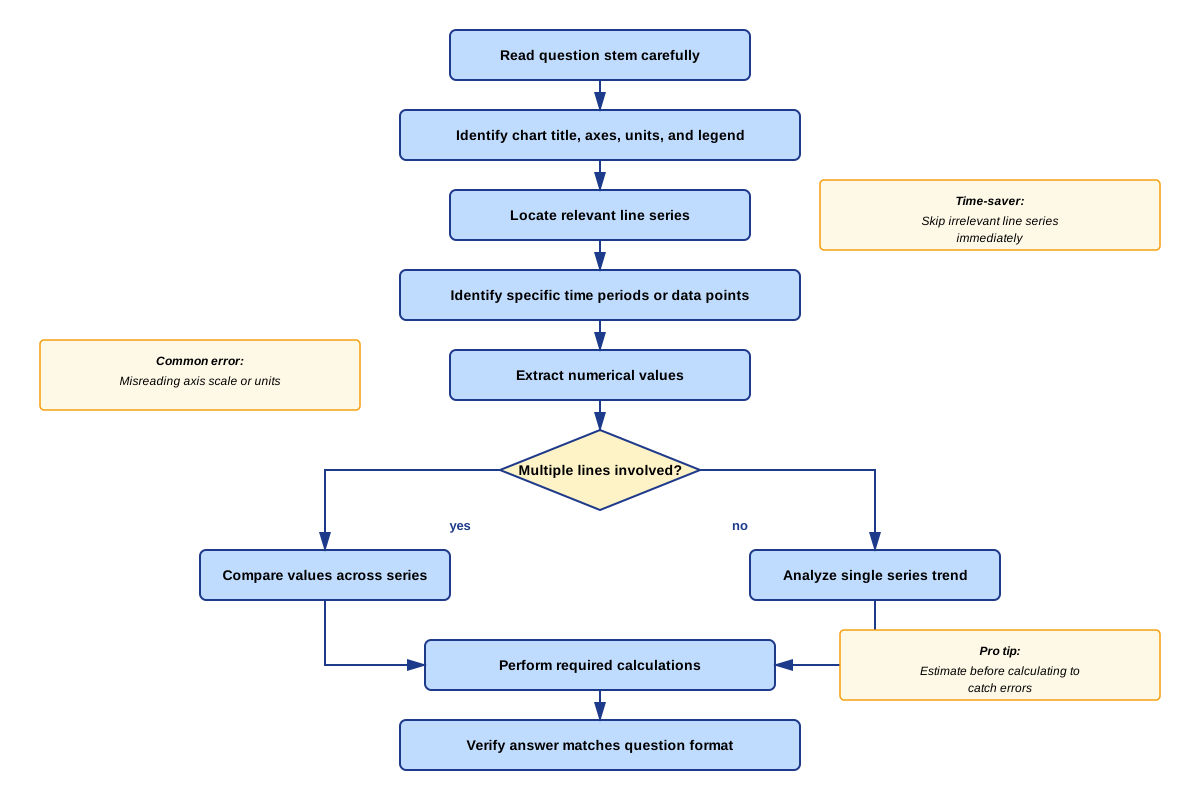
When approaching GMAT line chart questions, implement a systematic four-step process: Orient → Extract → Calculate → Verify. First, spend 15-20 seconds orienting yourself to the chart structure—read the title, identify what each axis represents, check the scale (especially whether the y-axis starts at zero), and note the units (thousands, millions, percentages). This orientation prevents careless errors from misreading scales or confusing variables.
Second, extract only the specific values needed to answer the question. Avoid the trap of trying to understand every data point on the chart—GMAT questions typically require only 2-4 specific values. If the question asks about "the percentage change from 2019 to 2022," locate only those two years and their corresponding values. This targeted extraction saves precious time.
Third, perform calculations methodically, writing down intermediate steps if using the provided notepad. For percentage change problems, explicitly identify which value is the base (denominator). For rate of change problems, remember to divide by the change in the x-axis variable, not just the y-axis change. Double-check whether the question asks for absolute change, percentage change, or rate of change—these are distinct concepts that yield different answers.
Fourth, verify your answer against the question requirements and answer choices. If the question asks for "the year with the greatest increase" and your calculation yields a value rather than a year, you've made an error. If your calculated value doesn't appear among the answer choices, check for unit errors (did you calculate in thousands when the answers are in millions?) or calculation mistakes.
Trigger Words to Watch For: - "Greatest/largest/maximum" or "least/smallest/minimum" → requires comparing multiple values - "Percentage" vs. "absolute" → determines calculation method - "Rate of change" or "per year" → requires dividing by time interval - "Approximately" → signals estimation is acceptable - "Between [year X] and [year Y]" → clarify whether this means the change from X to Y or the time period including both
Process-of-Elimination Tips: When answer choices are numerical values, eliminate options that are clearly outside the possible range based on visual inspection. If a line appears to be between 400 and 500, eliminate answers like 350 or 550. For statement evaluation questions (True/False or "which of the following"), eliminate statements containing absolute words like "always," "never," or "every" unless you can verify they hold for all relevant data points. A single counterexample disproves such statements.
Time Allocation: Allocate approximately 2-3 minutes per line chart question. Spend no more than 30 seconds on initial orientation, 60-90 seconds on extraction and calculation, and 30-45 seconds on verification and answer selection. If a question requires comparing more than four different values or multiple complex calculations, consider flagging it and returning if time permits—these are often designed to be time-consuming.
Memory Techniques
SAVE for systematic line chart analysis:
- Scale: Check the y-axis scale and starting point
- Axes: Identify what each axis represents and units
- Values: Extract only the specific values needed
- Evaluate: Calculate and verify against the question
"Peak Valley Rate" for trend questions: When questions ask about maximums, minimums, or rates of change, visualize the line as a mountain range. Peaks are local maximums, valleys are local minimums, and the steepness of slopes between them represents rates of change. The steepest upward slope is the greatest rate of increase.
"Base Matters" for percentage change: Create a mental image of a percentage calculation as a fraction with the initial value always in the denominator (base). Visualize the base as the foundation of a building—it's what you're measuring change relative to. This prevents the common error of using the final value as the base.
"Lines Cross, Values Match" for intersection points: When two lines intersect, their y-values are equal at that x-value. Visualize the intersection as two paths meeting—at the meeting point, they're at the same elevation (y-value).
"Gap = Difference" for multi-line charts: The vertical distance between two lines represents the absolute difference between their values. Visualize this as the gap between two runners in a race—the gap size shows how far apart they are at any given time.
Acronym for common calculations - "PARD":
- Percentage change: ((Final - Initial) / Initial) × 100%
- Absolute change: Final - Initial
- Rate of change: (Change in Y) / (Change in X)
- Difference between lines: Upper line value - Lower line value
Summary
Line charts represent one of the most critical data visualization formats for GMAT Data Insights success, appearing in approximately 15-20% of Graphics Interpretation questions. Mastery requires understanding the anatomy of line charts (axes, scales, data points, and legends), developing systematic value extraction skills that account for scale and estimation, identifying trends and patterns including peaks, troughs, and inflection points, and performing accurate calculations of absolute changes, percentage changes, and rates of change. Multi-line chart analysis adds complexity by requiring simultaneous comparison of multiple data series, identification of convergence and divergence patterns, and recognition of intersection points where variables have equal values. Scale considerations—particularly truncated y-axes and dual-axis charts—test careful reading and prevent visual misinterpretation. Success on GMAT line chart questions demands a systematic approach: orient to the chart structure, extract only needed values, calculate methodically while distinguishing between absolute and percentage changes, and verify answers against question requirements. The skills developed through line chart mastery—visual data interpretation, quantitative reasoning under time pressure, and analytical comparison—transfer directly to other Data Insights question types and represent fundamental business literacy competencies essential for graduate management education.
Key Takeaways
- Line charts display quantitative change over continuous intervals, most commonly time, with the independent variable on the x-axis and dependent variable on the y-axis
- Steepness of line segments indicates rate of change—steeper lines represent faster change, while flat lines indicate no change during that interval
- Percentage change calculations require identifying the base value (initial value in the denominator): ((Final - Initial) / Initial) × 100%
- Multi-line charts enable comparison through relative position, gap analysis, and identification of intersection points where variables have equal values
- Always check the y-axis scale and starting point—truncated scales (not starting at zero) can make small changes appear visually dramatic
- Systematic approach (Orient → Extract → Calculate → Verify) prevents common errors and optimizes time management on GMAT questions
- Distinguish between what questions ask for: absolute change, percentage change, rate of change, maximum/minimum values, or trend comparisons—each requires different analytical approaches
Related Topics
Bar Charts and Column Charts: These graphical formats share many interpretive principles with line charts but display discrete categories rather than continuous data. Mastering line charts provides the foundation for understanding how to extract values, compare categories, and calculate changes in bar chart contexts.
Multi-Source Reasoning: Advanced GMAT questions combine line charts with tables, text passages, and other graphics, requiring integration of information across multiple sources. Line chart mastery is prerequisite to handling these complex, multi-step reasoning challenges.
Scatter Plots and Correlation: While line charts show change over time, scatter plots display relationships between two variables. Understanding line chart slopes and trends prepares students for interpreting correlation patterns and trend lines in scatter plot contexts.
Table Analysis: Many Data Insights questions present numerical data in table format rather than graphical format. The calculation skills developed for line charts (percentage change, rate of change, comparisons) transfer directly to table analysis questions.
Two-Part Analysis: These questions may present line chart data and ask students to select two related answers that satisfy given conditions. Line chart interpretation skills enable the data extraction necessary for solving these integrated reasoning challenges.
Practice CTA
Now that you've mastered the core concepts of line chart interpretation, it's time to solidify your understanding through active practice. Attempt the practice questions associated with this topic, focusing on applying the systematic SAVE approach (Scale, Axes, Values, Evaluate) to each question. Work through problems methodically rather than rushing—building accuracy now creates the foundation for speed later. Use the flashcards to reinforce high-yield facts and common calculation formulas until they become automatic. Remember that line chart mastery isn't just about understanding concepts—it's about developing the rapid visual interpretation and calculation skills that enable you to confidently tackle these high-frequency GMAT questions under time pressure. Every practice question you complete builds the pattern recognition and analytical reflexes that distinguish top scorers. You've got this!
Sign up free to keep reading
Create a free AnvayaPrep account to finish this GMAT guide on Line charts — plus flashcards and practice questions.