Overview
Pie charts are one of the most frequently tested graphical representations in the GMAT Data Insights section. These circular diagrams divide data into wedge-shaped sectors, where each sector's size is proportional to the quantity it represents as a percentage of the whole. Understanding how to quickly extract, calculate, and manipulate information from pie charts is essential for success on the GMAT, as these visualizations appear in Graphics Interpretation questions, Multi-Source Reasoning problems, and Table Analysis items. The ability to work efficiently with pie charts can mean the difference between completing the Data Insights section on time and leaving questions unanswered.
GMAT pie charts test not only basic reading comprehension of visual data but also the ability to perform calculations under time pressure, recognize relationships between categories, and integrate information from multiple sources. Questions may require students to calculate actual values from percentages, compare proportions across different pie charts, or combine pie chart data with information from tables or text passages. The GMAT specifically designs these questions to reward test-takers who can move fluidly between percentages, fractions, and absolute values while maintaining accuracy.
Pie charts connect to broader Data Insights concepts including percentage calculations, ratio and proportion reasoning, and data interpretation across multiple formats. They often appear alongside bar graphs, line charts, or tables, requiring students to synthesize information from various visual representations. Mastering pie charts builds foundational skills for more complex data analysis tasks and demonstrates the quantitative reasoning abilities that business schools value in prospective MBA candidates.
Learning Objectives
- [ ] Identify pie charts and their structural components in GMAT Data Insights questions
- [ ] Explain how pie charts represent proportional relationships and percentage distributions
- [ ] Apply pie chart interpretation skills to solve GMAT questions involving calculations and comparisons
- [ ] Convert between percentages, fractions, and absolute values using pie chart data
- [ ] Analyze multiple pie charts simultaneously to identify trends and relationships
- [ ] Recognize common pie chart question patterns and select efficient solution strategies
Prerequisites
- Percentage calculations: Essential for converting between pie chart sectors (shown as percentages) and actual values, as well as calculating percentage increases or decreases
- Fraction-decimal-percentage conversions: Required to work flexibly with different numerical representations of the same proportional relationship
- Basic arithmetic operations: Necessary for performing calculations with the data extracted from pie charts, including multiplication, division, and addition
- Ratio and proportion concepts: Fundamental for understanding how pie chart sectors relate to each other and to the whole
Why This Topic Matters
Pie charts appear in approximately 15-20% of GMAT Data Insights questions, making them one of the highest-yield visual formats to master. In real-world business contexts, pie charts communicate market share distributions, budget allocations, demographic breakdowns, and resource utilization patterns—all critical information for managerial decision-making. MBA programs value candidates who can quickly interpret such visualizations because these skills translate directly to case analysis, financial modeling, and strategic planning coursework.
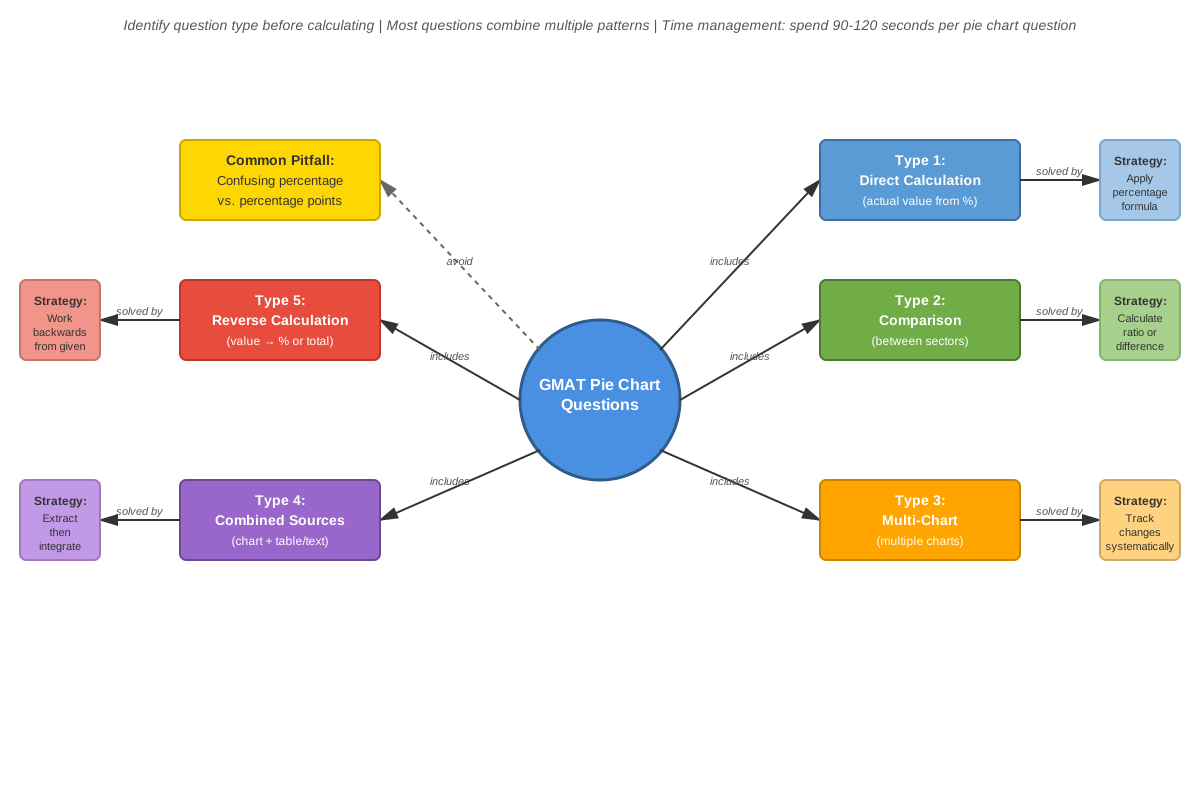
On the GMAT, pie chart questions typically appear in three formats: Graphics Interpretation questions that require filling in blanks with calculated values or comparative statements, Multi-Source Reasoning questions where pie charts must be analyzed alongside text and tables, and Table Analysis questions where sorting and filtering complement visual data. The exam frequently tests whether students can work backward from percentages to find totals, compare proportions across different pie charts representing different time periods or populations, and identify which statements must be true based on the visual data.
Common question patterns include calculating the actual number of items in a category when given only percentages, determining what percentage one category represents relative to another specific category (rather than the whole), finding the combined percentage of multiple categories, and comparing the same category across different pie charts. The GMAT also tests whether students can recognize when insufficient information prevents a definitive answer—a critical reasoning skill that separates high scorers from average performers.
Core Concepts
Structure and Components of Pie Charts
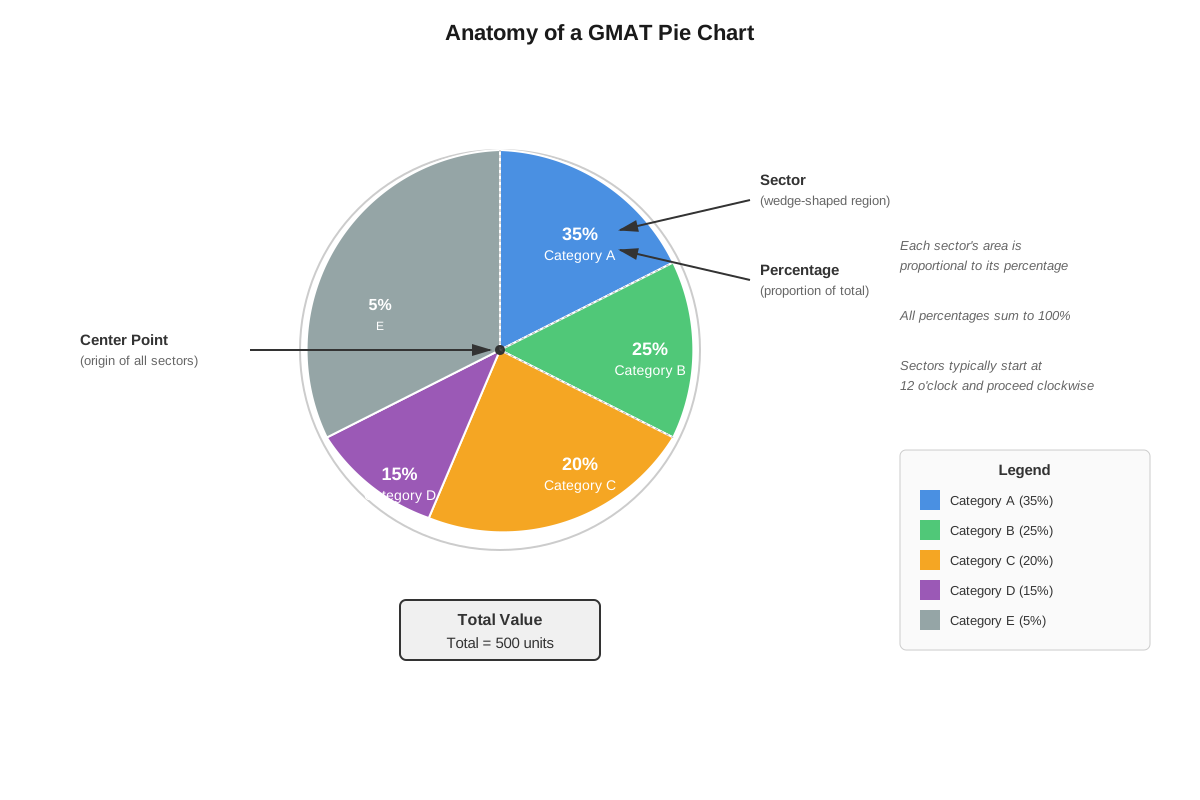
A pie chart (also called a circle graph) consists of a circle divided into sectors, where each sector represents a category or component of the whole dataset. The entire circle represents 100% of the data, and each sector's central angle is proportional to the percentage it represents. Since a circle contains 360 degrees, a sector representing 25% of the data would have a central angle of 90 degrees (25% × 360° = 90°).
The key components include:
- Sectors (or slices): The wedge-shaped divisions representing individual categories
- Labels: Text identifying what each sector represents
- Percentages or values: Numerical information showing the proportion of each category
- Legend: A key explaining colors or patterns when labels aren't directly on sectors
- Title: Descriptive text indicating what the entire pie chart represents
Reading and Interpreting Percentages
The most fundamental skill for GMAT pie charts is extracting percentage information accurately. Percentages may be displayed directly on the chart, in a legend, or may need to be calculated from the visual proportions. When percentages are provided, they should always sum to 100% (or very close, with minor rounding differences).
To verify understanding:
- Confirm all percentages sum to 100%
- Identify the largest and smallest sectors visually
- Note any sectors that appear equal in size
- Check whether the chart shows percentages, absolute values, or both
Converting Between Percentages and Absolute Values
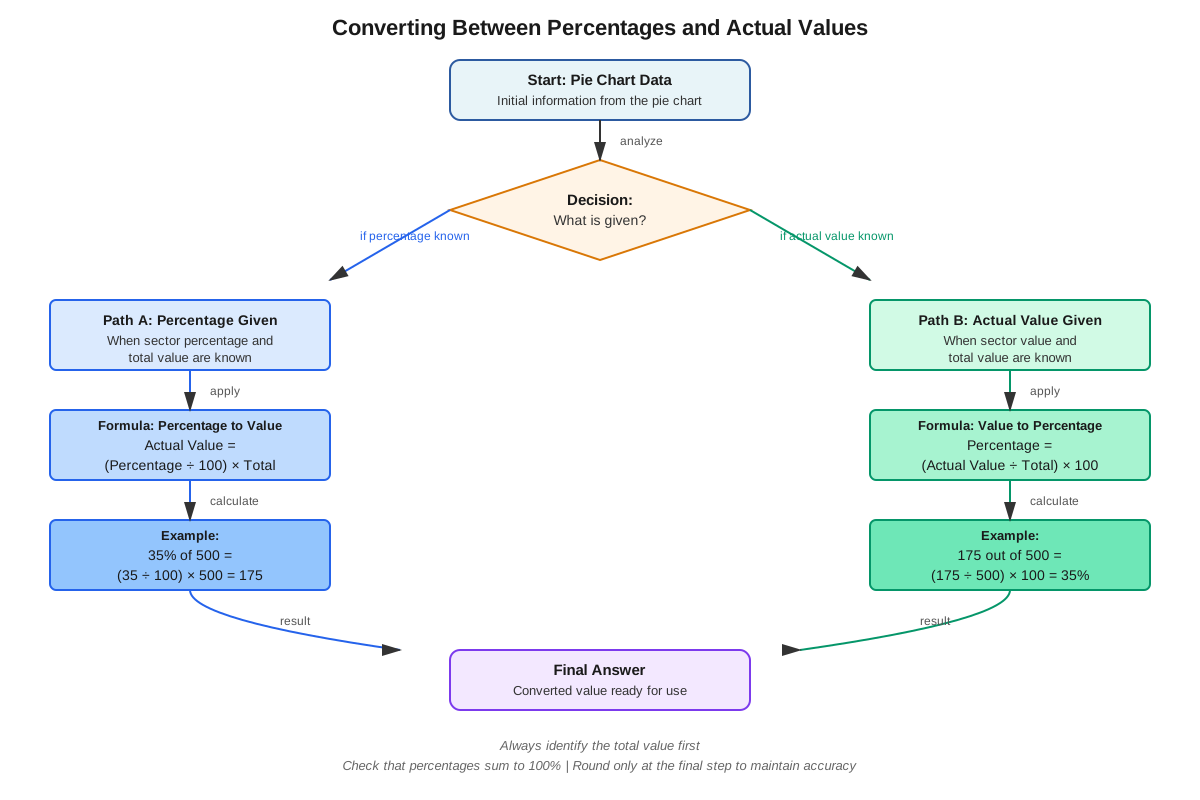
The GMAT frequently requires converting between percentage representations and actual quantities. This conversion requires knowing the total value represented by the entire pie chart.
Formula for finding absolute value from percentage:
Absolute Value = (Percentage ÷ 100) × TotalFormula for finding percentage from absolute value:
Percentage = (Part ÷ Total) × 100Formula for finding total from one category's data:
Total = Absolute Value ÷ (Percentage ÷ 100)For example, if a pie chart shows that Marketing represents 15% of a company's budget, and the total budget is $2,000,000, then Marketing's budget equals (15 ÷ 100) × $2,000,000 = $300,000.
Comparing Sectors Within a Single Pie Chart
Questions often ask about relationships between different sectors within the same pie chart. Common comparison types include:
- Ratio comparisons: "Category A is how many times larger than Category B?"
- Difference calculations: "How many more units are in Category X than Category Y?"
- Combined categories: "What percentage do Categories P, Q, and R represent together?"
- Relative percentages: "Category M represents what percentage of the combined total of Categories M and N?"
For relative percentage calculations, use this approach:
Relative Percentage = (Category Value ÷ Sum of Relevant Categories) × 100Analyzing Multiple Pie Charts
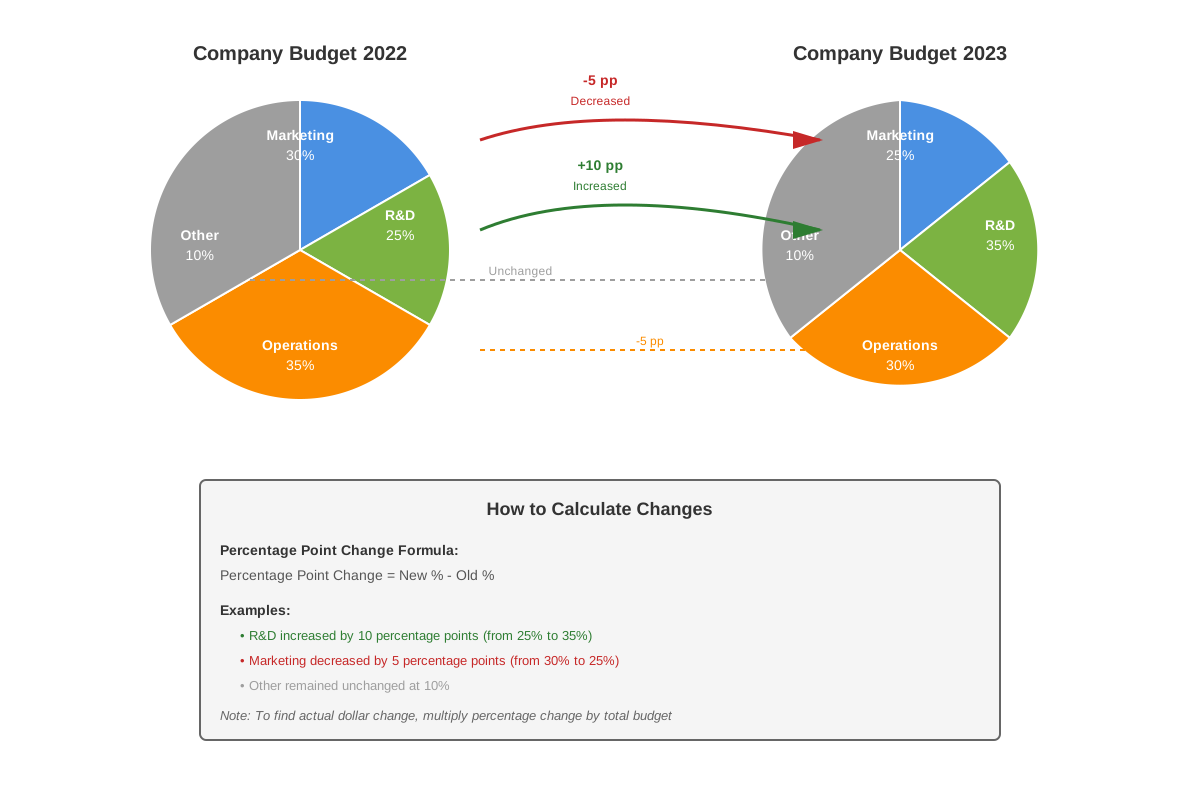
Advanced GMAT questions present two or more pie charts representing different populations, time periods, or conditions. These questions test the ability to:
- Compare the same category across different charts
- Calculate absolute changes when totals differ between charts
- Identify trends or patterns across time periods
- Determine which categories increased or decreased in both percentage and absolute terms
| Comparison Type | What to Calculate | Common Pitfall |
|---|---|---|
| Same category, different totals | Absolute values for both, then compare | Comparing percentages directly when totals differ |
| Percentage change over time | New % minus Old %, not percentage point change in absolute values | Confusing percentage point change with percent change |
| Largest absolute increase | Calculate absolute values for all categories in both periods | Assuming largest percentage increase = largest absolute increase |
| Combined analysis | Multiple calculations with intermediate steps | Calculation errors from rushing |
Working with Unlabeled or Partially Labeled Charts
Some GMAT pie charts deliberately omit certain percentages or labels, requiring students to calculate missing information. Strategies include:
- Use the 100% rule: All sectors must sum to 100%, so subtract known percentages from 100% to find missing values
- Visual estimation: If a sector appears to be approximately one-quarter of the circle, it represents roughly 25%
- Proportional reasoning: If one sector is clearly twice the size of another, their percentages have a 2:1 ratio
- Process of elimination: Use answer choices to work backward when direct calculation is complex
Sector Angle Calculations
Though less common, some questions reference the central angles of pie chart sectors. Remember that the entire circle contains 360 degrees, so:
Sector Angle = (Percentage ÷ 100) × 360°Conversely:
Percentage = (Sector Angle ÷ 360°) × 100A sector with a 72-degree central angle represents 72 ÷ 360 = 0.2 = 20% of the total.
Concept Relationships
The concepts within pie chart analysis build upon each other in a logical progression. Reading percentages forms the foundation → which enables converting to absolute values → which allows comparing sectors within a chart → which extends to analyzing multiple charts → culminating in complex multi-step problems that integrate all previous skills.
Pie charts connect directly to prerequisite knowledge of percentage calculations, as every pie chart problem involves working with percentages in some form. The ratio and proportion concepts underpin comparisons between sectors, while fraction-decimal-percentage conversions enable flexible movement between different numerical representations of the same data.
Within the broader Data Insights curriculum, pie charts relate closely to bar graphs (both show categorical data but in different formats), tables (pie charts often appear alongside tables that provide the absolute values), and percentage problems (pie charts are visual representations of percentage distributions). Mastering pie charts also builds skills for multi-source reasoning, where information must be synthesized from multiple visual and textual sources.
The relationship map flows as follows:
Basic percentage skills → Pie chart reading → Single-chart calculations → Multi-chart comparisons → Integrated data analysis → Complex Graphics Interpretation questions
High-Yield Facts
⭐ All sectors in a pie chart must sum to exactly 100% (or 360 degrees), allowing calculation of unlabeled sectors by subtraction
⭐ To find an absolute value from a percentage, multiply the percentage (as a decimal) by the total: Value = (% ÷ 100) × Total
⭐ When comparing the same category across two pie charts with different totals, always calculate absolute values before comparing—percentages alone can be misleading
⭐ The largest sector by percentage is not necessarily the largest by absolute value when comparing across pie charts with different totals
⭐ To find what percentage Category A represents of Category B (not the whole), divide A by B and multiply by 100
- A sector representing 25% of a pie chart has a central angle of 90 degrees (25% × 360° = 90°)
- If a pie chart shows percentages but no total, you cannot calculate absolute values without additional information
- When a question asks for a ratio between two sectors, divide their percentages or absolute values directly—no need to involve the total
- Percentage point change (e.g., from 30% to 35% = 5 percentage points) differs from percent change (5/30 = 16.67% increase)
- Visual estimation can quickly eliminate wrong answers: a sector that appears to be about one-third of the circle should be close to 33%
- If two pie charts represent different years and a category's percentage stays the same but the total increased, that category's absolute value also increased
- Combined categories: simply add their percentages when they're from the same pie chart
Quick check — test yourself on Pie charts so far.
Try Flashcards →Common Misconceptions
Misconception: When comparing a category across two pie charts, if the percentage increased, the absolute value must have increased too.
Correction: The absolute value depends on both the percentage AND the total. If the total decreased significantly, a category could have a higher percentage but lower absolute value. Always calculate absolute values: Value = (% ÷ 100) × Total for each chart before comparing.
Misconception: To find how much larger Category A is than Category B, subtract their percentages.
Correction: Subtracting percentages gives the percentage point difference, not the multiplicative relationship. To find "how many times larger," divide the values: A ÷ B. To find "how much more," subtract absolute values after calculating them from percentages.
Misconception: If a pie chart sector looks like it's about 25% of the circle, that's accurate enough for GMAT calculations.
Correction: Visual estimation is useful for eliminating obviously wrong answers, but the GMAT requires precise calculations using the exact percentages provided. Never rely solely on visual approximation for final answers.
Misconception: All pie charts show percentages, so you can always determine exact values.
Correction: Pie charts show proportions, which may be labeled as percentages, fractions, or left unlabeled. Without knowing the total quantity represented by the entire pie, you cannot calculate absolute values—only relative proportions and ratios.
Misconception: When a question asks "Category X represents what percent of Category Y," divide X's percentage by Y's percentage.
Correction: This asks for X as a percentage of Y specifically (not the whole pie). Calculate: (X's absolute value ÷ Y's absolute value) × 100, or equivalently, (X's % ÷ Y's %) × 100. This gives a percentage that may exceed 100% if X is larger than Y.
Misconception: If two sectors appear equal in size, they represent exactly the same percentage.
Correction: Visual appearance can be deceiving, especially with 3D pie charts or unusual color schemes. Always rely on the numerical labels provided rather than visual assessment alone.
Worked Examples
Example 1: Single Pie Chart with Absolute Value Calculation
Question: A company's annual revenue of $8,000,000 is distributed across five product lines as shown in the pie chart below. Product A represents 28%, Product B represents 22%, Product C represents 18%, Product D represents 17%, and Product E represents the remainder. How much revenue does Product E generate, and what is the ratio of Product A's revenue to Product E's revenue?
Solution:
Step 1: Find Product E's percentage.
All sectors must sum to 100%:
Product E = 100% - (28% + 22% + 18% + 17%)
Product E = 100% - 85% = 15%
Step 2: Calculate Product E's absolute revenue.
Product E revenue = (15 ÷ 100) × $8,000,000
Product E revenue = 0.15 × $8,000,000 = $1,200,000
Step 3: Calculate Product A's absolute revenue.
Product A revenue = (28 ÷ 100) × $8,000,000
Product A revenue = 0.28 × $8,000,000 = $2,240,000
Step 4: Find the ratio of Product A to Product E.
Ratio = Product A ÷ Product E = $2,240,000 ÷ $1,200,000
Ratio = 2,240 ÷ 1,200 = 224 ÷ 120 = 28 ÷ 15
Alternatively, using percentages directly:
Ratio = 28% ÷ 15% = 28/15 ≈ 1.87
Answer: Product E generates $1,200,000 in revenue, and Product A's revenue is 28/15 times (or approximately 1.87 times) Product E's revenue.
Connection to Learning Objectives: This example demonstrates identifying pie chart components, explaining percentage relationships, and applying calculation skills to find both absolute values and ratios.
Example 2: Multiple Pie Charts with Different Totals
Question: Two pie charts show the distribution of a company's workforce across four departments in 2020 and 2023. In 2020, the company had 500 employees: Sales 35%, Marketing 25%, Operations 30%, and Administration 10%. In 2023, the company had 650 employees: Sales 32%, Marketing 28%, Operations 26%, and Administration 14%. Which department had the largest absolute increase in employees, and by how many?
Solution:
Step 1: Calculate absolute values for each department in 2020.
- Sales 2020: 0.35 × 500 = 175 employees
- Marketing 2020: 0.25 × 500 = 125 employees
- Operations 2020: 0.30 × 500 = 150 employees
- Administration 2020: 0.10 × 500 = 50 employees
Step 2: Calculate absolute values for each department in 2023.
- Sales 2023: 0.32 × 650 = 208 employees
- Marketing 2023: 0.28 × 650 = 182 employees
- Operations 2023: 0.26 × 650 = 169 employees
- Administration 2023: 0.14 × 650 = 91 employees
Step 3: Calculate absolute changes for each department.
- Sales: 208 - 175 = 33 employees (increase)
- Marketing: 182 - 125 = 57 employees (increase)
- Operations: 169 - 150 = 19 employees (increase)
- Administration: 91 - 50 = 41 employees (increase)
Step 4: Identify the largest absolute increase.
Marketing had the largest increase at 57 employees.
Answer: Marketing had the largest absolute increase in employees, growing by 57 employees.
Key Insight: Notice that Sales had the highest percentage in both years, but Marketing had the largest absolute increase. This demonstrates why comparing percentages alone across different totals can be misleading—absolute values must be calculated.
Connection to Learning Objectives: This example shows how to analyze multiple pie charts, convert percentages to absolute values with different totals, and identify trends that aren't obvious from percentages alone.
Exam Strategy
When approaching GMAT pie charts, follow this systematic process:
- Read the title and labels first: Understand what the entire pie represents (total budget, total population, etc.) and what each sector represents before looking at numbers.
- Identify what's given and what's needed: Note whether percentages, absolute values, or both are provided. Determine whether you need to find a percentage, an absolute value, a ratio, or a comparison.
- Check if the total is provided: This is critical—without the total, you can only work with ratios and relative percentages, not absolute values.
- Verify percentages sum to 100%: This quick check catches errors and helps identify unlabeled sectors.
- Write down key formulas before calculating: For absolute values: Value = (% ÷ 100) × Total. For percentages: % = (Part ÷ Total) × 100.
Exam Tip: When a question involves multiple pie charts, create a quick reference table with rows for each category and columns for each chart's percentages and absolute values. This organization prevents calculation errors.
Trigger words and phrases to watch for:
- "How many times larger" → Calculate a ratio by dividing absolute values
- "How much more/less" → Calculate absolute difference by subtracting values
- "What percent of [specific category]" → This asks for a relative percentage, not percentage of the whole
- "Combined" or "together" → Add the relevant percentages or absolute values
- "Approximately" → Estimation may be acceptable; look for answer choices that are far apart
- "Must be true" → Requires definitive calculation, not estimation
Process-of-elimination strategies:
- Eliminate answers that would require a sector to exceed 100% or be negative
- If comparing across charts with different totals, eliminate answers that assume percentages directly translate to absolute comparisons
- For ratio questions, eliminate answers that don't maintain the proportional relationship visible in the chart
- Use visual estimation to eliminate answers that are wildly inconsistent with sector sizes
Time allocation advice:
Spend 30-45 seconds reading and understanding the pie chart(s) before attempting calculations. For single-chart questions, allocate 90-120 seconds total. For multi-chart questions, allocate 120-150 seconds. If a calculation becomes complex, check whether estimation or working backward from answer choices would be faster.
Memory Techniques
Mnemonic for pie chart problem-solving: "PACT"
- Percentages: Identify all percentages and verify they sum to 100%
- Absolute values: Calculate actual quantities using the total
- Compare: Determine relationships between sectors or across charts
- Test: Verify your answer makes logical sense given the visual representation
Visualization strategy: Picture a pizza cut into slices. The entire pizza is 100% of the food. If someone eats 25% of the pizza, they've eaten one-quarter of it (90 degrees of the 360-degree circle). This concrete image helps maintain the connection between percentages, fractions, and the visual representation.
Acronym for common calculations: "TRAP"
- Total = Part ÷ (Percentage ÷ 100)
- Ratio = Sector A ÷ Sector B
- Absolute = (Percentage ÷ 100) × Total
- Percentage = (Part ÷ Total) × 100
Memory aid for multiple pie charts: "Same category, different pies? Calculate before you compare!" This reminds you that percentages from different pie charts (with different totals) cannot be directly compared—absolute values must be calculated first.
Summary
Pie charts are essential visual tools in GMAT Data Insights that represent proportional relationships through circular sectors, with each sector's size corresponding to its percentage of the whole. Mastery requires three core competencies: accurately reading percentage information from the visual representation, converting between percentages and absolute values using the formula Value = (% ÷ 100) × Total, and comparing sectors both within single charts and across multiple charts with potentially different totals. The GMAT tests these skills through Graphics Interpretation questions requiring precise calculations, Multi-Source Reasoning problems demanding synthesis of visual and textual data, and comparison questions where the relationship between percentage changes and absolute changes must be clearly understood. Success depends on systematic approaches that verify all percentages sum to 100%, calculate absolute values before making comparisons across different totals, and recognize that the largest percentage does not necessarily correspond to the largest absolute value when totals differ. Students must avoid common pitfalls such as comparing percentages directly across charts with different totals, confusing percentage point changes with percent changes, and relying on visual estimation alone for final answers.
Key Takeaways
- Pie charts represent proportional data where all sectors sum to 100% (or 360 degrees), enabling calculation of unlabeled sectors through subtraction
- Converting between percentages and absolute values requires knowing the total: Absolute Value = (% ÷ 100) × Total
- When comparing the same category across multiple pie charts with different totals, always calculate absolute values first—percentage comparisons alone are insufficient and often misleading
- Sector relationships within a single chart can be expressed as ratios (divide the values), differences (subtract absolute values), or relative percentages (divide one sector by another and multiply by 100)
- The GMAT frequently tests whether students recognize when insufficient information prevents definitive answers, particularly when totals are not provided
- Systematic approaches (reading labels, verifying percentages sum to 100%, organizing multi-chart data in tables) prevent calculation errors under time pressure
- Visual estimation is valuable for eliminating obviously incorrect answers but should never replace precise calculations for final answer selection
Related Topics
Bar Graphs and Column Charts: These represent categorical data similar to pie charts but use rectangular bars instead of circular sectors, making absolute value comparisons more visually intuitive. Mastering pie charts provides the percentage calculation foundation needed for bar graph analysis.
Line Graphs: While pie charts show proportions at a single point in time, line graphs show trends over time. Combined questions may present pie charts for specific years alongside line graphs showing overall growth, requiring integration of both visual formats.
Table Analysis: Tables often accompany pie charts in Multi-Source Reasoning questions, providing the absolute values that correspond to pie chart percentages. Skills in converting between formats transfer directly between these question types.
Percentage Problems: All pie chart questions are fundamentally percentage problems presented visually. Advanced percentage concepts like percentage change, percentage point difference, and compound percentages build on pie chart foundations.
Ratio and Proportion: Comparing sectors within pie charts or across multiple charts involves ratio reasoning. Mastering pie charts strengthens proportional thinking applicable throughout GMAT Quantitative and Data Insights sections.
Practice CTA
Now that you've mastered the core concepts of pie chart interpretation, it's time to solidify your understanding through active practice. Attempt the practice questions associated with this topic, focusing on applying the systematic approaches outlined in the Exam Strategy section. Use the flashcards to reinforce quick recall of key formulas and common pitfall corrections. Remember that pie charts appear in approximately 15-20% of Data Insights questions—your investment in mastering this high-yield topic will pay dividends on test day. Approach each practice problem methodically, verify your percentages sum to 100%, and always calculate absolute values before comparing across different totals. With consistent practice, you'll develop the speed and accuracy needed to confidently tackle any pie chart question the GMAT presents!
Sign up free to keep reading
Create a free AnvayaPrep account to finish this GMAT guide on Pie charts — plus flashcards and practice questions.