Overview
Data tables are one of the most frequently tested formats for presenting statistical information on the ACT Math test. These visual representations organize numerical information into rows and columns, allowing students to extract, compare, and analyze data efficiently. On the ACT, data tables appear in approximately 10-15% of all math questions, making them a high-yield topic that directly impacts your score. Mastering data table interpretation is not merely about reading numbers—it requires understanding relationships between variables, performing calculations across multiple data points, and recognizing patterns within structured information.
The ACT uses data tables to test multiple mathematical competencies simultaneously. A single question might require you to locate specific values, calculate percentages, determine ratios, identify trends, or combine information from different parts of the table. These questions assess your ability to work efficiently under time pressure while maintaining accuracy. Unlike pure computation problems, ACT data tables emphasize analytical thinking and data literacy—skills that extend beyond the exam into college coursework and professional contexts.
Data tables connect to virtually every area of ACT Math, including algebra (solving for unknowns using table values), geometry (calculating areas or volumes from dimensional data), and particularly statistics and probability (analyzing distributions, calculating means, and determining probabilities). Understanding how to navigate data tables efficiently creates a foundation for success across the entire mathematics section, as these organizational structures appear in contexts ranging from simple frequency distributions to complex multi-variable comparisons.
Learning Objectives
- [ ] Identify when Data tables is being tested in ACT Math questions
- [ ] Explain the core rule or strategy behind Data tables interpretation and analysis
- [ ] Apply Data tables skills to ACT-style questions accurately and efficiently
- [ ] Extract specific values from multi-row, multi-column tables without error
- [ ] Perform calculations using multiple data points from different table locations
- [ ] Recognize and interpret different table formats (frequency tables, two-way tables, summary statistics tables)
- [ ] Identify trends, patterns, and relationships within tabulated data
Prerequisites
- Basic arithmetic operations: Addition, subtraction, multiplication, and division are essential for performing calculations with table values
- Fraction and percentage conversions: Many data table questions require converting between these formats to find proportions or parts of a whole
- Understanding of variables: Tables organize data by categories or variables, requiring recognition of what each row and column represents
- Reading comprehension: Interpreting table headers, labels, and units is fundamental to extracting correct information
Why This Topic Matters
Data tables represent how information is organized in virtually every academic discipline and professional field. Scientists record experimental results in tables, businesses track financial data in spreadsheets, and researchers present survey findings in tabular format. The ability to quickly extract relevant information from structured data is a fundamental literacy skill in the modern world.
On the ACT Math test, data table questions appear with remarkable consistency. Approximately 6-9 questions per test involve interpreting information from tables, charts, or graphs, with pure data tables accounting for roughly 3-5 of these questions. These questions typically appear in the middle-to-later portions of the test (questions 20-50), though they can occur anywhere. The ACT favors data tables because they efficiently test multiple skills: reading comprehension, numerical reasoning, calculation accuracy, and analytical thinking.
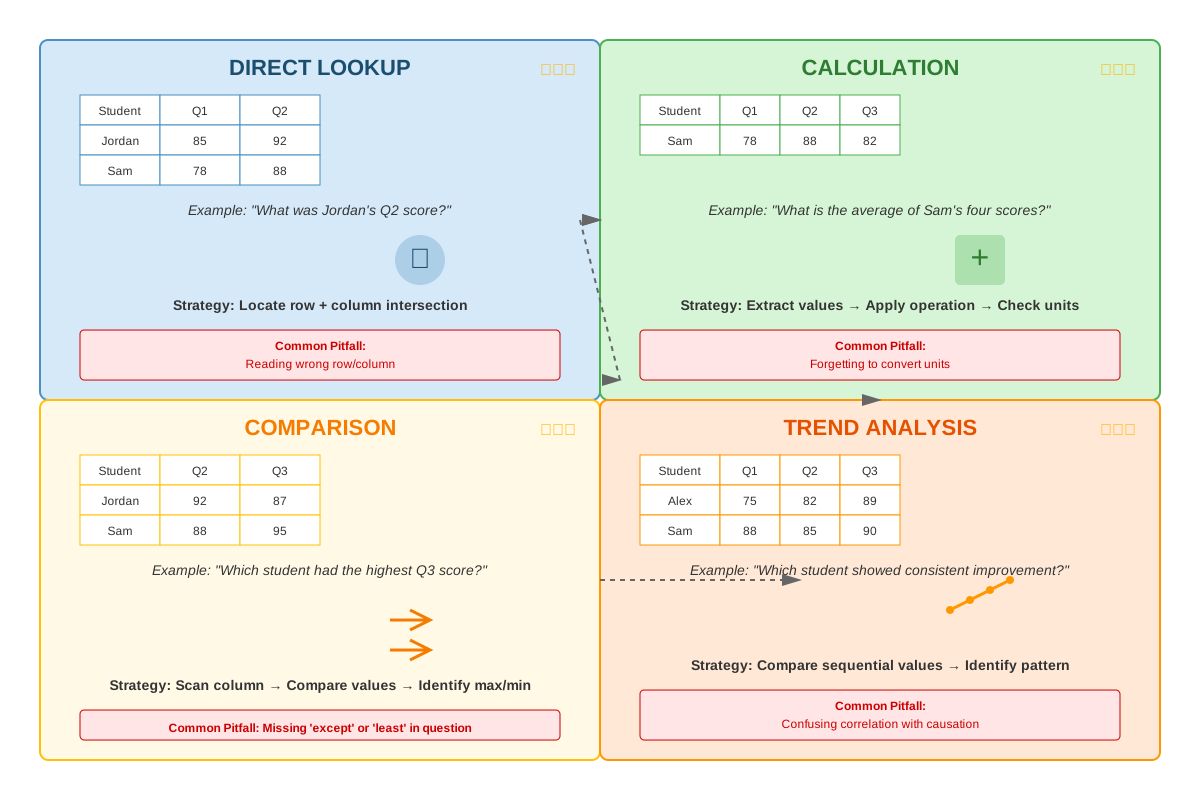
Common question types include: finding specific values within tables, calculating sums or differences across rows or columns, determining percentages or proportions, comparing values between categories, identifying maximum or minimum values, and using table data to solve algebraic equations. Two-way tables (also called contingency tables) frequently appear in probability questions, while summary statistics tables present means, medians, or other calculated values. The ACT also tests your ability to recognize when information is NOT present in a table, requiring you to determine what can and cannot be concluded from the given data.
Core Concepts
Structure and Components of Data Tables
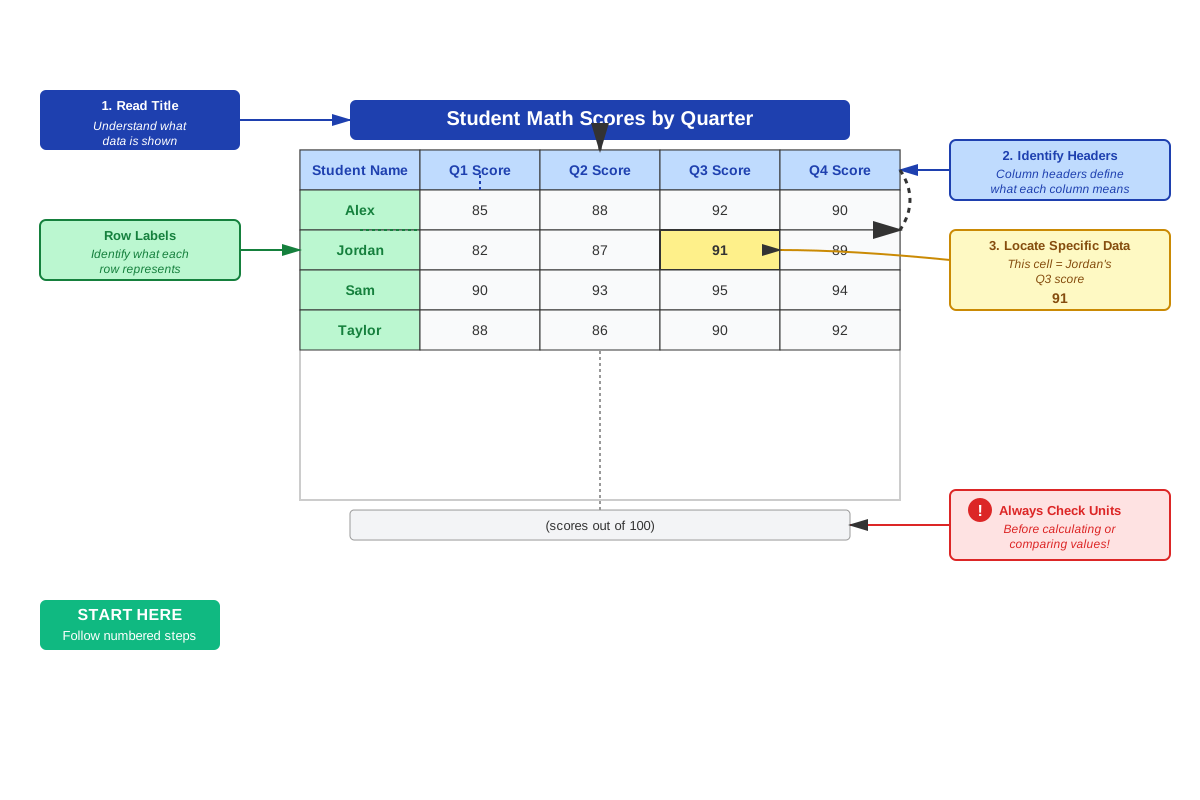
A data table is a systematic arrangement of information in rows and columns, where each cell contains a specific data point. The fundamental structure includes several key components that must be identified before attempting any calculations. The table title or caption describes what information the table contains. Column headers (at the top) and row headers (typically on the left) identify the categories or variables being compared. The data cells contain the actual numerical values or categorical information.
Understanding the units of measurement is critical. Tables may present data in dollars, percentages, thousands of people, or any other unit. Misreading units is one of the most common errors on ACT data table questions. Always check whether values are given in actual numbers or scaled (e.g., "in thousands" or "in millions"). Some tables include a total row or total column that sums values across categories, which can be used to verify calculations or find missing information.
Types of Data Tables on the ACT
Frequency tables display how often different values or categories occur in a dataset. These tables typically have two columns: one listing the categories or values, and another showing the frequency (count) of each. For example, a frequency table might show how many students scored in different grade ranges on a test. These tables are fundamental for calculating totals, finding modes, and determining probabilities.
Two-way tables (also called contingency tables or cross-tabulation tables) organize data by two categorical variables simultaneously. These tables have rows representing one variable and columns representing another, with cells showing the count or frequency for each combination. Two-way tables are particularly important for probability questions, as they allow calculation of conditional probabilities and joint probabilities. For instance, a two-way table might show the number of students categorized by both grade level (rows) and favorite subject (columns).
Summary statistics tables present calculated values rather than raw data. These might include means, medians, ranges, standard deviations, or other statistical measures for different groups or time periods. The ACT uses these tables to test whether students can interpret pre-calculated statistics and use them in further computations.
Comparison tables present the same type of measurement across different categories, time periods, or conditions. These tables facilitate direct comparison and often require calculating differences, ratios, or percentage changes between values.
Reading and Extracting Information
The systematic approach to reading data tables begins with orientation. First, read the table title and all headers to understand what information is being presented. Identify what each row represents and what each column represents. Note any units, scales, or special formatting. This orientation phase prevents the most common error: looking up values in the wrong row or column.
When a question asks for a specific value, use your finger or pencil to trace from the appropriate row header across and from the appropriate column header down until they intersect. This physical tracking reduces errors, especially in larger tables. Always verify you're reading from the correct cell before performing any calculations.
For questions requiring multiple values, mark or write down each value as you extract it. Don't try to hold multiple numbers in your head while searching for others. This systematic extraction prevents confusion and allows you to verify your work if time permits.
Performing Calculations with Table Data
Addition and subtraction across rows or columns are common operations. To find a total, sum all values in the relevant row or column. To find a difference, subtract one value from another. Always double-check that you're combining values that make logical sense—adding values from different categories may not be meaningful.
Percentage calculations frequently appear in data table questions. To find what percentage one value is of another, divide the part by the whole and multiply by 100. For example, if a table shows 45 students chose pizza and 180 total students were surveyed, pizza represents (45 ÷ 180) × 100 = 25% of responses.
Ratio and proportion questions require comparing two values from the table. Express the ratio in simplest form by dividing both numbers by their greatest common factor. For proportions, set up an equation with the known ratio equal to an unknown ratio and solve.
Average (mean) calculations may require you to sum values from a table and divide by the count. Be careful to identify whether you're finding the average of values in a row, column, or the entire table.
Identifying Patterns and Trends
Beyond extracting individual values, the ACT tests your ability to recognize patterns within data tables. Increasing or decreasing trends occur when values consistently rise or fall across rows or columns. For example, a table showing sales data across months might demonstrate seasonal patterns.
Maximum and minimum values questions ask you to identify the largest or smallest value in a row, column, or entire table. Scan systematically rather than jumping around randomly to ensure you don't miss the true extreme value.
Comparison questions require determining which category has more or less of something, or by how much categories differ. These questions test your ability to perform mental math quickly or to recognize relative magnitudes without detailed calculation.
Working with Missing or Implied Information
Some ACT questions require you to determine values not explicitly stated in the table. If a table provides subtotals and a grand total, you can find a missing subtotal by subtracting the known subtotals from the grand total. Similarly, if you know the total and all but one component, you can find the missing component through subtraction.
Implied relationships exist when the table structure suggests connections between values. For instance, if a table shows "Male," "Female," and "Total" columns, you know that Male + Female = Total for each row, even if not explicitly stated.
Concept Relationships
The concepts within data table interpretation form a hierarchical relationship. Table structure understanding (identifying headers, units, and organization) serves as the foundation for all other skills. This foundational knowledge enables accurate information extraction, which in turn allows for performing calculations with the extracted data. These calculations support pattern recognition and trend analysis, the highest-level skill that demonstrates true data literacy.
Data tables connect directly to prerequisite topics: arithmetic operations provide the computational tools needed for table calculations, fractions and percentages enable proportion-based questions, and variable understanding helps interpret what each row and column represents. The relationship flows as: Prerequisites → Table Reading → Data Extraction → Calculation → Analysis.
Within the broader Statistics and Probability unit, data tables serve as the organizational structure for presenting information used in other topics. Measures of central tendency (mean, median, mode) are often presented in table format. Probability calculations frequently use two-way tables to organize outcomes. Data interpretation questions across all formats (tables, charts, graphs) share common analytical skills. The relationship map shows: Data Tables → organize information for → Statistical Calculations → which inform → Probability Determinations → leading to → Data-Based Conclusions.
High-Yield Facts
⭐ Data tables on the ACT typically appear in 3-5 questions per test, making them one of the most frequently tested data representation formats
⭐ Always read the table title and all headers before attempting to extract any values—misidentifying what rows and columns represent is the most common error
⭐ Check units carefully; tables may present values in thousands, millions, percentages, or other scaled formats that affect calculations
⭐ Two-way tables (contingency tables) are the preferred format for ACT probability questions involving two categorical variables
⭐ When calculating percentages from table data, identify the correct "whole" or denominator—this is often a total row or column value
- The intersection of a specific row and column is called a cell, and each cell contains one data point
- Frequency tables show how many times each value or category appears in a dataset
- Summary statistics tables present pre-calculated values (means, medians, etc.) rather than raw data
- If a table includes a total row or column, you can find missing values by subtraction
- Comparison questions require identifying which category has the maximum or minimum value, or calculating differences between categories
- Some questions test whether you can recognize what information is NOT available in the table
- Tables may combine numerical data with categorical labels, requiring both quantitative and qualitative interpretation
- Time-series tables show how values change over time periods (years, months, quarters)
- The ACT may present tables with more information than needed for a specific question, testing your ability to identify relevant data
- Percentage change calculations require finding the difference between two values and dividing by the original value
Quick check — test yourself on Data tables so far.
Try Flashcards →Common Misconceptions
Misconception: All values in a data table can be directly added together to find meaningful totals → Correction: Only values from the same category or measurement type should be combined. Adding values from different categories (like adding "number of students" to "average test score") produces meaningless results. Always verify that the mathematical operation makes logical sense for the data being combined.
Misconception: The largest number in a table is always the answer when a question asks for "the most" → Correction: Questions asking for "the most" may require calculations or comparisons rather than simply identifying the largest visible number. For example, "which category had the most growth" requires calculating the change for each category, not just finding the largest current value.
Misconception: Percentages in a table can be added directly to find a total percentage → Correction: Percentages represent proportions of potentially different wholes, so adding them directly is usually incorrect. To find a combined percentage, you must work with the underlying counts or values, then calculate the percentage of the combined total.
Misconception: If a table shows data for several years, the values must be increasing or decreasing consistently → Correction: Data can fluctuate irregularly without following a consistent trend. Don't assume patterns that aren't explicitly shown in the values. Each data point must be evaluated individually unless the question specifically asks about overall trends.
Misconception: Empty cells in a table mean the value is zero → Correction: Empty cells may indicate missing data, inapplicable categories, or data not collected, rather than zero. A zero would typically be explicitly written as "0" in the cell. The distinction matters for calculations—missing data should not be included in averages or sums.
Misconception: The order of rows or columns in a table indicates importance or magnitude → Correction: Tables may organize information alphabetically, chronologically, or in any arbitrary order. Don't assume that the first row or column represents the highest or most important value unless the table is explicitly labeled as being sorted by magnitude.
Worked Examples
Example 1: Two-Way Table with Percentage Calculation
Question: The table below shows the number of students in a school who participate in sports and music programs.
| Participates in Music | Does Not Participate in Music | Total | |
|---|---|---|---|
| Participates in Sports | 45 | 78 | 123 |
| Does Not Participate in Sports | 62 | 95 | 157 |
| Total | 107 | 173 | 280 |
What percentage of students who participate in sports also participate in music?
Solution:
Step 1: Identify what the question is asking. We need the percentage of sports participants who also do music, not the percentage of all students.
Step 2: Identify the relevant values. Students who participate in sports = 123 (total from the first row). Students who participate in both sports AND music = 45 (intersection of first row and first column).
Step 3: Set up the percentage calculation. We want to know what percentage 45 is of 123.
Percentage = (Part ÷ Whole) × 100
Percentage = (45 ÷ 123) × 100
Step 4: Perform the calculation.
45 ÷ 123 ≈ 0.3659
0.3659 × 100 ≈ 36.59%
Step 5: Round appropriately. The answer is approximately 36.6% or 37% depending on the answer choices provided.
Key Learning Point: This problem demonstrates the importance of identifying the correct denominator. The question asks about students who participate in sports (123), not all students (280). Using 280 as the denominator would be incorrect because it changes the reference group.
Example 2: Finding Missing Values and Making Comparisons
Question: The table below shows the number of books sold by a bookstore during four months.
| Month | Fiction | Non-Fiction | Children's | Total |
|---|---|---|---|---|
| January | 234 | 156 | 89 | 479 |
| February | 198 | 142 | 76 | 416 |
| March | 267 | 189 | ? | 548 |
| April | 245 | 178 | 94 | 517 |
How many more Children's books were sold in January than in March?
Solution:
Step 1: Recognize that we need to find the missing value for March Children's books before we can answer the question.
Step 2: Use the total row information. For March: Fiction + Non-Fiction + Children's = Total
267 + 189 + Children's = 548
Step 3: Solve for the missing value.
456 + Children's = 548
Children's = 548 - 456
Children's = 92
Step 4: Now answer the actual question. Compare January Children's books (89) to March Children's books (92).
Step 5: Calculate the difference. The question asks how many MORE were sold in January than March, so we compute:
January - March = 89 - 92 = -3
Step 6: Interpret the result. The negative value indicates that actually FEWER Children's books were sold in January than in March. The correct answer is that 3 MORE Children's books were sold in March than in January, or that January sold 3 FEWER than March.
Key Learning Point: This problem tests multiple skills: finding missing values using totals, performing subtraction comparisons, and carefully reading the question. The phrase "how many more in January than March" requires January - March. If the result is negative, it means the premise of the question is false, and you must interpret accordingly. Always read answer choices carefully—they may be phrased to account for this reversal.
Exam Strategy
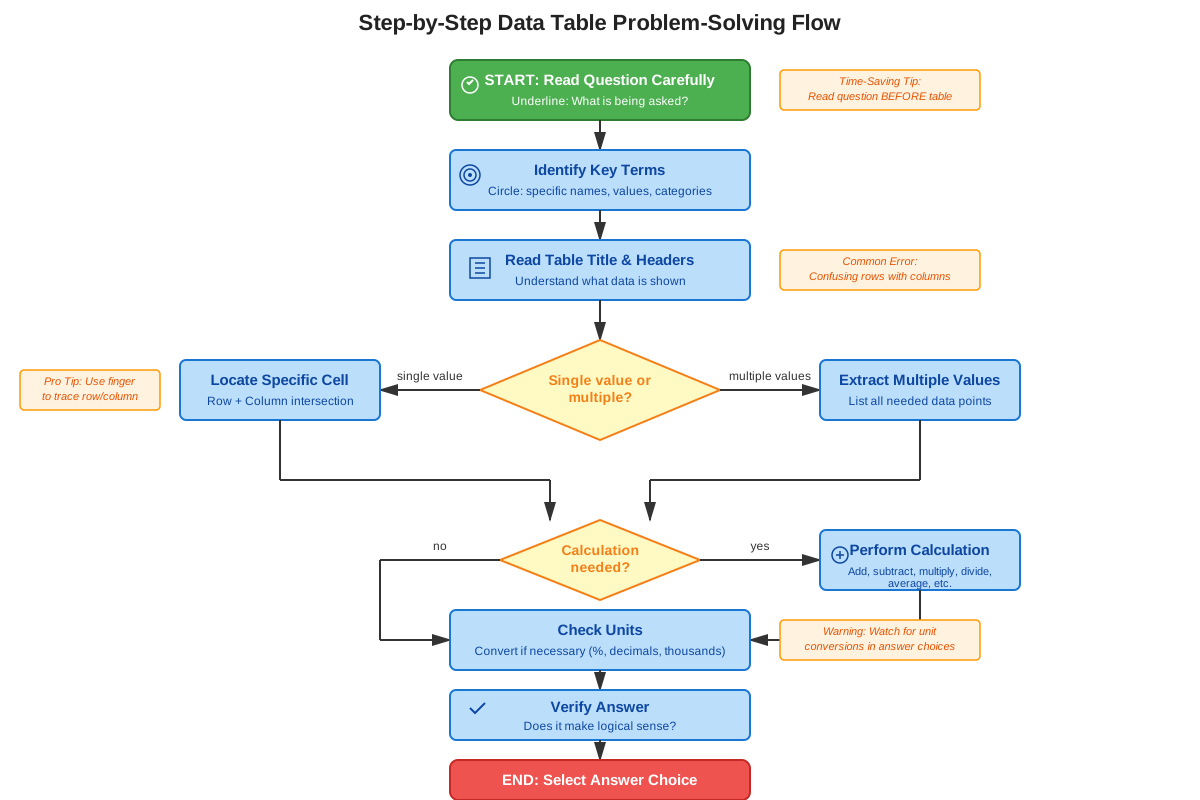
When approaching ACT data table questions, begin with a systematic orientation process. Spend 5-10 seconds reading the table title, all headers, and noting units before reading the question. This upfront investment prevents errors and often makes the question easier to understand. Many students rush directly to the question and waste time searching for information they haven't properly organized.
Trigger words and phrases that indicate data table questions include: "according to the table," "based on the information in the table," "the table shows," "how many," "what percentage," "which category," and "what is the total." When you see these phrases, immediately locate the relevant table and orient yourself to its structure.
Use physical tracking to prevent errors. Place your pencil or finger on the row header and trace across, then place it on the column header and trace down. Mark the intersection point before reading the value. This technique is especially valuable in larger tables where visual tracking alone may lead to reading from an adjacent cell.
For multi-step problems, write down intermediate values rather than trying to hold them in memory. If you need to add three values from different parts of the table, extract and write all three before performing the addition. This approach reduces cognitive load and creates a record you can check if your answer doesn't match the choices.
Process of elimination works effectively with data table questions. If a question asks for a percentage and one answer choice is greater than 100%, eliminate it immediately (unless the context specifically allows for percentages over 100%, such as percentage increase). If you're finding a count of people and one answer is a decimal, eliminate it. Use logical constraints to narrow choices before calculating.
Time allocation for data table questions should be approximately 45-60 seconds per question. Simple extraction questions (finding a single value) should take 30-40 seconds. Questions requiring calculations or multiple steps may take 60-90 seconds. If a question requires more than 90 seconds, mark it and return later—you may be overcomplicating the approach.
When answer choices are close together, double-check your calculation and verify you're using the correct values from the table. Close answer choices often include common errors (using the wrong row, forgetting to convert units, or using an incorrect denominator for percentages).
Memory Techniques
RUTH - Read, Understand, Track, Handle
- Read the title and all headers first
- Understand what each row and column represents
- Track with your finger or pencil to the correct cell
- Handle the calculation carefully with the extracted values
"Headers Before Numbers" - Always identify what the headers say before looking at any numerical values. This prevents the common error of grabbing numbers without understanding what they represent.
The Intersection Rule - Visualize finding a value in a table as finding the intersection of two streets. You need both the "street name" (row header) and the "avenue name" (column header) to locate the correct address (cell value).
"Part Over Whole Times 100" - For percentage calculations from tables, remember this phrase. The "part" is the specific value you're interested in, the "whole" is the total or reference value, and multiplying by 100 converts the decimal to a percentage.
Two-Way Table Probability Mnemonic: "Row-Column-Total" - For probability questions with two-way tables, remember you need three pieces: which row, which column, and which total (row total, column total, or grand total) serves as your denominator.
Summary
Data tables are systematic arrangements of information in rows and columns that appear frequently on the ACT Math test, accounting for 3-5 questions per exam. Mastering data tables requires understanding their structure (titles, headers, cells, units), accurately extracting specific values, performing calculations with multiple data points, and recognizing patterns or trends within the data. The most critical skills include identifying what each row and column represents, using physical tracking to locate correct cells, checking units and scales before calculating, and determining the appropriate denominator for percentage calculations. Two-way tables are particularly important for probability questions, while summary statistics tables present pre-calculated values that must be interpreted and used in further computations. Success with data table questions depends on systematic orientation before attempting calculations, careful attention to what the question actually asks, and verification that mathematical operations make logical sense for the data being combined. Common errors include misreading units, using incorrect denominators for percentages, adding incompatible values, and confusing which total to use as a reference point. By developing a consistent approach—reading headers first, tracking carefully to cells, extracting values before calculating, and double-checking that operations are logically appropriate—students can achieve high accuracy on this frequently tested and high-yield topic.
Key Takeaways
- Data tables appear in 3-5 questions per ACT Math test, making them a high-frequency, high-yield topic worth mastering thoroughly
- Always read the table title, all headers, and units before attempting to extract any values or perform calculations
- Use physical tracking (finger or pencil) to trace from row headers and column headers to the correct cell intersection, preventing the most common error of reading from the wrong location
- Two-way tables (contingency tables) are the standard format for ACT probability questions involving two categorical variables
- When calculating percentages from table data, carefully identify the correct denominator—it should be the total of the relevant category, not necessarily the grand total
- Missing values in tables can often be found by using totals: subtract known values from the total to find the unknown value
- Not all values in a table should be added together—only combine values that represent the same type of measurement or category
Related Topics
Measures of Central Tendency - After mastering data tables, students should study how to calculate and interpret means, medians, and modes, which are often presented in table format or calculated from table data.
Two-Way Frequency Tables and Probability - This advanced topic builds directly on data table skills, using contingency tables to calculate conditional probabilities and joint probabilities.
Data Interpretation from Charts and Graphs - The skills developed with data tables transfer to interpreting bar graphs, line graphs, pie charts, and scatter plots, all of which organize information visually.
Percentage and Proportion Problems - Many data table questions require percentage calculations, making this a natural extension topic that deepens computational skills.
Statistical Analysis and Distributions - Understanding how data tables organize information prepares students for more advanced statistical concepts including standard deviation, quartiles, and distribution shapes.
Practice CTA
Now that you've mastered the core concepts of data tables, it's time to put your knowledge into action! Complete the practice questions to reinforce your understanding and build the speed and accuracy needed for test day. Each practice problem has been carefully designed to mirror actual ACT question types and difficulty levels. Work through the flashcards to cement the key facts and strategies in your memory. Remember, data table questions are highly predictable—with focused practice, you can achieve near-perfect accuracy on this high-yield topic. Your investment in mastering data tables will pay dividends across multiple questions on test day!
Sign up free to keep reading
Create a free AnvayaPrep account to finish this ACT guide on Data tables — plus flashcards and practice questions.