Overview
Probability from data is a critical component of the SAT Math section that tests students' ability to calculate probabilities based on information presented in tables, charts, graphs, and data sets. Unlike theoretical probability questions that rely on abstract scenarios, these problems require students to extract relevant information from real-world data representations and apply probability principles to determine the likelihood of specific outcomes. This topic bridges statistical reasoning with probability concepts, making it one of the most practical and frequently tested areas on the exam.
Understanding how to work with probability from data is essential for SAT success because these questions appear consistently across multiple test administrations, typically comprising 2-4 questions per exam. The College Board emphasizes data literacy as a core competency, and sat probability from data questions assess whether students can interpret information accurately and perform calculations efficiently under time pressure. These problems often appear in the Problem Solving and Data Analysis domain, which accounts for approximately 29% of the SAT math section.
Mastering this topic connects directly to broader mathematical concepts including ratios, proportions, percentages, and data interpretation. Students who excel at probability from data questions demonstrate not only computational skills but also critical thinking abilities—they must identify relevant information, ignore distractors, and select appropriate problem-solving strategies. This skill set extends beyond the SAT, forming the foundation for statistical reasoning in college coursework and professional contexts where data-driven decision-making is paramount.
Learning Objectives
- [ ] Identify key features of Probability from data
- [ ] Explain how Probability from data appears on the SAT
- [ ] Apply Probability from data to answer SAT-style questions
- [ ] Extract relevant numerical information from two-way tables, bar graphs, and scatter plots to calculate probabilities
- [ ] Distinguish between conditional probability and joint probability when analyzing data sets
- [ ] Evaluate whether given probabilities are reasonable based on data trends and patterns
- [ ] Solve multi-step probability problems that require combining data from multiple sources
Prerequisites
- Basic probability concepts: Understanding that probability equals favorable outcomes divided by total outcomes provides the foundation for all data-based probability calculations
- Fraction, decimal, and percentage conversions: SAT probability questions may require answers in any of these formats, and efficient conversion saves valuable time
- Reading tables and graphs: The ability to locate specific data points in two-way tables, bar charts, and other visual representations is essential before any calculations can begin
- Basic arithmetic operations: Adding, subtracting, multiplying, and dividing accurately ensures correct probability calculations once relevant data has been identified
Why This Topic Matters
In real-world applications, probability from data drives decision-making across numerous fields. Medical researchers use patient data to calculate the probability of treatment success, financial analysts assess investment risks based on historical market data, and quality control specialists determine defect rates from manufacturing records. These practical applications make probability from data one of the most relevant mathematical skills students will use beyond the classroom.
On the SAT, probability from data questions appear with high frequency—typically 2-4 questions per test, representing approximately 3-6% of the total math score. These questions most commonly appear in the Problem Solving and Data Analysis domain but occasionally cross into the Heart of Algebra section when combined with algebraic reasoning. The College Board consistently includes these questions because they assess multiple competencies simultaneously: data literacy, numerical reasoning, and practical problem-solving.
Common question formats include: two-way tables showing categorical data with requests to find conditional probabilities; bar graphs or histograms requiring students to calculate the probability of values falling within specific ranges; scatter plots where students must determine the probability that a randomly selected data point meets certain criteria; and survey results presented in various formats requiring probability calculations. Questions may ask for probabilities as fractions, decimals, or percentages, and often include answer choices designed to catch common calculation errors.
Core Concepts
Understanding Probability from Data
Probability from data refers to calculating the likelihood of events based on actual collected information rather than theoretical models. The fundamental formula remains: probability = (number of favorable outcomes) / (total number of outcomes). However, both the numerator and denominator must be extracted from data presentations such as tables, charts, or graphs. This requires careful attention to what the question asks and which data points are relevant.
When working with data-based probability, students must distinguish between the sample space (all possible outcomes represented in the data) and the event space (the specific outcomes of interest). For example, if a table shows 500 survey respondents categorized by age and preference, the sample space is 500, but the event space depends on the specific question—it might be "respondents aged 18-25" or "respondents who prefer option A."
Two-Way Tables and Probability
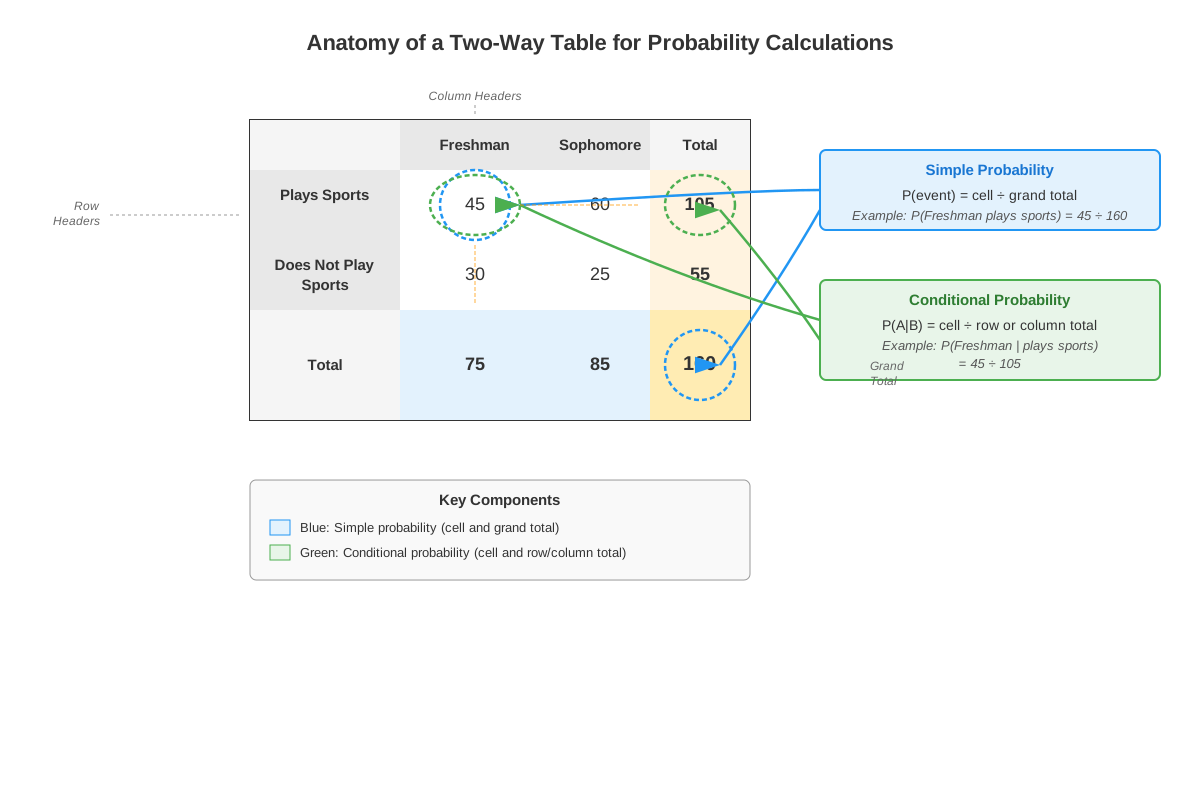
Two-way tables (also called contingency tables or frequency tables) organize data by two categorical variables, creating rows and columns with frequencies in each cell. These tables are the most common data format for SAT probability questions. A typical two-way table includes:
| Category | Group A | Group B | Total |
|---|---|---|---|
| Type 1 | 45 | 30 | 75 |
| Type 2 | 25 | 50 | 75 |
| Total | 70 | 80 | 150 |
To calculate probability from a two-way table:
- Identify the total sample size (usually the bottom-right cell)
- Locate the relevant cell(s) based on the question requirements
- Apply the probability formula using the appropriate numerator and denominator
- Simplify or convert to the requested format
Conditional Probability in Data
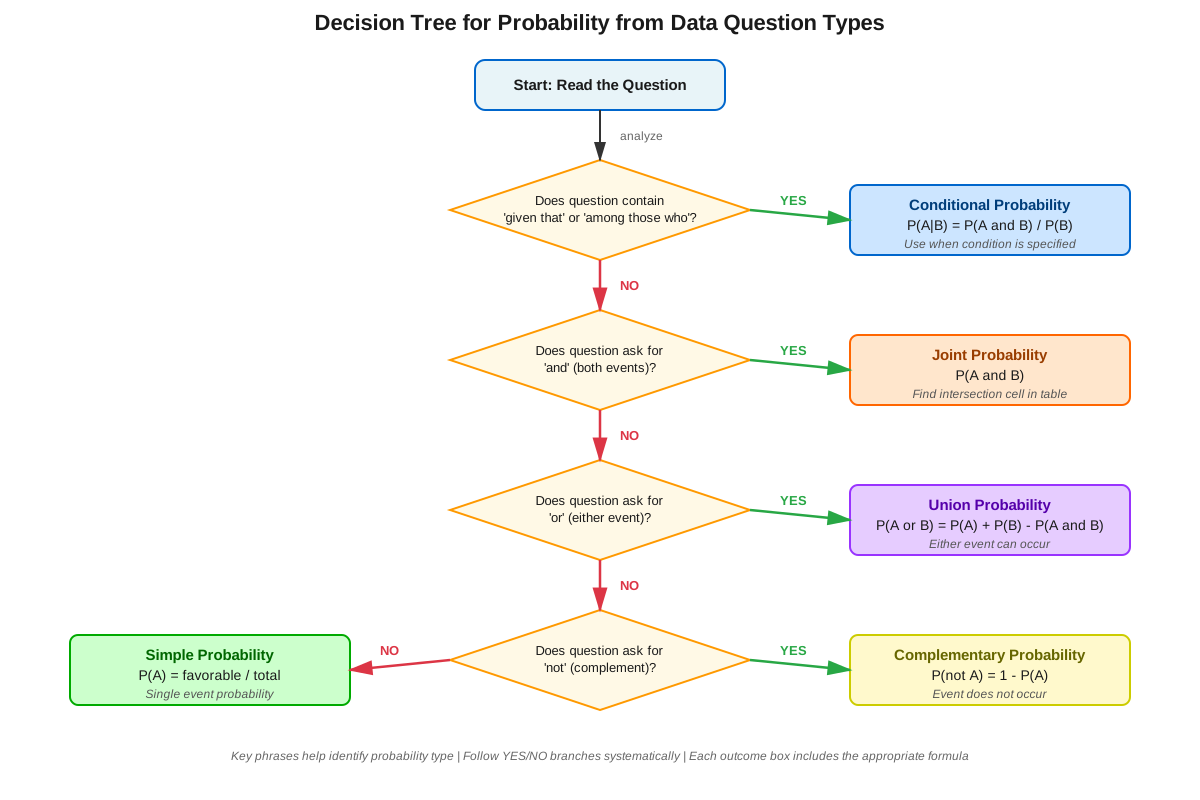
Conditional probability measures the likelihood of an event occurring given that another event has already occurred. In data contexts, this often appears as "given that" or "among those who" language. The key distinction: conditional probability uses a restricted sample space.
For conditional probability P(A|B), read as "probability of A given B":
- The denominator is the total for the condition (B)
- The numerator is the intersection of A and B
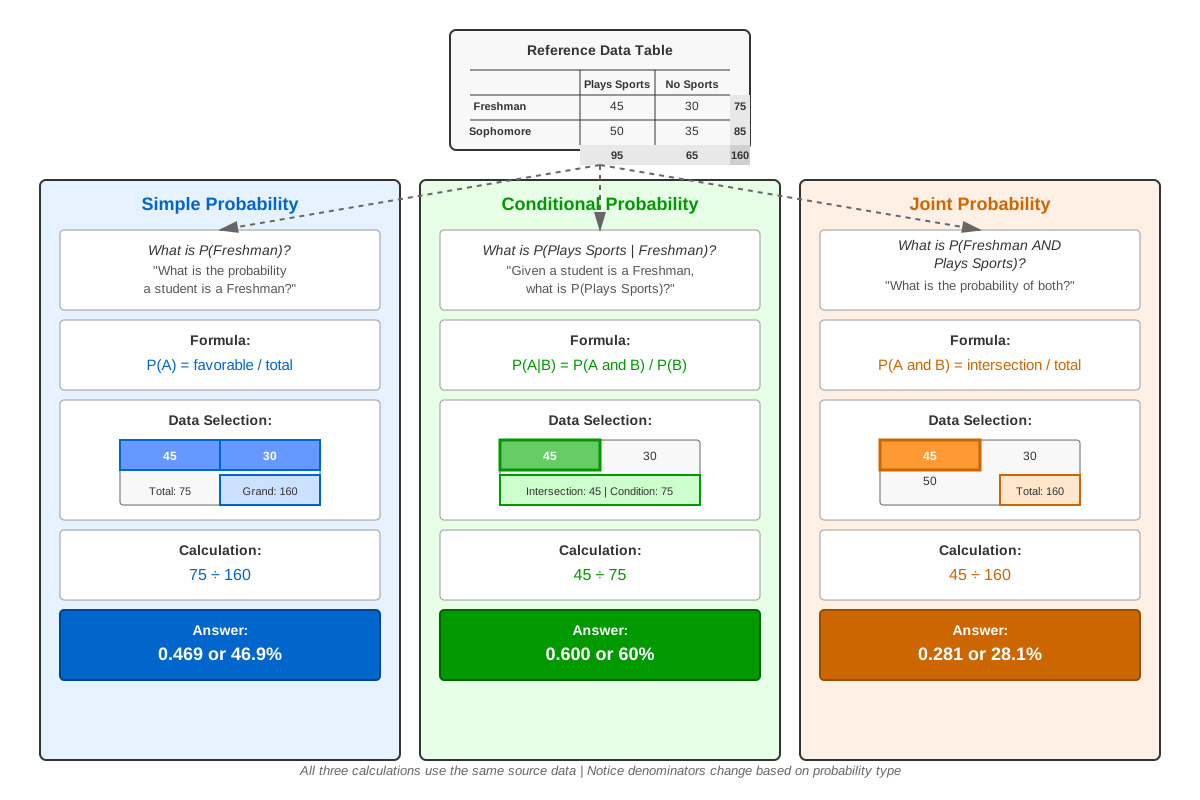
Using the table above, if asked "What is the probability that a randomly selected Type 1 item is from Group A?", the calculation would be:
- Condition: Type 1 (restricts sample space to 75)
- Event: Group A among Type 1 items (45)
- Probability: 45/75 = 3/5 = 0.6 = 60%
Joint Probability vs. Marginal Probability
Joint probability refers to the probability of two events occurring together, calculated using a specific cell in a two-way table divided by the total sample size. Marginal probability refers to the probability of a single event, calculated using row or column totals.
From the previous table:
- Joint probability of Type 1 AND Group A: 45/150 = 0.3
- Marginal probability of Type 1: 75/150 = 0.5
- Marginal probability of Group A: 70/150 ≈ 0.467
Probability from Graphs and Charts
Bar graphs, histograms, and pie charts present data visually, requiring students to extract numerical values before calculating probabilities. Key strategies include:
- Bar graphs: Read the height of bars to determine frequencies, then calculate probabilities using the sum of all bars as the denominator
- Histograms: Pay attention to bin widths and whether the question asks about specific ranges or cumulative probabilities
- Pie charts: Convert percentages to probabilities (divide by 100) or use the given percentages directly if the question asks for probability as a percentage
Complementary Probability in Data Contexts
The complement of an event A, denoted A', represents all outcomes that are NOT A. The complement rule states: P(A') = 1 - P(A). This is particularly useful when calculating "at least one" probabilities or when finding the probability of NOT meeting certain criteria is easier than finding the probability of meeting them.
For example, if data shows that 120 out of 200 students passed an exam, the probability of randomly selecting a student who did NOT pass is:
- P(did not pass) = 1 - P(passed) = 1 - (120/200) = 1 - 0.6 = 0.4
Concept Relationships
The concepts within probability from data build upon each other in a logical progression. Basic probability calculation (favorable/total) serves as the foundation → which extends to two-way table interpretation → which enables understanding of conditional probability (restricted sample spaces) → which connects to joint and marginal probabilities (different ways of viewing the same data) → all of which can be applied to various data representations (graphs, charts, tables).
Probability from data connects to prerequisite topics through several pathways. Fraction operations enable probability calculations and simplification. Percentage conversions allow students to express probabilities in the format requested by questions. Data interpretation skills provide the ability to extract relevant information from visual representations. Ratio and proportion reasoning helps students understand the relationship between parts and wholes in probability contexts.
This topic also relates to other SAT math areas. It connects to statistics through measures of center and spread that might inform probability questions. It links to algebraic reasoning when probability expressions must be set equal to given values and solved. It relates to problem-solving strategies through multi-step questions requiring sequential calculations.
Relationship map: Data Representation → Information Extraction → Sample Space Identification → Event Space Identification → Probability Calculation → Answer Format Conversion → Solution Verification
Quick check — test yourself on Probability from data so far.
Try Flashcards →High-Yield Facts
⭐ Probability always falls between 0 and 1 (or 0% and 100%) - any calculated value outside this range indicates an error
⭐ In two-way tables, the bottom-right cell represents the total sample size for non-conditional probability questions
⭐ Conditional probability uses a restricted denominator based on the given condition, not the total sample size
⭐ The sum of all probabilities in a complete sample space equals 1 (or 100%)
⭐ "Given that" or "among those who" language signals conditional probability, requiring a different denominator than the total
- Joint probability (both events occurring) is always less than or equal to either marginal probability
- When data is presented in percentages, verify whether the question asks for probability as a decimal, fraction, or percentage
- Complementary probability (P(A') = 1 - P(A)) is often the fastest solution path for "at least one" questions
- Row totals and column totals in two-way tables represent marginal frequencies for each category
- Probability from data questions may require multiple steps: extraction, calculation, and conversion
- Answer choices often include common errors such as using the wrong denominator or forgetting to simplify
Common Misconceptions
Misconception: All probability questions use the total sample size as the denominator → Correction: Conditional probability questions use a restricted sample space as the denominator, specifically the total for the given condition, not the overall total
Misconception: Probability can be greater than 1 if the favorable outcomes are large → Correction: Probability is always between 0 and 1 (inclusive) because it represents a ratio of part to whole; values greater than 1 indicate a calculation error, typically using the wrong denominator
Misconception: Joint probability and conditional probability are the same thing → Correction: Joint probability P(A and B) uses the total sample size as denominator, while conditional probability P(A|B) uses only the subset where B occurs as the denominator
Misconception: When a question asks for probability "as a percentage," multiply the decimal by 10 → Correction: To convert decimal probability to percentage, multiply by 100 (not 10), so 0.35 becomes 35%, not 3.5%
Misconception: In two-way tables, any cell value can serve as the denominator → Correction: The denominator must represent the relevant sample space—either the total (bottom-right) for general probability, or a row/column total for conditional probability
Misconception: Probability from graphs requires estimating values → Correction: SAT questions provide graphs with clear, readable values or include the data in accompanying text; estimation should only be used when answer choices are far apart
Misconception: The complement of an event has the same probability as the event → Correction: The complement has probability 1 - P(event), so they only have equal probability when each equals 0.5
Worked Examples
Example 1: Two-Way Table with Conditional Probability
Problem: A survey of 240 students asked about their preferred study location and grade level. The results are shown below:
| Location | 9th Grade | 10th Grade | Total |
|---|---|---|---|
| Library | 45 | 35 | 80 |
| Home | 55 | 65 | 120 |
| Café | 15 | 25 | 40 |
| Total | 115 | 125 | 240 |
What is the probability that a randomly selected 10th grader prefers studying at home?
Solution:
Step 1: Identify that this is a conditional probability question because of "a randomly selected 10th grader" - the condition restricts our sample space.
Step 2: Find the denominator (total 10th graders): 125
Step 3: Find the numerator (10th graders who prefer home): 65
Step 4: Calculate probability: 65/125
Step 5: Simplify: 65/125 = 13/25 = 0.52 = 52%
Answer: 13/25, 0.52, or 52% (depending on requested format)
Key insight: The denominator is NOT 240 (total students) because we're only considering 10th graders. This addresses Learning Objective: Apply Probability from data to answer SAT-style questions, specifically conditional probability scenarios.
Example 2: Multi-Step Probability with Complement
Problem: A quality control inspector examined 500 products from a manufacturing line. The results showed:
- 380 products passed all inspections
- 75 products had minor defects but were still acceptable
- 45 products failed inspection
If a product is randomly selected from those examined, what is the probability that it either passed all inspections OR had minor defects?
Solution:
Step 1: Identify what the question asks - probability of passing OR having minor defects (two separate favorable outcomes).
Step 2: Method A (Direct calculation):
- Favorable outcomes: 380 + 75 = 455
- Total outcomes: 500
- Probability: 455/500 = 91/100 = 0.91 = 91%
Step 3: Method B (Using complement - often faster):
- The complement of "passed OR minor defects" is "failed"
- P(failed) = 45/500 = 9/100 = 0.09
- P(passed OR minor defects) = 1 - 0.09 = 0.91 = 91%
Answer: 91/100, 0.91, or 91%
Key insight: When multiple favorable outcomes exist, either add them directly or use the complement rule if it's simpler. This demonstrates Learning Objective: Solve multi-step probability problems that require combining data from multiple sources.
Exam Strategy
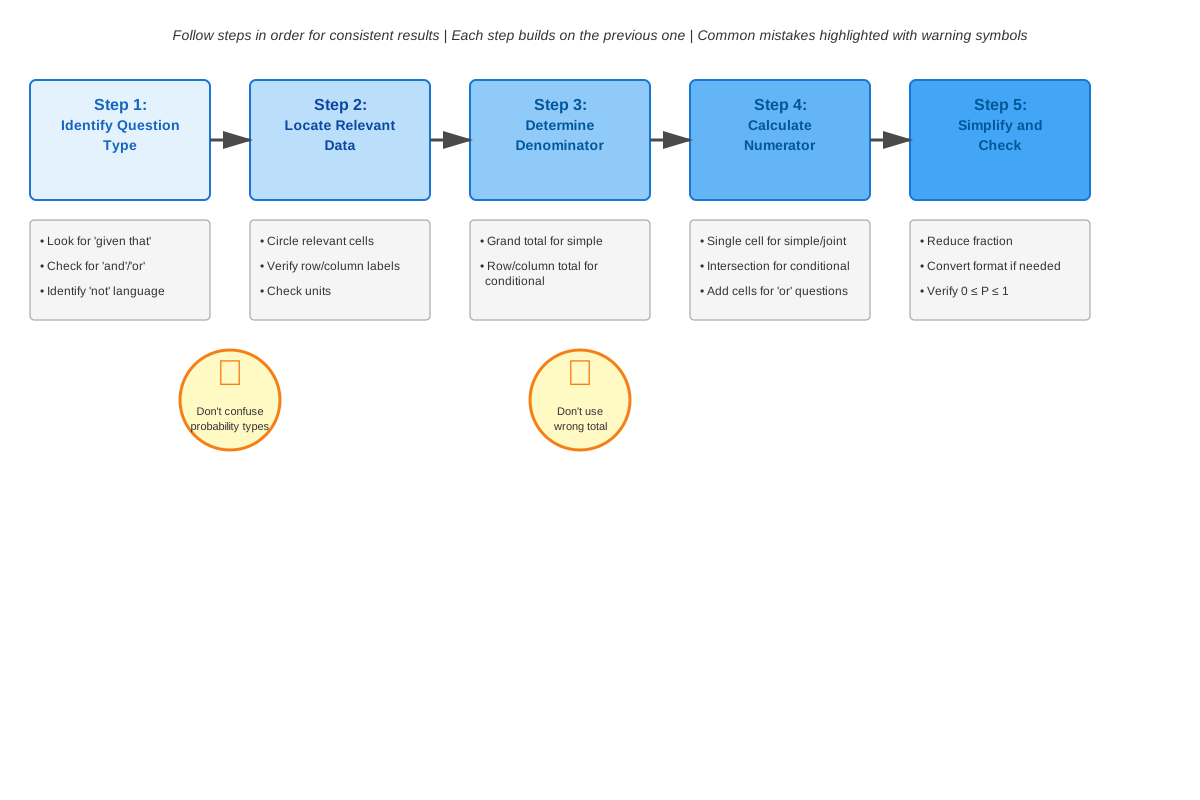
When approaching SAT probability from data questions, follow this systematic process:
Step 1: Read the question carefully to identify exactly what probability is being asked. Circle or underline key phrases like "given that," "among those who," or "at least one" that signal specific probability types.
Step 2: Locate and label the data source - identify whether you're working with a two-way table, bar graph, pie chart, or other representation. Mark the relevant rows, columns, or data points.
Step 3: Determine the denominator first - this is the most common error point. Ask: "Am I selecting from the entire sample (use total) or from a specific group (use conditional total)?"
Step 4: Identify the numerator - count or calculate the favorable outcomes based on the question requirements.
Step 5: Calculate and simplify - perform the division and convert to the requested format (fraction, decimal, or percentage).
Exam Tip: Trigger words for conditional probability include "given that," "among," "of those who," "if we know that," and "restricting to." These phrases always mean you should use a subset as your denominator, not the total.
Process of elimination strategies:
- Eliminate any answer greater than 1 or less than 0 immediately
- If the question asks for conditional probability, eliminate answers that use the total sample size as denominator
- Check if answer choices are in different formats (some fractions, some decimals) - convert to a common format for comparison
- Verify that your answer makes intuitive sense (e.g., if most data points meet the criteria, probability should be greater than 0.5)
Time allocation: Probability from data questions typically require 60-90 seconds. If you spend more than 2 minutes, mark the question and return to it later. These questions reward accuracy over speed, but don't let one problem consume excessive time.
Memory Techniques
DICE mnemonic for probability from data:
- Denominator first (identify sample space)
- Identify the condition (if any)
- Count favorable outcomes
- Evaluate and simplify
"Given = Restricted": Whenever you see "given" in a probability question, remember that your denominator is restricted to the condition, not the total.
Visualization strategy: For two-way tables, physically circle or highlight the relevant row, column, or cell before calculating. This prevents using wrong values and helps you visualize the restricted sample space for conditional probability.
The 0-to-1 Check: Before selecting your answer, visualize a number line from 0 to 1 and mentally place your calculated probability on it. If it doesn't fit, you've made an error.
"Part over Whole" mantra: Repeat "favorable over total" or "part over whole" as you set up each calculation to reinforce the fundamental probability structure.
Summary
Probability from data represents a crucial intersection of statistical reasoning and probability theory on the SAT Math section. Success requires three core competencies: accurately extracting information from data representations (tables, graphs, charts), identifying the appropriate sample space (total vs. conditional), and performing precise calculations. The fundamental principle remains constant—probability equals favorable outcomes divided by total outcomes—but the challenge lies in determining which values to use from the presented data. Two-way tables are the most common format, requiring students to distinguish between joint probability (using the overall total), marginal probability (using row or column totals), and conditional probability (using restricted totals based on given conditions). Questions may require single-step calculations or multi-step reasoning involving complements, combinations of events, or conversions between fractions, decimals, and percentages. Mastery demands both conceptual understanding of probability types and procedural fluency in data interpretation, making this topic one of the highest-yield areas for focused SAT preparation.
Key Takeaways
- Probability from data questions require extracting numerical information from tables, graphs, or charts before applying probability formulas
- Conditional probability (indicated by "given that" language) uses a restricted denominator based on the condition, not the total sample size
- In two-way tables, the bottom-right cell represents the total sample size for general probability questions, while row/column totals serve as denominators for conditional probability
- All probability values must fall between 0 and 1 (or 0% and 100%); values outside this range indicate calculation errors
- The complement rule (P(A') = 1 - P(A)) often provides the fastest solution path for "at least one" or "not" questions
- Answer format matters—be prepared to express probabilities as simplified fractions, decimals, or percentages as requested
- Multi-step problems may require combining information from multiple data sources or performing sequential probability calculations
Related Topics
Conditional Probability and Independence: Building on probability from data, this advanced topic explores whether events are independent and how to calculate probabilities of compound events, essential for more complex SAT questions.
Statistics from Data: Understanding measures of center (mean, median) and spread (range, standard deviation) from data sets connects directly to probability concepts and frequently appears alongside probability questions.
Ratios and Proportions: These fundamental concepts underlie all probability calculations, and strengthening ratio reasoning improves speed and accuracy on probability from data questions.
Data Interpretation and Analysis: Broader skills in reading graphs, identifying trends, and drawing conclusions from data support probability calculations and appear throughout the SAT Math section.
Mastering probability from data creates a foundation for these related topics while simultaneously strengthening overall data literacy—a skill the SAT heavily emphasizes and that proves invaluable in college-level coursework across disciplines.
Practice CTA
Now that you've mastered the core concepts of probability from data, it's time to solidify your understanding through active practice. Attempt the practice questions designed specifically for this topic, focusing on applying the systematic approach outlined in the Exam Strategy section. Use the flashcards to reinforce high-yield facts and test your ability to quickly recall key distinctions between probability types. Remember: understanding concepts is the first step, but SAT success requires translating that understanding into accurate, efficient problem-solving under timed conditions. Each practice question you complete builds the pattern recognition and procedural fluency that will make probability from data questions feel automatic on test day. You've got this!
Sign up free to keep reading
Create a free AnvayaPrep account to finish this SAT guide on Probability from data — plus flashcards and practice questions.