Overview
Tables are one of the most frequently tested data presentation formats in the GMAT Quantitative Reasoning section. A table is a systematic arrangement of data in rows and columns that allows test-takers to quickly locate, compare, and analyze numerical information. Unlike graphs or charts that emphasize visual patterns, tables present precise numerical values that require careful reading and mathematical manipulation to extract meaningful insights.
Mastering GMAT tables is essential because they appear in both Problem Solving and Data Sufficiency questions, often combined with other statistical concepts such as ratios, percentages, averages, and probability. The GMAT uses tables to test not only computational skills but also the ability to synthesize information from multiple data points, identify relevant versus irrelevant information, and perform multi-step calculations under time pressure. Tables may present data about business scenarios (sales figures, profit margins), demographic information (population statistics, survey results), or scientific measurements (experimental data, performance metrics).
The relationship between tables and other Quantitative Reasoning concepts is fundamental and interconnected. Tables serve as the foundation for understanding more complex data interpretation questions and integrate seamlessly with statistics (calculating means, medians, and standard deviations from tabular data), probability (determining likelihood from frequency tables), and algebra (setting up equations based on tabular relationships). Success with table-based questions requires strong arithmetic skills, attention to detail, and the ability to organize multi-step problem-solving approaches—all core competencies that the GMAT assesses across its quantitative section.
Learning Objectives
- [ ] Identify Tables and their structural components (rows, columns, headers, data cells)
- [ ] Explain Tables and their purpose in presenting quantitative information
- [ ] Apply Tables to GMAT questions by extracting relevant data and performing calculations
- [ ] Analyze complex tables with multiple variables and nested categories
- [ ] Synthesize information from multiple rows and columns to answer comparative questions
- [ ] Evaluate the sufficiency of tabular data in Data Sufficiency questions
- [ ] Calculate derived values (percentages, ratios, averages) from raw tabular data
Prerequisites
- Basic arithmetic operations: Addition, subtraction, multiplication, and division are essential for manipulating numerical data extracted from tables
- Percentage calculations: Many table questions require converting between raw numbers and percentages or calculating percentage changes
- Ratio and proportion concepts: Understanding relationships between quantities helps interpret comparative data in tables
- Average (mean) calculations: Tables frequently require computing averages across rows or columns
- Reading comprehension skills: Accurately interpreting row and column headers prevents misidentification of data points
Why This Topic Matters
Tables represent one of the most practical data presentation formats encountered in business, research, and everyday decision-making. In professional contexts, executives analyze sales tables to identify trends, researchers compile experimental results in tabular format, and analysts compare financial performance across quarters using structured data tables. The ability to quickly extract insights from tables is a fundamental skill for MBA candidates and business professionals.
On the GMAT, table-based questions appear with high frequency, comprising approximately 15-20% of all Quantitative Reasoning questions. They appear in both Problem Solving questions (where you calculate a specific answer) and Data Sufficiency questions (where you determine whether provided information is adequate). The exam tests tables in various formats: simple two-dimensional tables, complex multi-category tables, tables with missing values that must be calculated, and tables requiring synthesis of information across multiple cells.
Common GMAT table presentations include: comparative data across time periods (quarterly sales, annual growth rates), categorical breakdowns (demographics by age and gender, product sales by region), frequency distributions (survey responses, test score ranges), and financial statements (revenue and expense breakdowns). The GMAT often embeds tables within word problems, requiring test-takers to first understand the scenario, then locate relevant data, and finally perform appropriate calculations—all within approximately two minutes per question.
Core Concepts
Structure and Components of Tables
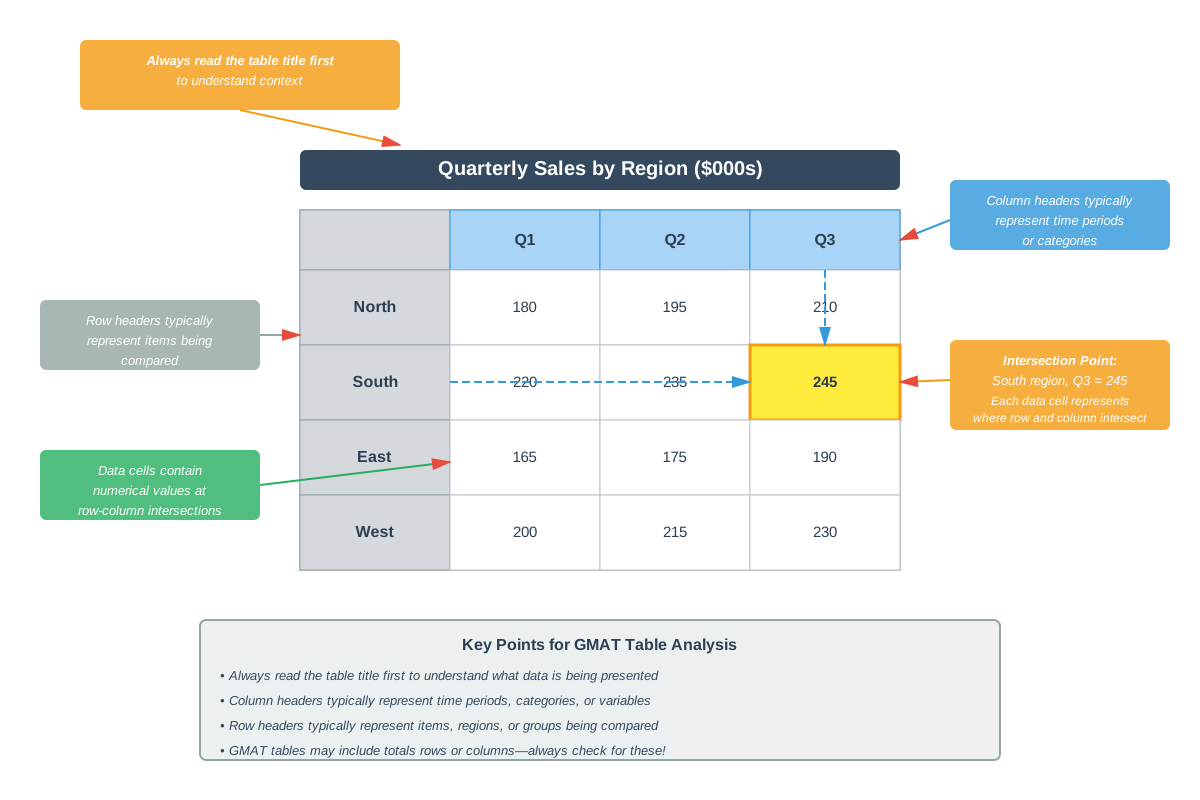
A table consists of a grid structure with rows (horizontal arrangements) and columns (vertical arrangements) that organize data systematically. Each intersection of a row and column creates a cell containing a specific data point. Understanding table anatomy is crucial for accurate data extraction.
Column headers appear at the top of each column and identify what type of data that column contains (e.g., "Year," "Revenue," "Region"). Row headers appear in the leftmost column and identify what each row represents (e.g., specific products, time periods, or categories). The title of the table, typically positioned above the entire structure, describes the overall dataset and often includes important contextual information such as units of measurement or time periods covered.
Tables may include subtotals (intermediate sums for categories) and totals (overall sums across all categories). Some tables present nested categories, where main categories are subdivided into subcategories, creating a hierarchical structure. For example, a sales table might show total sales by region, with each region broken down by individual sales representatives.
Reading and Interpreting Tables
Effective table interpretation requires a systematic approach. First, read the table title to understand the overall context and identify any units (thousands, millions, percentages). Second, examine column and row headers to understand what each dimension represents. Third, note any footnotes or legends that provide additional context about data collection methods, definitions, or special notations.
When locating specific data points, use a finger or pencil to trace from the relevant row header across and the relevant column header down until they intersect. This physical tracking method reduces errors, especially in large tables with many rows and columns. Pay attention to whether numbers represent raw values, percentages, rates, or other derived measures.
Calculations from Tabular Data
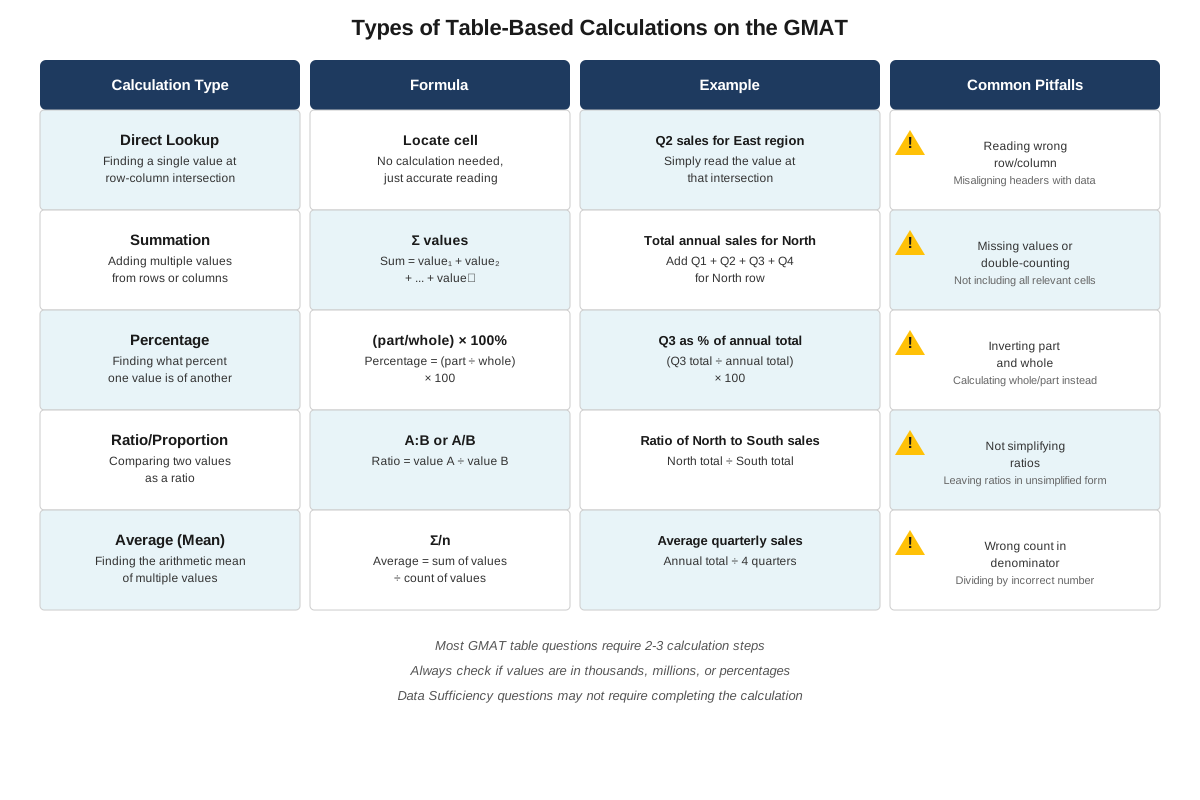
GMAT questions frequently require performing calculations using data extracted from tables. Common calculation types include:
Direct lookup: Finding a single value at the intersection of a specific row and column. This is the simplest operation but requires careful attention to avoid reading from the wrong cell.
Summation: Adding values across multiple cells, either within a single row (summing across columns) or within a single column (summing down rows). For example, calculating total annual revenue by summing quarterly revenues.
Difference calculations: Subtracting one value from another to find changes, gaps, or comparisons. This often appears in questions about growth, decline, or comparative performance.
Percentage calculations: Converting raw numbers to percentages (part/whole × 100) or calculating percentage change ((new - old)/old × 100). Many GMAT table questions ask "what percentage of total X does category Y represent?"
Average calculations: Computing the mean by summing values and dividing by the count. Questions might ask for the average across a row, down a column, or across specific selected cells.
Ratio and proportion: Expressing the relationship between two values as a ratio or determining unknown values using proportional relationships.
Multi-Step Table Problems
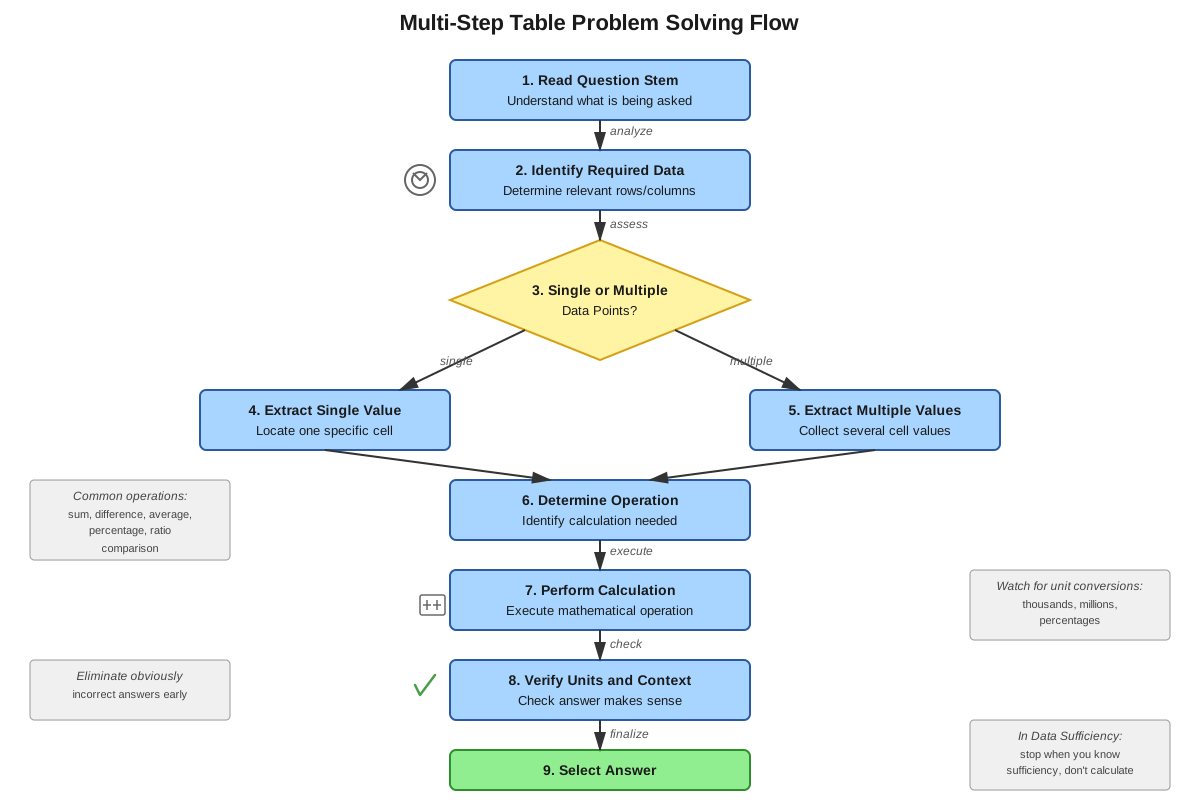
Complex GMAT questions require synthesizing information from multiple cells and performing sequential calculations. These problems test both computational accuracy and logical reasoning. A typical multi-step problem might require: (1) extracting two values from different cells, (2) calculating a derived value (such as a percentage), (3) comparing that result to another value in the table, and (4) drawing a conclusion.
For example, a question might present a table showing product sales by quarter and ask: "In which quarter did Product A represent the highest percentage of total sales?" This requires calculating total sales for each quarter, then calculating Product A's percentage for each quarter, then comparing those percentages—a three-step process requiring data from multiple cells.
Tables with Missing or Derived Information
Some GMAT tables intentionally omit certain values that must be calculated before answering the question. For instance, a table might show individual category values but omit the total, requiring you to sum the categories. Alternatively, a table might show totals and some subcategories, requiring you to calculate missing subcategories by subtraction.
These questions test whether you can identify what information is needed, recognize what calculations will produce that information, and execute those calculations accurately. They also test your ability to work backwards from totals to components or forwards from components to totals.
Comparative Analysis Using Tables
Many GMAT questions require comparing values across different rows or columns to identify maximums, minimums, trends, or relationships. Comparative questions might ask: "Which region had the greatest percentage increase?" or "In how many quarters did sales exceed $5 million?"
Effective comparison strategies include: scanning for the largest or smallest values, calculating differences or ratios between values, identifying patterns or trends across time periods, and ranking categories by specific criteria. For complex comparisons, creating a brief written list or calculation can prevent errors.
Concept Relationships
The concepts within table interpretation form a hierarchical progression. Table structure recognition (identifying rows, columns, headers) serves as the foundation that enables accurate data extraction (locating specific values). Data extraction then enables basic calculations (sums, differences, products, quotients), which in turn enable derived value calculations (percentages, averages, ratios). These derived values support comparative analysis (identifying trends, extremes, relationships), which represents the highest level of table interpretation.
Tables connect to prerequisite topics in essential ways: arithmetic operations provide the computational tools for manipulating tabular data; percentage concepts enable conversion between raw numbers and relative measures; ratio and proportion allow expression of relationships between table values; and average calculations summarize data across multiple cells.
Tables also connect forward to more advanced topics: statistical analysis often begins with tabular data (calculating standard deviation, identifying outliers); probability questions frequently present frequency data in tables; multi-source reasoning questions combine tables with graphs and text passages; and data sufficiency questions test whether tabular information is adequate to answer specific questions.
Relationship map: Table Structure → Data Extraction → Basic Calculations → Derived Values → Comparative Analysis → Decision Making
High-Yield Facts
- ⭐ Always read the table title first to understand units, time periods, and overall context before attempting calculations
- ⭐ Column headers and row headers must both be checked to ensure you're extracting data from the correct cell
- ⭐ When calculating percentages from tables, identify whether the question asks for "percentage of total" or "percentage change"
- ⭐ Tables showing data across time periods frequently test percentage change: (New - Old) / Old × 100
- ⭐ If a table shows both individual values and totals, verify totals by summing to catch potential errors
- Footnotes and units in parentheses (thousands, millions, %) are critical for accurate interpretation
- Missing values in tables can often be calculated by subtraction: Total - Sum of Known Parts = Missing Part
- When comparing multiple categories, calculate all values before selecting an answer to avoid premature conclusions
- Tables with nested categories require careful attention to which level of aggregation the question addresses
- Data Sufficiency questions with tables often test whether you can determine a specific value from provided information without actually calculating it
- Percentage questions from tables typically require two pieces of information: the part and the whole
- Average calculations from tables require both the sum of values and the count of values
- Tables presenting rates (per capita, per unit, per hour) require multiplication to find totals
- Cross-tabulation tables (showing two categorical variables simultaneously) require reading both dimensions carefully
Quick check — test yourself on Tables so far.
Try Flashcards →Common Misconceptions
Misconception: All numbers in a table represent raw counts or absolute values.
Correction: Tables may contain percentages, rates, ratios, or other derived measures. Always check column headers and the table title to understand what type of values are presented. A column labeled "Growth Rate" contains percentages, not absolute values.
Misconception: When a question asks for a percentage, you can simply read it directly from the table.
Correction: Unless the table explicitly shows percentages, you must calculate them using the formula: (Part / Whole) × 100. Even if the table contains some percentages, the specific percentage requested may require calculation from raw numbers.
Misconception: The largest absolute number always represents the largest percentage.
Correction: Percentages depend on the denominator (the whole). A smaller absolute number can represent a larger percentage if it's being compared to a smaller total. Always calculate percentages rather than assuming based on absolute values.
Misconception: You must use every number in the table to answer the question.
Correction: GMAT tables often contain more information than necessary. Part of the skill being tested is identifying which data points are relevant to the specific question asked. Irrelevant data serves as a distractor.
Misconception: Totals shown in tables are always accurate and can be trusted without verification.
Correction: While GMAT tables are generally accurate, verifying totals by summing components is a valuable error-checking strategy and may reveal calculation errors in your own work. Additionally, some questions intentionally present incomplete totals that you must calculate.
Misconception: When comparing values across rows or columns, you can rely on visual estimation.
Correction: The GMAT designs answer choices to be close enough that estimation leads to errors. Perform actual calculations, especially for percentage comparisons, rather than relying on which numbers "look bigger."
Misconception: Data Sufficiency questions require you to calculate the final answer.
Correction: Data Sufficiency questions only require determining whether sufficient information exists to find an answer, not actually calculating it. Recognizing what information would be needed saves valuable time.
Worked Examples
Example 1: Multi-Step Percentage Calculation
Question: The table below shows quarterly sales (in thousands of dollars) for three products. What percentage of total annual sales did Product B represent in Q2?
| Product | Q1 | Q2 | Q3 | Q4 |
|---|---|---|---|---|
| A | 120 | 150 | 180 | 200 |
| B | 80 | 100 | 90 | 110 |
| C | 200 | 180 | 220 | 240 |
Solution:
Step 1: Identify what the question asks. We need Product B's Q2 sales as a percentage of total Q2 sales (not annual sales for Product B, which would be a common misreading).
Step 2: Extract relevant data. Product B's Q2 sales = 100 (thousand dollars).
Step 3: Calculate total Q2 sales across all products:
- Q2 total = Product A (Q2) + Product B (Q2) + Product C (Q2)
- Q2 total = 150 + 100 + 180 = 430 thousand dollars
Step 4: Calculate the percentage:
- Percentage = (Part / Whole) × 100
- Percentage = (100 / 430) × 100
- Percentage = 0.2326 × 100 = 23.26%
Step 5: Round appropriately (GMAT typically accepts reasonable rounding):
- Product B represented approximately 23.3% of Q2 sales
Connection to learning objectives: This example demonstrates applying tables to GMAT questions by extracting multiple data points, performing summation, and calculating a derived percentage value.
Example 2: Comparative Analysis with Percentage Change
Question: The table shows employee counts by department for two consecutive years. Which department experienced the greatest percentage increase in employees?
| Department | 2022 | 2023 |
|---|---|---|
| Sales | 45 | 54 |
| Marketing | 30 | 39 |
| Operations | 60 | 66 |
| IT | 25 | 35 |
Solution:
Step 1: Recognize that "greatest percentage increase" requires calculating percentage change for each department, not simply identifying the largest absolute increase.
Step 2: Apply the percentage change formula: ((New - Old) / Old) × 100 for each department.
Sales:
- Change = (54 - 45) / 45 × 100 = 9/45 × 100 = 0.20 × 100 = 20%
Marketing:
- Change = (39 - 30) / 30 × 100 = 9/30 × 100 = 0.30 × 100 = 30%
Operations:
- Change = (66 - 60) / 60 × 100 = 6/60 × 100 = 0.10 × 100 = 10%
IT:
- Change = (35 - 25) / 25 × 100 = 10/25 × 100 = 0.40 × 100 = 40%
Step 3: Compare calculated percentages: IT experienced the greatest percentage increase at 40%.
Key insight: Notice that Sales and Marketing both had an absolute increase of 9 employees, but Marketing had a higher percentage increase because it started from a smaller base (30 vs. 45). Similarly, IT had only one more employee increase than Sales in absolute terms (10 vs. 9), but a much higher percentage increase due to its smaller starting point.
Connection to learning objectives: This example demonstrates analyzing complex tables, synthesizing information from multiple rows, and performing comparative analysis using derived values.
Exam Strategy
When approaching GMAT table questions, follow this systematic process:
Initial Assessment (15-20 seconds):
- Read the table title and identify units of measurement
- Scan column and row headers to understand data organization
- Note any footnotes or special notations
- Read the question carefully to identify exactly what is being asked
Data Extraction Strategy:
Use physical tracking (finger or pencil) to trace from row headers to column headers, especially in large tables. This prevents the common error of reading from an adjacent row or column. For complex tables, verbally confirm to yourself: "I need the value where [row category] intersects with [column category]."
Trigger Words to Watch For:
- "What percentage" → requires calculating (part/whole) × 100
- "Percentage increase/decrease" → requires ((new-old)/old) × 100
- "Average" or "mean" → requires sum divided by count
- "Total" → requires addition across cells
- "Difference" → requires subtraction
- "Ratio" → requires expressing relationship as a fraction
- "Greatest," "least," "highest," "lowest" → requires comparison across multiple values
Process of Elimination Tips:
- Eliminate answer choices that are impossible based on the range of values in the table
- If calculating a percentage of total, eliminate answers greater than 100%
- For percentage change questions, eliminate answers that don't match the direction of change (positive vs. negative)
- Check whether answer choices are in the same units as the question asks (thousands vs. millions, percentages vs. decimals)
Time Allocation:
Allocate approximately 2 minutes per table question. Spend 20-30 seconds understanding the table structure and question, 60-90 seconds performing calculations, and 10-20 seconds verifying your answer. If a question requires more than three calculation steps, double-check that you're not overcomplicating the approach.
Common Traps to Avoid:
- Reading from the wrong row or column (use physical tracking)
- Confusing "percentage of total" with "percentage change"
- Using the wrong denominator in percentage calculations
- Failing to convert units when the table uses thousands or millions
- Selecting the first answer that seems reasonable without completing all necessary comparisons
Exam Tip: For Data Sufficiency questions with tables, determine what specific information you would need to answer the question, then check whether the statements provide that information. You don't need to perform the actual calculation.
Memory Techniques
TRACE Method for Table Reading:
- Title: Read the table title first
- Rows: Identify row headers and categories
- Axis: Examine column headers (the vertical axis)
- Cells: Locate specific data cells needed
- Execute: Perform required calculations
Percentage Calculation Mnemonic - "POW":
- Part: Identify the specific value
- Over: Divide by the whole/total
- Whole hundred: Multiply by 100
Percentage Change Mnemonic - "NO-O":
- New minus Old
- Over Old
- Times 100
Comparison Strategy - "CALC":
- Calculate all relevant values first
- Arrange them in order (if helpful)
- Locate the maximum/minimum/target
- Confirm by checking your work
Visualization Strategy:
When working with tables showing time periods, visualize a timeline to understand trends. For tables showing categories, create a mental hierarchy (main categories → subcategories) to organize information. For comparative questions, mentally highlight or mark the values being compared.
Summary
Tables are structured data presentations using rows and columns that appear frequently in GMAT Quantitative Reasoning questions, testing both computational skills and analytical reasoning. Mastering tables requires understanding their structural components (headers, cells, totals), developing systematic data extraction techniques, and performing accurate calculations including percentages, averages, and comparisons. Success with GMAT table questions depends on careful reading of titles and headers to understand context and units, precise location of relevant data points using physical tracking methods, and methodical execution of multi-step calculations. The most common question types involve calculating percentages (both "percentage of total" and "percentage change"), performing comparative analysis to identify extremes or trends, and synthesizing information from multiple cells to derive new values. Avoiding common pitfalls—such as confusing percentage types, reading from incorrect cells, or failing to identify relevant versus irrelevant data—is essential for accuracy under time pressure.
Key Takeaways
- Always read the table title, units, and headers before attempting to extract data or perform calculations
- Use physical tracking (finger or pencil) to prevent reading from the wrong row or column intersection
- Distinguish between "percentage of total" (part/whole × 100) and "percentage change" ((new-old)/old × 100)
- Not all data in a table is relevant to every question; identify what the question specifically asks before extracting data
- Multi-step problems require systematic approaches: extract data, perform intermediate calculations, then compute the final answer
- Verify that your answer makes logical sense given the values in the table (e.g., a percentage of total cannot exceed 100%)
- For Data Sufficiency questions, determine what information is needed without necessarily calculating the final answer
Related Topics
Graphs and Charts: After mastering tables, students progress to interpreting bar graphs, line graphs, and pie charts, which present similar data in visual formats. Tables provide the foundation for understanding how data relationships can be represented graphically.
Statistics: Advanced statistical concepts including standard deviation, median, mode, and range often use tabular data as their starting point. Mastery of table interpretation enables efficient calculation of these statistical measures.
Multi-Source Reasoning: This question type combines tables with graphs, text passages, and other data sources, requiring synthesis across multiple formats. Strong table skills are essential for these integrated reasoning questions.
Data Sufficiency with Tables: A specialized question type that tests whether information in a table (combined with additional statements) is sufficient to answer a question without requiring actual calculation.
Probability from Frequency Tables: Probability questions often present data in table format, requiring calculation of favorable outcomes divided by total outcomes based on tabular information.
Practice CTA
Now that you've mastered the core concepts of interpreting and analyzing tables, it's time to reinforce your learning through active practice. Attempt the practice questions associated with this topic to apply your knowledge to GMAT-style problems. Use the flashcards to memorize key formulas and strategies, particularly the percentage calculation methods and the TRACE approach to table reading. Remember that consistent practice with timed questions will build both accuracy and speed—two essential components of GMAT success. Each practice question you complete strengthens your pattern recognition and calculation efficiency, bringing you closer to your target score. Start practicing now to transform your understanding into mastery!
Sign up free to keep reading
Create a free AnvayaPrep account to finish this GMAT guide on Tables — plus flashcards and practice questions.